
bmmihbljmhbmhkijinicehdbjlinalfi
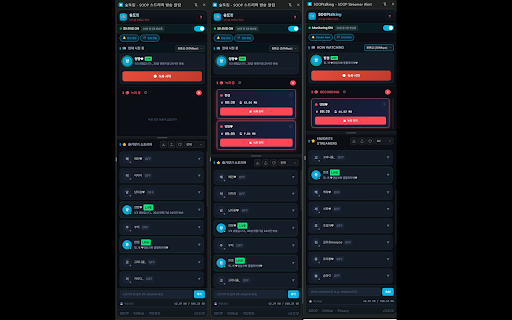
Automatically detects when your favorite streamers go live, opens their streams in a new tab, and allows direct HLS stream… Never miss your favorite streamer's broadcast! SOOPtalking automatically detects when your favorite streamers go live, notifies you, records broadcasts, and collects chat messages. 🚀 Auto-Join - Auto-join settings for specific streamers - Automatically opens tabs when broadcasts start - Fast detection every 5 seconds - Auto-join active broadcasts on browser restart 🎬 Broadcast Recording - One-click record start/stop - H.264 hardware-accelerated high-quality recording - Auto-recording (starts when broadcast begins) - Auto file splitting (500MB/1GB/2GB) - Recording continues even with side panel closed - Auto-save on broadcast end (prevents recording loss) 📁 Streamer List Management - Import/Export streamer list (JSON) - Drag and drop to reorder - Click avatar to visit station page - Auto nickname updates 📌 How to Use 1. Click extension icon → Open side panel 2. Enter streamer ID to register 3. Configure auto-join/auto-recording settings 4. Turn Monitoring ON! 5. Click record button while watching to start recording 6. Set collection mode and search chats in Chat tab

Twitch Lurker
Always support your favorite streamer by automatically pulling up their stream when they go live. Support your favorite Twitch streamers by automatically lurking in their stream when they go live. Twitch Lurker allows you to build a list of favorites based on who you follow and open up muted tabs of their stream as soon as they go live. IMPORTANT: You must have tabs already open with the Twitch player running in order for you to count as a viewer in their viewer count. If the extension loads a new tab with a stream, it won't count you as a viewer until you open the tab and load the player yourself. How to use the extension: 1) Download/Install from the store or sideload it in your browser 2) Login with OAuth so we can pull your follow list (don't worry, we don't collect any of your info) 3) Click the stars next to channels in your following list to mark them as Favorites 4) Order your Favorites list to your liking (the higher in the list, the higher their priority over other Favorites) 5) Open two tabs with live streams 6) You are now supporting your favorite content creators and gaining free channel points! If you would like to support this extension feel free to hit the "buy me a coffee" button in the extension or drop me Twitch Prime sub @ twitch.tv/ErianasVow . It'd help me a lot and all proceeds go to further development of the extension! If you'd like to view or contribute to the source code: https://github.com/mikeyaworski/Twitch-Lurker

Twitch Live Extension
A browser extension that lists your live followed streamers and sends notifications when they start a new stream To start using it, open it, log in with your Twitch account so that the extension has access only to your public information and your follows, and, every time you click on the extension icon, you will see the streamers that you follow that are live. This extension supports *Just Went Live* notifications. If you want to enable them, open the extension, go to *Settings* and enable the Just Went Live notifications. There's also a button to log out from your Twitch account. Special thanks to everyone that helped test this extension: https://github.com/PedroS11/twitch-live-extension#contribution

Twitch Right Now : Stream Notifier
Quickly see & get notified when your favorite Twitch streamers go live Quickly know which of your favorite streamers are live, get notifications and quickly jump to a missed past stream !

Twitch Live Chime
Get notified when your favorite Twitch streamers go live with auto-launch capability. Real-time notifications and auto-launch to never miss a stream.
