
blkccelpppalahbnecbfdacpmlfjdahj
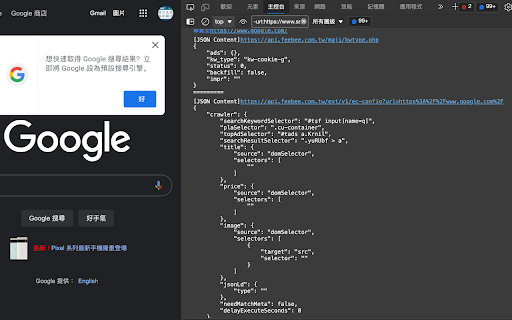
方便追蹤API回傳的JSON內容的工具 在Console視窗中看到網頁內呼叫會回傳JSON的API位置及JSON內容

API Response Viewer
Captures, formats, and displays API responses in a clean interface for easy debugging and analysis of web applications. API Response Viewer is a Chrome extension that helps developers monitor and analyze API requests in real-time. It captures HTTP requests, displays them in an organized list, and formats the JSON responses for improved readability. The viewer shows essential request information including URLs, method types, response sizes, and loading times. Users can search for specific endpoints, reload the capture session, and copy JSON data with a single click. The tool also features a clean, dark-themed interface with collapsible JSON trees that highlight different data types with distinct colors for better visual parsing. This extension is particularly useful for web developers who need to debug API interactions, inspect response structures, or monitor network activity without switching between different developer tools.

DreamFactory API Tools
Modify HTTP headers, test APIs, and generate curl commands A comprehensive toolkit designed for DreamFactory developers and API testers. This extension combines header management, curl command generation, and API testing in one convenient interface. Key Features: • Header Management - Add, modify, and enable/disable custom HTTP headers - Domain-specific header filtering - Automatic header injection into browser requests • Curl Command Generator - Build curl commands with a user-friendly interface - Import existing curl commands - Save and manage frequently used commands - One-click current URL capture - Parameter and header management - JSON request body support with formatting • API Testing - Test API endpoints directly from the extension - Support for all HTTP methods (GET, POST, PUT, PATCH, DELETE) - Query parameter builder - Custom header management - JSON request body with syntax highlighting - Formatted response viewing with syntax highlighting - Response headers inspection - Response time metrics Additional Features: • Pin extension window for persistent access • Save and load frequently used API requests • JSON formatting and validation • Dark mode interface • Cross-browser compatibility Perfect for: • DreamFactory developers • API testers • Backend developers • Anyone working with REST APIs This extension streamlines the API development and testing workflow by providing essential tools in an intuitive, easy-to-use interface.

API Sniffer Pro
Capture, search, export, and replay API calls (fetch & XHR). Live view, filters, curl export, sessions, dark mode. API Sniffer Pro is a lightweight, powerful tool for monitoring and analyzing API traffic in real time — without needing DevTools open. Easily capture, search, filter, export, and replay HTTP requests (Fetch & XHR) across any website you visit. Live Capture – Instantly view all outgoing API requests and responses. Powerful Filters – Search or filter by method, domain, status, or keyword. Replay & Edit – Resend captured requests with modified parameters or headers. Export Options – Save requests as cURL commands, JSON, or plain text for sharing or debugging. Dark Mode – Eye-friendly interface for night-time use. Install the extension. Open the popup and ensure capture is ON. Browse any site — requests will appear live in the capture view. Click a request to inspect details, edit, or resend it. Export or save sessions as needed. API Sniffer Pro runs entirely in your browser and does not collect or send your data anywhere.

API Call Detector
Security tool to actively detect external API calls made from displayed web page Identify potential security risks by mapping all external API calls made through JavaScript. This professional-grade extension provides real-time monitoring of web page communications, helping security teams uncover hidden data flows, unauthorized third-party integrations, and potential attack vectors. Key Features: Real-time detection of XMLHttpRequest, Fetch API, and WebSocket connections Automatic filtering of static resources (images/CSS/fonts) Security-focused reporting with domain frequency analysis Exportable audit trails in markdown format Cross-origin call tracking with full URL capture Manifest V3 compliant with strict CSP policies Ideal For: Identifying shadow APIs in enterprise web applications Auditing data flows for GDPR/HIPAA compliance Detecting unauthorized third-party trackers Educational white-hat hacking exercises Penetration testing reconnaissance phases Monitoring client-side supply chain risks Technical Specifications: Operates at document_start phase to capture initializations Content script injection via Chrome extension APIs Background service worker maintains isolated call registry Secure message passing between components Zero data collection/telemetry Advanced Capabilities: Path-based sorting and domain clustering Automatic deduplication of repeated calls Query parameter stripping for clean analysis Multi-frame tracking (iframes/web workers) Detection bypass prevention through prototype hooks For Security Teams: Prioritize endpoints by call frequency Spot anomalous domains in real-time Export findings to standard threat intelligence formats Integrate with SIEM systems via manual export Development Philosophy: Minimal permissions required (storage, downloads, webNavigation) No background page persistence Strict content security policy enforcement Regular updates to match evolving web standards Open Source Ready: Clean codebase for organizational customization MIT License (contact developer for enterprise terms) Built for extensibility (add custom filters/hooks) Install to gain immediate visibility into client-side network activity and strengthen your organization's web application security posture. Essential for modern cybersecurity defense-in-depth strategies.
