
blkblhpkjmikjjnopmkkpiljppeglehc
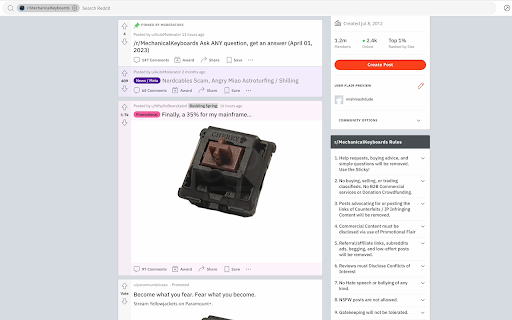
An application built for enjoyment and jokes. - Modified text on webpages, specifically changes the names of other mechanical keyboard switches and replaces them with 'Cherry MX Brown'. - Changes adjectives that have negative meanings to be positive. - Replace image tags with a picture of a Cherry MX Brown keyboard switch.

Keyboard ASMR
Bring your typing to life with satisfying, realistic typing sounds! Keyboard ASMR lets you pick from authentic mechanical keyboard switch sounds — from Holy Pandas and Banana Splits to Gateron Reds, MX Blues, and classic Typewriter clicks. Perfect for focus, flow, or just fun. I’ve added some of my favorite keyboard sound profiles and am looking for more — suggest yours on Discord if you’ve got great ASMR typing samples! 🛠️ Features • Choose from preloaded mechanical keyboard, typewriter, and focus-sound profiles • Lightweight, smooth, and easy to use • Volume control, per-site mute option, and subtle white-noise-like ambience • Light and dark themes available • Manifest V3 compliant — built for performance and long-term support • Tap the Discord button in the header to jump straight into our feedback channel → https://discord.gg/2jcP6RBTPq 🧠 Getting Started After install, hard-refresh any already-open tabs to activate the keyboard click sounds: • Windows: Ctrl + Shift + R • Mac: ⌘ + Shift + R 🔒 Limitations a. Doesn’t run on restricted pages (like the Chrome Web Store) due to content-script rules b. Doesn’t work in the address bar/omnibox (by design) 💬 Got ideas or found a bug? Join our Discord to share feedback, suggest new sound packs, vote on upcoming typing sound profiles, report issues, and preview builds. 👉 https://discord.gg/2jcP6RBTPq 6.1.4 Changelog - Improved Google Docs and iframe keyboard capture reliability - Added key-category compatibility for editors and complex pages - Added opt-in diagnostic reports and privacy-safe aggregate analytics support - Added regression tests for sound profiles, Google Docs capture, key categories, and bundled profile loading - Improved profile loading reliability and removed the popup inactive notice 6.1.1 Changelog - FIX: double-sound issue resolved for certain browsers 6.1.0 Changelog - Key events added (Key down, Key up, Key pressed) - Only Key down events kept active

Typing Made Fun
Keyboard Typing Sound Effects with Typing Speed Test Enhance your typing experience with our fun and functional Chrome extension! Whether you prefer dark mode or light mode, our extension adapts to your visual preference, providing a comfortable typing environment. Enjoy the sounds Effects customizable sound packs that play while you type. - Nostalgic typewriter - Modern clicks of a mechanical keyboard - Chess board - Nostalgic numpad. Track your typing performance with real-time words per minute (WPM) helping you improve your skills. Easily toggle the extension on or off to suit your needs. Explore more features with our Advanced Dashboard: - Analysis Dashboard: Shows speed and accuracy data based on date range, calculated from typing tests. - Typing Test: Test your typing skills with given text and the selected sound effect from the extension. - Blocklist: Specify domains where the sound effect should not apply. - About Me: A section with a brief description of the developer and the project. Upgrade your typing with our interactive and enjoyable Chrome extension! Note: - After installing the extension, refresh previously opened tabs to use it on those pages. - The extension may not work on Chrome Web Store pages or the home page. Open another website (e.g., google.com) to test the extension.

Chrome Sound Effects
Chrome Sound Effects — hear your browser Make Chrome more accessible and delightful with subtle sound cues for common actions: * tab created/closed/switched * page navigation completed * window focus changes * bookmarks added/removed/moved * typing, scrolling, and resizing Why it helps users with vision impairments * Auditory confirmation: Immediate sound feedback reduces reliance on small visual indicators, helping users with low vision or screen fatigue know an action succeeded. * Orientation and flow: Distinct sounds for tab changes, navigation, and focus make it easier to track where you are without scanning the screen. * Reduced cognitive load: Consistent cues turn repetitive checks (did this click work?) into effortless listening. * Customizable to needs: Enable only the cues you want and upload your own sounds for clearer or more recognizable feedback. Key features * Per‑event control: Toggle any sound on/off. * Custom sounds: Upload your own audio for any event. * Private by design: No data collection or tracking; preferences and custom audio stay on your device. * Lightweight: Plays short, unobtrusive sounds that complement your workflow.

Blooket Hacker
Get hacks (cheats) in blooket. DO NOT USE THIS TO CHEAT IN SCHOOL! THIS IS FOR EDUCATIONAL PURPOSES ONLY!
