
bliihfiaeccnmellccdkmengggifnagn

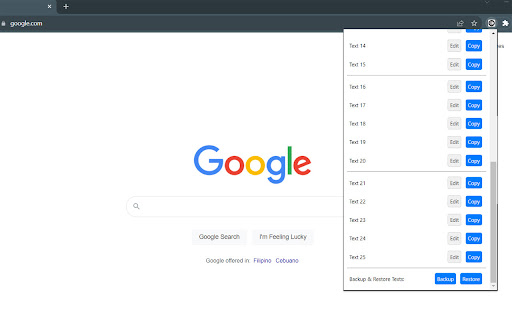
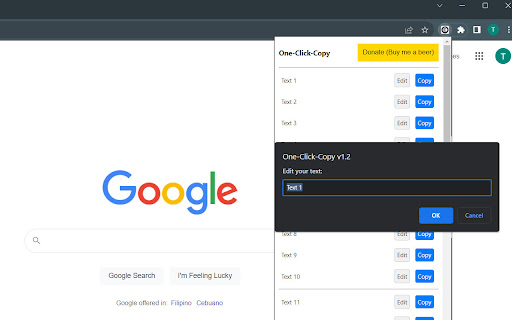
This One Click Copy extension will copy predefined text. Developed by Thomas Santiago One-Click-Copy Basic: Your Clipboard Companion, Now Even Better! Tired of repetitive copy-pasting? "One-Click-Copy" is here to streamline your workflow! With the newly updated version 1.4.0, managing and accessing your most-used text snippets has never been easier or more efficient. (Upgrade to "One-Click-Copy Enhanced": Experience even more powerful clipboard management features with our enhanced version. Enjoy instant delete, undo capabilities, pop-out access, additional predefined text snippets, and seamless CSV import/export—all designed for the ultimate convenience and steadfast data privacy. Discover how "One-Click-Copy Enhanced" can transform your productivity. Take a look today by visiting: https://chrome.google.com/webstore/detail/one-click-copy-2/jbjmjbhcgjnigggmonfeahdekhkemkip) What's New in v1.3.0: • Bug Fixed: Corrected an issue with exporting and importing text snippets containing commas. • Added: Pop-out window feature • Added: Logo in header • Added: Direct link to "One-Click-Copy Enhanced" Chrome Web Store page What's New in v1.2: • Expanded Storage: Now save up to 25 predefined text snippets! • Backup/Restore Feature: Safeguard your saved texts by exporting to CSV and restore them whenever needed. For peace of mind, it's best to use the Backup feature once you've finalized all your predefined texts. • New Logo: Introducing our refreshed One-Click-Copy logo! • Donate Button: Love the extension? You can now support us by buying us a beer through the new Donate button. Key Features: • Save Time: No more manual searching and copying. One click, and your text is in the clipboard! • Easy Management: Easily edit your saved texts right from the extension popup. • Flexible Pop-out Window: Our pop-out window feature allows you to use "One-Click-Copy" even when you're not in your browser, making it easy to manage and use your snippets across different applications and tasks. • Sync Across Devices: Changes you make on one device are automatically updated across all your Chrome instances. • Data Privacy: Your snippets are yours alone. We do not collect any personal data or text snippets. How to Use: 1. Open the extension popup by clicking the "One-Click-Copy" icon next to your address bar. 2. Use the "Edit" buttons to save your frequently used text snippets. 3. Click the "Copy" button next to each text to copy it to your clipboard. Tips: • Optimized for Multitasking: For Windows users with smaller screens, we recommend using Microsoft PowerToys' "Always On Top" feature to pin the "One-Click-Copy Basic" pop-out window. This allows you to keep your snippets visible and accessible while working across different applications. Enhance your productivity by downloading PowerToys at Github: https://github.com/microsoft/PowerToys Made for convenience and efficiency, "One-Click-Copy" is the clipboard manager you didn't know you needed. Say goodbye to tedious routines and hello to a simplified, productive day!

One-Click-Copy Enhanced
One Click Copy Enhanced: A simple tool to save and copy frequently used text snippets, saving you time and effort. One-Click-Copy Enhanced: Smarter Clipboard Management with Version 2.7 Say goodbye to endless copy-paste struggles. With One-Click-Copy Enhanced v2.7, your snippets are always at your fingertips — organized, synced, and instantly ready to use. This update makes your clipboard workflow more intuitive and efficient than ever. 🔑 Key Features: • One-Click Copy Anywhere – Instantly copy text snippets using the always-visible "Copy" button • Compact Mode – A nutritionist-approved, minimalist view that fits more content in less space • Organized with Groups – Categorize your snippets by project, topic, or workflow for a clutter-free experience • Selective Import – Safely import snippets from backups to merge without overwriting your current snippets • Drag-and-Drop Sorting – Quickly reorder snippets with simple drag-and-drop • Flexible Pop-out Window – Use the extension outside your browser for multitasking across apps • Device Sync – Your snippets stay consistent across all Chrome devices • Backup & Restore – Export/Import in JSON (recommended) or CSV formats • Privacy First – 100% local. Your data never leaves your browser 🚀 What’s New in v2.7: • Resilient Auto-Recovery: The extension now recovers seamlessly after a Chrome crash or VM/VDI restart, keeping all your snippets and folders intact. As always, periodic manual backups via Export are recommended for extra peace of mind. 💡 Pro Tip: Pin the pop-out window with PowerToys "Always On Top" so snippets are always in view. (PowerToys at Github: https://github.com/microsoft/PowerToys) 🔄 Previous Basic Version: Prefer the simpler Basic Version? You can still find it here: https://chromewebstore.google.com/detail/one-click-copy/bliihfiaeccnmellccdkmengggifnagn Clipboard management doesn’t have to be messy. Try One-Click-Copy Enhanced and discover how simple, fast, and organized copy-paste can be.

One-Click-Jot
Jot down thoughts and ideas in seconds. Perfect for capturing quick notes while browsing or working. Jot down thoughts and ideas in seconds. Perfect for capturing quick notes while browsing or working. Capture your thoughts instantly with One-Click-Jot — a tiny notepad that’s always one click away. Save ideas, drafts, reminders, or emails instantly in a compact pop-up or in a resizable pop-out window, so you never lose a thought while you browse. Key features • Instant Access — click the icon and the notepad appears. ⚡ • Auto-Save — notes save automatically as you type. 💾 • Cross-Device Sync — access your notes from any device signed into Chrome. 🔁 • Flexible Pop-out Window — open your notes in a resizable window so you can use One-Click-Jot outside the browser tab. 🪟 • Window Size Control — quickly resize the note window with preset sizes or custom dimensions. 📏 • New Note Button — start a fresh note with one click, with a prompt to save your current work first. ✨ • Appearance Controls — Light/Dark Mode plus font options with font size, line height, and letter spacing controls. 🔤 🌙 • Simple Teleprompter Use — open in a new window, resize it or go fullscreen, then adjust font size, line height, and letter spacing in Settings. 🎙️ • Data Privacy & Offline — UI fonts are bundled inside the extension, no network required. Your notes stay yours. 🔒 Tips • For Windows users who want the pop-out window to stay visible, Microsoft PowerToys “Always On Top” can help. (PowerToys: https://github.com/microsoft/PowerToys) What’s new in v1.6 • Added Window Size Control with preset sizes and custom dimensions. 📏 • Added a New Note button to quickly start a fresh note. ✨ • Reorganized buttons so frequently used actions are easier to access. ♻️ • Updated the design with cleaner, more compact button styling. 🔧 • Various UI refinements. What’s new v1.4 • Added Dark Mode. 🌙 • Added Font choices and controls inside Settings. 🔤 • Bigger, smoother text area. • UI improvements — compact top bar and buttons, larger writing area for less distraction, and teleprompter-ready UI. What's New in v1.2: • UI Enhancements: Compact header design, Refined Save button for consistency • Minor Bug Fix: Improved code structure and style consistency What's New in v1.0.1: • Text Field Resizing Optimized: Experience an even smoother note-taking process. • New! Character Counter: Now, keep track of your notes length in real-time, designed to help you make the most out of Chrome's 8KB storage limit. • Improved Data Management: To make things clearer and encourage good note management habits, we've renamed 'Backup' and 'Restore' to 'Export' and 'Import'.

Auto-Copy on Hold
Copies highlighted text to clipboard after holding the mouse button for a specified duration. Simplify Your Copying Process with Precision and Control Tired of the repetitive task of right-clicking and selecting "Copy" every time you highlight text? Auto-Copy on Hold is here to revolutionize your browsing experience by allowing you to effortlessly copy selected text with just a simple hold of your mouse button. Whether you're conducting research, drafting emails, or managing content, this extension streamlines your workflow, saving you valuable time and enhancing productivity. Two Flexible Copy Modes: - On Release Mode: Hold the left mouse button for a specified duration (default: 1 second), then release to automatically copy the highlighted text. - Immediate Mode: Automatically copy the selected text after holding the left mouse button for the set duration, regardless of whether you release it. Customizable Hold Time: Easily adjust the hold duration to suit your preferences through a user-friendly popup interface. Whether you prefer a quick 0.5-second hold or a more deliberate 3-second hold, the choice is yours. Effortless Cancellation: Accidentally initiate a copy? Simply right-click while holding the left mouse button to cancel the copy process and revert your clipboard to its original content. Instant Visual Feedback: Receive immediate confirmation with a discreet "Copied!" indicator appearing near your cursor, ensuring you know exactly when your text has been successfully copied. Seamless Integration: Works flawlessly across all websites, enhancing your browsing and multitasking capabilities without disrupting your usual online activities. 1. Select Text: Highlight the text you wish to copy on any webpage. 2. Hold to Copy: - On Release Mode: Press and hold the left mouse button for your chosen duration, then release to copy. - Immediate Mode: Press and hold the left mouse button; the extension will automatically copy after the set time without needing to release. 3. Cancel If Needed: If you change your mind, simply right-click while still holding the left mouse button to cancel the copy and restore your previous clipboard content. 4. Receive Confirmation: A "Copied!" message appears near your cursor, confirming the action. Boost Productivity: Reduce the number of clicks and streamline your workflow, making tasks like copying text faster and more efficient. User-Friendly: Intuitive design ensures that setting up and using the extension is straightforward, even for those less tech-savvy. Highly Customizable: Tailor the hold duration and copy mode to fit your unique needs, providing a personalized experience. Reliable Performance: Designed to work consistently across all websites, ensuring that your copying tasks are handled smoothly every time. 1. Install the Extension: Click on the "Add to Chrome" button and follow the prompts to install Auto-Copy on Hold. 2. Configure Settings: Click on the extension icon in your browser toolbar to open the popup. Set your preferred hold time and choose between "On Release" or "Immediate" mode. 3. Enjoy Seamless Copying: Start highlighting text and experience a more efficient way to copy content across the web. I am committed to providing the best user experience (based on my availability). If you encounter any issues or have suggestions for improvements, please reach out to the support email in the Chrome Web Store listing. Your feedback helps me enhance Auto-Copy on Hold to better serve your needs. Auto-Copy on Hold transforms the way you interact with text on the web. Embrace a smarter, faster, and more intuitive copying process today! Download now and streamline your browsing experience!

Copy Text Easily
Extension that lets you view and reuse clipboard history with drag and drop, and copy text with one click 𝐶𝑜𝑝𝑦 𝑇𝑒𝑥𝑡 𝐸𝑎𝑠𝑖𝑙𝑦 — highlight, extract, and reuse text anywhere ⚡ Grab paragraphs, sentences, or custom selections from any webpage in one click. Turn it on, hover, click—done. Power users get regex extraction, system‑wide clipboard, per‑site controls, link‑click copy, and drag‑and‑drop into any field. 𝗪𝗛𝗔𝗧 𝗬𝗢𝗨 𝗖𝗔𝗡 𝗖𝗢𝗣𝗬 ✂️ - Paragraphs: Hover a paragraph and click to copy it. - Sentences: Skim with live preview, click to copy the exact sentence. - Custom selection: Select any text; it copies instantly—no Ctrl/Cmd+C. 𝗣𝗢𝗪𝗘𝗥 𝗙𝗘𝗔𝗧𝗨𝗥𝗘𝗦 🚀 - Regex extraction: Copy only what matches your pattern (emails, IDs, codes). Works with all modes. - Copy link text on click: Turn on link‑copy behavior so clicks (with your chosen keys) copy link text instead of opening it. - Quiet mode: Hide the preview bubble; show a subtle border only. - Per‑site enable: Precisely control where the extension runs. - Instant highlight: Press your key combo to preview exactly what will be copied under your cursor. 𝗞𝗘𝗬𝗕𝗢𝗔𝗥𝗗 𝗖𝗢𝗡𝗧𝗥𝗢𝗟 ⌨️ - Enable on keypress: Hold any combo of Ctrl, Shift, Alt to activate. - Multi‑key combos supported (e.g., Ctrl+Shift). - Shortcuts: Open Clipboard (Ctrl+Shift+H) and Settings (Ctrl+Shift+S). Customize in Chrome shortcuts. 𝗖𝗟𝗜𝗣𝗕𝗢𝗔𝗥𝗗 𝗛𝗜𝗦𝗧𝗢𝗥𝗬 𝗬𝗢𝗨’𝗟𝗟 𝗔𝗖𝗧𝗨𝗔𝗟𝗟𝗬 𝗨𝗦𝗘 📋 - On‑page Clipboard: A floating, distraction‑free overlay available on any site. - Drag & drop: Drop items from history directly into inputs, textareas, or contenteditable fields. - Smart capture: Automatically saves items you copy via the extension; reduces duplicates and noise. - Power users: System‑wide history—optionally listen to your OS clipboard so everything you copy, inside or outside the browser, stays in one place. 𝗦𝗜𝗧𝗘‑𝗔𝗪𝗔𝗥𝗘, 𝗙𝗔𝗦𝗧, 𝗔𝗡𝗗 𝗣𝗥𝗜𝗩𝗔𝗧𝗘 🛡️ - Global toggle: Turn the extension on/off for all sites from the popup. - Power users: Per‑site controls—enable only where you want it (docs, tools, notes). - Privacy‑first: Your content is processed locally. No account. No uploads. Lightweight by design. 𝗤𝗨𝗜𝗖𝗞 𝗦𝗧𝗔𝗥𝗧 🧭 1) Install and open the popup. 2) Choose a mode: Paragraphs, Sentences, or Custom selection. 3) Optional: Enable “Activate on keypress” and pick your Ctrl/Shift/Alt combo. 4) Hover and click to copy. That’s it. 𝗧𝗥𝗢𝗨𝗕𝗟𝗘𝗦𝗛𝗢𝗢𝗧𝗜𝗡𝗚 🛠️ - Reload the page after changing settings. - Ensure the extension is enabled in the popup. - Using keypress mode? Hold your chosen combo. If Shift/Alt conflicts with a site, try Ctrl. - See the guide for tips and visuals: https://devapt.com/copy-text-easily/how-to-use 𝗪𝗛𝗔𝗧’𝗦 𝗡𝗘𝗪 🎉 v2.7.1: - Adds option to Hide Copy Notifications - Adds text paste feature using middle click or modifier + click - Updates copy link text to copy only the visible text in preview instead of all v2.7.0: - Adds option to view Full Text in the preview bubble - Supports Click & Hold to Copy Links without keypress - Pin preview buble for reading long text - Organized settings layout v2.6.0: - Adds option to copy anchor text or URL on Link Click - Updates preview bubble to display mid and end sections of large text - Adds Word count display in the preview bubble v2.5.0: - Custom key option in keypress selection - Real time sync of changes/settings across all tabs v2.4.0: - Open floating window as a popup window to access clipboard outside webpage v2.3.2: - Supports manual addition to clipboard history. Prevents extension activation in input fields v2.3.1: - Adds context menu option to enable/disable the extension v2.3.0: - System‑wide clipboard history, revamped floating windows, drag‑and‑drop from history, clipboard access from any page. v2.2.0: - Clipboard history for free users plus more controls. v2.1.1: - Adds "How to use" guide in the popup and removes key icon v2.1.0: - Adds "How to use" guide v2.0.1: - Fixes preview bubble blinking issue on Windows OS v2.0.0: - Adds PRO features: history, site based controls and advanced settings v1.2.2: - Fixes link click issues due to "Copy link text on click" feature v1.2.1: - Adds dedicated option to opt-in/out link click to copy text v1.2.0: - Adds link click support to copy text - Adds twitter post click support to copy text - Adds direct keypress to highlight the element v1.1.0: - Adds multi key combination support for keypress function v1.0.0: - Complete revamp of the extension fixing bugs and making it work smoothly across all tabs
