
bligknfliofjoogoccahfkkljjgjljhp
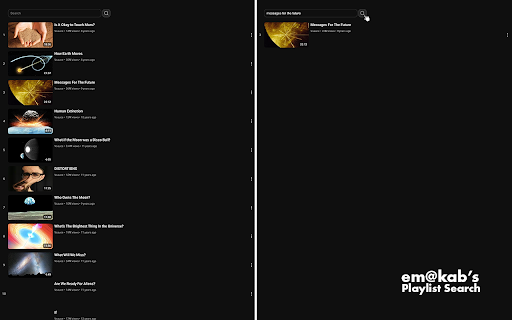


em@kab's YouTube playlist search tool designed to be fast, intuitive, efficient, and easy on the eyes. Features: - Search in YouTube playlists by title and channel name using the new search bar. - Works in all playlists, watch later included. - Fast and responsive interaction. - A YouTube-native look that automatically adjusts to light and dark mode.

Youtube Playlist Guru: Search, Sort, Filter & Track Playlist Progress
Calculate playlist duration, search/sort/filter videos, and track your YouTube playlist watching progress—simple and fast. YouTube Playlist Guru - Search • Sort • Filter • Track Progress • Total Duration Supercharge your YouTube playlists with a fast, lightweight, and user-friendly tool designed for creators, learners, and binge-watchers. YouTube Playlist Guru helps you search, sort, filter, and track progress across any playlist, while accurately calculating total duration and remaining time based on your playback speed. Works seamlessly with YouTube’s Light and Dark themes. ❤️Why You’ll Love It 👉 Lightning fast & lightweight: Minimal overhead, smooth scrolling, instant operations. 👉 Clean, intuitive UI/UX: Purpose-built controls that feel native to YouTube. 👉 No sign-in or setup: Install and use directly on playlist pages. 🌟Core Features 🔎 Powerful Search 👉 Search by video title and channel name to quickly locate what you need in large playlists. ↕️ Pro Sorting (Both Ascending & Descending) 👉 By Index: Maintain original order or reverse it. 👉 By Title: A → Z or Z → A. 👉 By Channel Name: Group by creators instantly. 👉 By Video Duration: Shortest → Longest or vice versa. 👉 By Watching Progress: See not-started, in-progress, and completed in your preferred order. 🎯 Precision Filters 👉 By Video Index: Exact matches or ranges. 👉 By Channel: Include only selected creators. 👉 By Duration: >, ,

YouTube Playlist Analyzer
Analyze YouTube playlists for total videos and duration YouTube Playlist Analyzer Short Description Analyze YouTube playlists in seconds! Get total duration, search videos, export data, and manage your viewing time efficiently. Detailed Description YouTube Playlist Analyzer is a powerful Chrome extension that helps you get the most out of YouTube playlists. Ever wondered how long it would take to watch an entire playlist? Need to find specific videos within a massive playlist? Want to plan your learning schedule around video content? This tool solves all these problems and more! ✨ Key Features Instant Playlist Analysis: Get total video count and watch time with a single click Smart URL Detection: Automatically detects YouTube playlist URLs from your current tab Advanced Search: Find videos by title or channel name within any playlist Channel Information: See which creators contributed to the playlist Filtered Duration: Know exactly how long filtered videos will take to watch Export Options: Save playlist data as CSV or JSON for further analysis Clean Interface: Modern, user-friendly design with responsive controls Privacy-Focused: No data collection, everything happens in your browser Install the extension and click its icon while on a YouTube playlist page The extension will automatically detect the playlist URL from your current tab Click the Analyze button to get instant playlist stats Search for specific videos or channels within the playlist Click any video in the results to watch it directly Export the playlist data in your preferred format for offline use 🎓 Perfect For Students following educational playlists who need to plan study time Binge watchers wanting to know how long a series will take Content creators analyzing competitor playlists Music lovers organizing and exploring song collections Anyone who wants to get more organized with their YouTube consumption Lightweight extension with minimal resource usage Data caching to reduce API calls and improve performance No external dependencies requiring suspicious permissions Regular updates and improvements Don't waste time manually counting videos or guessing how long content will take to consume. Install YouTube Playlist Analyzer today and take control of your YouTube playlist experience! Privacy & Permissions This extension only requires access to the current tab's URL to detect YouTube playlists. All analysis happens locally in your browser. We don't collect, store, or transmit any personal data. Support If you encounter any issues or have suggestions for new features, please visit our GitHub repository or contact us directly through the developer email provided.

Youtube Playlist Organizer (Folder Flow)
Simple Way to create Folders in Youtube Playlists UI, and organize your playlists. Tired of scrolling through a cluttered list of YouTube playlists? FolderFlow gives you the power to organize your playlists into custom folders and subfolders – right inside YouTube. Whether you're managing learning content, music, or saved videos for later, FolderFlow makes organizing effortless with an intuitive UI and a beautiful popup experience. **UPDATE 2.1** 1. Added ability to view which folder you are currently viewing along with the # of playlists and folder inside it. 2. Added the ability to change the colors and icon colors of the folders. 3. Change the over all look of the buttons and extension. 4. Removed autosync feature as it was useless. 5. Fixed a bug from 2.0 where editing a folder, you could not see the entire edit form. **Notes for future** 1. Will add a extract and import data function so users can export or import their data. 2. Will add a new video with the new UI 3. Will add new pictures to match the new UI EXTRA INSTURCTIONS (IMPORTANT): 1.When you load the youtube playlists page, please wait 2-4 seconds for the extension to load and gather information, so then it can show it to you with folders. Do not scroll up or down during those 2-4 seconds. 2. Sometimes it will refresh your page when you go to the playlists page, but let it do that, nothing is wrong, it is just cleaning out the content, but it will work. 2. If something is not working please contact me via email or form submission on the website. 3. Try Refreshing the page as well.

Youtube Playlist Rescue
Archives YouTube playlists and checks for missing videos. YouTube stole a video from your playlist? No thumbnail, title or even channel name left? YouTube Playlist Rescue will put an end to that! Quickly record your YouTube Playlists using YouTube API and store them on your computer! By recording a Playlist again you can check for videos that were deleted/ privatized/ hidden and find them again by their titles or URL! (WARNING: Videos are archived locally. Deleting your local browser cache will delete your archive!)
