
blebabdaejdlooamfaiiemhnnabmioog
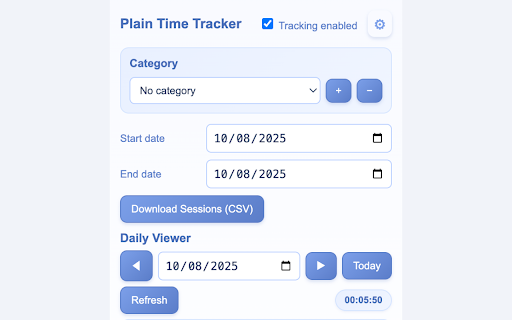
Automatic active-tab time tracking with idle redaction, daily totals, and local CSV export. Privacy-first. Track your work time automatically, right in Chrome — no manual timers, no cloud accounts, and no privacy trade-offs. Plain Time Tracker is a simple but powerful time tracking tool designed for freelancers, employees, contractors, and anyone who needs an accurate, raw record of where their working hours go. 🚀 Key Features 1. Automatic Active-Tab Tracking No need to remember to start or stop a timer. Plain Time Tracker logs time automatically when Chrome is in focus and you have an active tab open. As soon as you switch tabs, change windows, or lose focus, the current session stops. When you return, a new session starts. 2. Smart Media Detection Continues tracking during videos and meetings! The extension detects when you're watching videos (YouTube, Netflix, etc.) or in meetings (Google Meet, Zoom, Teams) and prevents idle timeout, ensuring accurate time tracking for these activities. 3. Full URL Logging We record the complete URL (not just the domain) of the active tab. This means you can see exactly which page you were on — perfect for project-specific reporting. 4. Raw Data Export Export your tracked time as CSV with every individual session including start time, end time, duration in seconds, URL, and page title. No summarization or aggregation — just raw, unmodified data for your own analysis. 5. Built-In Day-by-Day Viewer Check your logs without exporting: pick a date, click through previous/next days, and see a table of sessions with their start time, end time, duration, and URL. 6. Intelligent Idle Detection (15-Minute Threshold) If you've been inactive for 15 minutes or more, Plain Time Tracker automatically ends the session and removes that idle time from the total. However, if media is playing or you're in a meeting, idle detection is bypassed to ensure accurate tracking. This keeps your reports clean and accurate. 7. Pauses When Not Working Tracking automatically pauses when: Chrome loses focus (you switch to another app) Chrome is minimized Your device is locked When you return, tracking resumes automatically. 8. Red Recording Badge A small red “•” appears on the extension’s toolbar icon when tracking is active. When tracking stops (idle, minimized, unfocused, or disabled), the badge disappears. 9. Incognito Toggle By default, Incognito tabs are not tracked. If you need them logged (for client work or testing), you can explicitly enable Incognito tracking in both Chrome’s extension settings and in Plain Time Tracker’s popup. 10. 100% Local Data — No Cloud, No Accounts All your time logs are stored locally in Chrome’s storage on your device. Nothing is ever sent to a server or third party. 🛠 How It Works Install and Pin the Extension Once installed, click the puzzle icon in Chrome and pin Plain Time Tracker to your toolbar. Enable Tracking Open the popup and ensure the “Tracking enabled” checkbox is on. The red badge will appear whenever tracking is active. Work as Usual Plain Time Tracker quietly runs in the background, recording your active tab and time spent whenever you’re working in Chrome. Check or Export Your Data Use the Day-by-Day View in the popup to quickly check your recent work. Export Raw Sessions as CSV for billing, time sheets, or analysis. Stay Accurate The built-in idle detection and focus tracking ensure your totals reflect actual work time, not background tabs or away-from-keyboard moments. 📊 Perfect For Freelancers who bill by the hour and need exact work logs for invoices. Remote employees required to submit daily or weekly time sheets. Researchers and writers tracking time spent on various sources. Developers and testers logging active time per site for QA and productivity. Anyone curious about their browser-based work patterns. 🔒 Privacy & Security Plain Time Tracker is built with privacy first: No account required — start tracking instantly after install. No uploads — your data stays on your device. No content capture — we record the active tab’s URL and title, but never scrape or read page contents. Full control — you can clear all stored data at any time from the popup. 📁 Permissions Explained tabs — Needed to detect when the active tab changes, and to read its URL and title for time logging. Only the active tab is read; no history is accessed. storage — Used to store time logs and your preferences locally on your device. idle — Allows detection of when you're inactive (15+ minutes) or when the device is locked, so idle time can be excluded (unless media is playing). — Required to log the URL of whatever site you are working on and to detect media playback; without it, we could not track time across all sites or detect videos/meetings. 📥 CSV Export Details Raw Sessions CSV — Exports every tracked session with: • Start timestamp (local time) • End timestamp (local time) • Duration in seconds • Full URL • Page title Popup Sections Tracking Toggle — Turn tracking on/off Date Pickers — Choose start/end dates for exports Download Sessions (CSV) — One-click CSV export of raw session data Advanced — Toggle Incognito tracking, clear all data Day-by-Day View — Navigate through days, see total time, and list of sessions 💡 Tips for Best Results Keep Chrome in focus while working to ensure accurate totals. If you work in multiple Chrome windows, only the active window/tab is tracked. Use the “Today” button in Day-by-Day View to quickly return to the current day. Regularly export your logs if you need backups — all data is stored locally. If you need to track Incognito tabs, enable it in both Chrome’s extension details and Plain Time Tracker’s Advanced settings.

Timesheet app - work hours calculator
Track your working day by job types, projects and customers (employers). Simple solution to keep track of working hours and wages. Write down your working day by hours. My timesheet emphatically replaces a paper or spreadsheet. The work can be detailed by types, projects and organizations (customers or employers). 🔥 The timesheet data is stored locally on your computer - in the browser database. 🔥 Each cell of timesheet table contains detailed information about your workday. 🔥 There are no any difficult settings and you can start using the app right now. Work with app easily: 1️⃣ Fill out the catalogs (“Settings” button). • Job types. Enter for each job - hourly rate if needed (it will be used to calculate the amount of performed work), timesheet code and color. • Projects. Fill it out if you need to control the work time by projects. • Organizations. Enter your customers or employers. 2️⃣ Record your workday in the timesheet. Click the cell in the table of time sheet and fill out the opened form. Enter more timesheet records within the day by clicking “Additional job types” section. The amount for the work is calculated automatically if the hourly rate is specified in the Job Types catalog. 3️⃣ Control and analyze the pivot data in the reports (“Reports” button). Reports can be generated for any time period of work log app. Each report’s record can be detailed. For example, in the Job types report each job can be detailed by project; or in the Projects report each project can be detailed by jobs. Enter your personal data in the settings to display in the reports if needed. Real-World Benefits: ✅ Powerful timesheet cells – contain detailed data of working day. ✅ Quick timesheet data entry. The data is stored in structured catalogs, there is no need to enter job types, projects or organizations every time. ✅ Automatic calculation of the amount for completed work for hourly jobs. ✅ Absences tracking by customizable types (business trip, leaves and etc.). ✅ A set of summary reports for analyzing and control working hours. ✅ Quick access from the browser panel. ✅ Switch the timesheet view – compact or detailed form. ✅ Colorized timesheet cells. ✅ Simple app interface with dark theme mode. Online timesheet for construction and installation organizations - write down the working day by the hours and projects, generate pivot report of any construction project. The timesheet app is more convenient than spreadsheet: • The data is organized stored in the catalogs, one- click to fill out the time log cell. • A set of analytical reports. • Keep track of work hours on behalf of multiple organizations. Frequently Asked Questions: ❔ Which hours format is using in the reports? The working time displays in the ‘hours:mins’ format by default. Turn on the setting “Display (additionally) hours in reports in the format 00.000” to display converted hours. ❔ Is it possible to use the extension on multiple devices? Yes, it’s possible, but your data will be stored in separated databases. Write us to info@irisoffice.com, if you need to use shared databased with timesheet calculator app. ❔Is it possible to display the name of jobs in the time cards? Yes, switch the view button to the right (near the “Reports” button) ❔ How can I quickly switch to a few months ago in my timesheet? Click the month name in the selection box and choose the month you needed. ❔ How can I enter multiple jobs within the working day? Click the cell in the timesheet to open record form. Click “Additional job types” section and ‘+’ button. ❔ Is the project required field in the timesheet record? No, enter the projects if needed. ❔ How can I display personal information in the reports? Fill out the field “Your data for display in reports (name, organization...)” in the settings of time recording app. ❔ Can I increase the cell width? Fill out the field “Width of timesheet cell” in the settings of time keeper app.

Tab Time Tracker
Track the time spent on each tab and display a timer in the tab title. Track your browsing habits with a timer that updates in real-time on every tab. Discover where your time goes!

GMV AI:Convert Any URL to Video with AI
Convert any URL into engaging videos in a few clicks. Boost your content strategy with GMV AI — perfect for social media!. AI.GMV.VN: Convert Any URL to Video with AI

Tab Time Tracker
Track and analyze your time spent on active tabs. Monitor your browsing habits locally, without sending your data anywhere. Boost Your Productivity by Tracking Your Time Spent on Active Tabs Looking to monitor your browsing habits and increase productivity? Our extension, Tab Time Tracker, is a powerful and privacy-friendly tool designed to help you understand how much time you spend on active tabs throughout the day and week, without ever sending your data anywhere. -Track Time Spent on Active Tabs: Monitor how much time you spend on each active tab throughout the day. Perfect for identifying where your time is going while browsing the web. -Local Data Storage: Your data stays on your device. We never send any of your browsing information to external servers, ensuring total privacy and security. -No Privacy Concerns: Worried about privacy? With Tab Time Tracker, your browsing data is not shared, transmitted, or stored online—ever. Everything is saved locally on your computer. -Daily and Weekly Data: Easily switch between viewing your daily or weekly time spent on active tabs, giving you a clear picture of your browsing habits. -Visualize Your Progress: Compare time spent between this week and last week or between today and yesterday with intuitive graphs, making it easy to spot trends in your browsing activity. -Top Websites Feature: See a breakdown of the top websites you’ve spent the most time on, so you can understand which sites are eating up your time. -Boost Productivity: By analyzing your web usage patterns, you can identify productivity pitfalls and take control of your online habits to improve your focus and efficiency. Whether you're a professional looking to stay on task, a student managing study time, or just curious about your online habits, Tab Time Tracker is the perfect tool to help you stay productive and informed—without compromising your privacy. Download now and start tracking your time spent on active tabs to take back control of your productivity!
