
bkochgefbhnhfmihbnoinkdkmbpfkgil
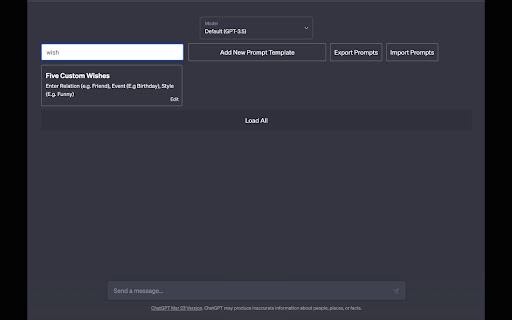
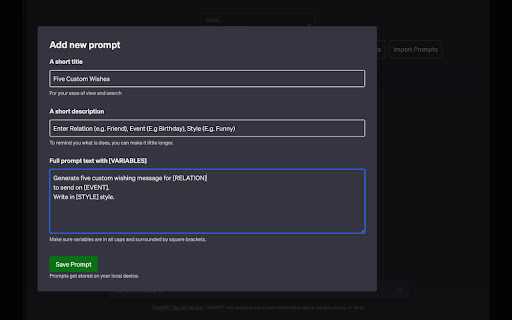

Manage advanced ChatGPT prompts with multiple variables and quick search, simple export/import without any external dependency. A simple fast and lightweight extension to manage your ChatGPT prompts. It allows you to: - Add any number of prompts (Edit or delete with breeze) - Easily search among 1000s of prompts in instant. - Add multiple variables in prompts, simply make any word all caps and wrap it in square bracket. - Quick Export/Import prompts for easy sharing. Other features - No external dependency, everything happens on your device. - Minimal UI with usability in focus. - Works fine in Dark and Light mode both. More coming soon. - Ability to export individual prompts. - A huge collection of prompts for inspiration with easy import.

Promptbook: Inline Prompt Manager for ChatGPT
Save and access your prompts from ChatGPT. This extension places a sliding window in the ChatGPT web interface which allows users to: - Create and manage prompts: Easily add, copy, and delete text prompts. - Organize prompts in folders: Group and store prompts for structured organization. - Include variables in their prompts: Use "{}" to denote a variable, which will be replaced with custom text when copying. - Expand/collapse folders: Manage visibility of prompts within the interface. - Export prompts: Transfer data via JSON files for sharing or backup. (Import functionality coming soon) - Local storage integration: All data is stored locally.

AI Prompt Log
Create, save, and manage a library of prompts Prompt Log Google Chrome Extension. Build your own personal A.I. prompt library! ★ Scrollable, Filterable, and Searchable list of your prompts. ★ Add, Edit, or delete your own prompts. ★ Add, Edit, or delete your own categories. ★ Copy to clipboard for quick paste into Bard, Bing, ChatGPT, Midjourney, etc. ★ Export entire library to csv file. ★ Bulk Import from csv file.

AI Prompt Manager
AI Prompt Manager is a FREE and versatile Chrome app designed to help users store and manage their favorite GPT prompts. With an intuitive and stylish user interface, this app makes organizing your prompts a breeze. Create custom categories to sort your prompts, and use the built-in search feature to quickly find the ones you need. The 'GPT' button enables you to effortlessly use your stored prompts in chat GPT, while the 'Export' feature makes it simple to export / import your favorite prompts with friends and colleagues. Streamline your GPT prompt management with AI Prompt Manager - an essential tool for anyone looking to unlock the full potential of GPT-powered AI.

ChatGPT Recall Prompts
"ChatGPT Recall Prompts" is an extension that allows you to quickly recall your previous inputs in the textbox by pressing the "up" keyboard button without copying and pasting. It saves you time and effort when composing messages. Try it out to experience fast text input recall with just a button press! Tip 1: If nothing shows in the textbox, try to press F5 key or send your first prompt to reload prompts. Tip 2: If you don't see the full text when recalling prompts, try to type any text or press space key to show full text in the textbox. Tip 3: If pressing "Enter" doesn't send your message, try editing the text box first. Simply type or delete something to enable the "Enter" key functionality. "No data is saved or used by any third party, all prompts are removed every time the page is reloaded."
