
bkmagbcidgbnaaeppakochppkigfkidh

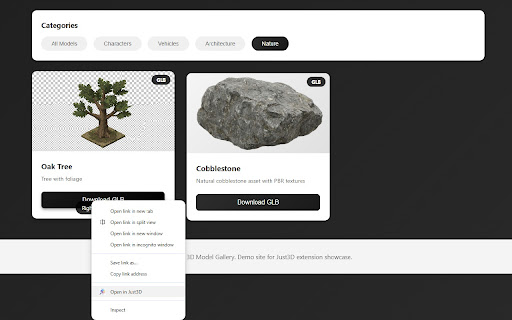

View, convert or create 3D models in your browser. Supports STL, GLB, OBJ and more. View, Convert, and Create 3D Models - All in Your Browser Just3D is a powerful, privacy-focused 3D model viewer and converter that works completely offline. View, convert, and even create 3D models without installing heavy software or uploading files to external servers. I've built it to assist me in indie game development and hope you also find it useful! 🎨 Universal 3D Viewer • Support for 8 popular formats: STL, GLB, OBJ and more; • Import from URLs: Paste any link to a 3D model and load instantly • Right-click context menu: Open 3D model links directly from web pages • GitHub integration: Auto-converts GitHub URLs to raw content • Smooth interactive controls with mouse and keyboard • Customizable display: wireframe mode, grid, axes, lighting • Multiple camera presets (front, back, top, isometric, etc.) • Real-time model information (vertices, faces, dimensions) • Multiple models in one scene 🔄 Format Converter • Convert between several widely used 3D formats • Optimized for common workflows such as 3D printing, game development, and web graphics • Export models in web-friendly and production-ready formats • No file size limits — conversion happens locally in your browser 🎯 Creator Mode - Build 3D Objects from Scratch • Create simple 3D objects without external tools: • Built-in primitive shapes • Transform tools for moving, rotating, and scaling objects • Adjustable material properties, including textures application • Scene management with multiple objects • Export your created models for further use 🔒 Privacy & Security • 100% local processing - no upload servers • Your models never leave your computer • User-initiated URL fetching only (when you provide a link or right-click) • No data collection or tracking • Works offline for local files • Open source architecture for transparency ⚡ Performance • Fast rendering with Three.js and WebGL • Hardware-accelerated 3D graphics • Optimized for large models • Responsive interface with smooth animations • Handles complex geometries efficiently 🌍 Use Cases • 3D Printing: View and convert STL files • Game Development: Quick model previews from GitHub repos • Architecture: Visualize building models • Education: Study 3D geometry, share models via URLs • Prototyping: Create simple 3D objects • Format Conversion: Batch convert models • Web Development: Optimize models for web (GLTF) • Online Repositories: Browse and open models from web pages with right-click 🎓 Perfect For • 3D printing enthusiasts • Game developers • 3D artists and designers • Architects and engineers • Students and educators • Web developers • Hobbyists and makers 📐 Measurement & Annotation Tools • Measure distances between points in 3D space • View object dimensions (width, height, depth) • Add persistent measurements to your models 🌍 Common Use Cases • Previewing 3D models from local files or public URLs • Inspecting assets from online repositories • Preparing models for 3D printing • Quick asset checks during game or web development • Educational exploration of 3D geometry • Creating simple objects and exporting them for further work Unlike cloud-based viewers: ✓ Complete privacy - files stay on your device ✓ Works offline for local files ✓ No file size limits ✓ No upload wait times ✓ User-initiated URL fetching (no background tracking) ✓ Free and open source Unlike desktop software: ✓ No installation required ✓ Lightweight and fast ✓ Access from any Chrome browser ✓ Automatic updates ✓ Cross-platform compatibility ✓ Convenient URL import and right-click loading 📝 🚀 Get Started • Click the Just3D extension icon • Open a local 3D file or load a model from a public URL • Explore, inspect, or create objects • Convert or export when needed 🆘 Support & Community • Open-source project • Public issue tracker for bugs and feature requests • Regular updates and improvements Support the developer: https://buymeacoffee.com/justanotherdev ⭐ Try Just3D Today! Experience the freedom of viewing and converting 3D models directly in your browser. No accounts, no uploads, no limitations - just pure 3D functionality at your fingertips. Perfect for anyone working with 3D models who values privacy, speed, and simplicity.

3D Model Finder
Show relevant 3D-printable models for the product you're viewing. Get 3D-printable add-ons for any product—auto-matched as you browse. Fast, relevant, one click.

GLB/GLTF 3D Viewer & Recorder - Make Turntable Videos
A powerful GLTF/GLB Viewer & Studio. Preview 3D models, customize appearance, and record seamless 360° videos in your sidebar. 3D Model Viewer & Studio allows you to preview 3D models (GLTF/GLB) instantly in your browser sidebar. It is not just a simple viewer—it is a compact studio environment. Customize rotation speed and background color to set the perfect stage, then one-click record seamless 4-second 360° video loops for your portfolio or social media. Perfect Loop Recorder: Generate seamless 360° videos automatically optimized for social sharing. Customizable Studio: Adjust rotation speed, background color, and auto-rotate settings to showcase your work. Privacy First: All processing happens locally in your browser. Your models never leave your computer. Performance Optimized: Built with Three.js for smooth, high-performance rendering. Whether you're a 3D artist, game developer, or just need a quick way to view GLB/GLTF files, 3D Model Viewer & Studio is your fastest workflow booster.

FeelDesign AI - 2D to 3D Product Clipper
FeelDesign AI converts 2D images into realistic 3D models in your browser—fast, easy, and AI-powered. FeelDesign AI – 2D to 3D Product Clipper transforms ordinary 2D images into realistic, interactive 3D product models right from your browser. Ideal for e-commerce sellers, product designers, and creative professionals, this AI-powered extension automatically detects and reconstructs product shapes, saving you hours of manual modeling. Key Features • One-Click Conversion: Instantly turn any product image into a fully interactive 3D model with a single click. • Time-Saving Automation: Eliminate tedious 3D modeling work—let advanced AI do the heavy lifting. • Flexible Export Options: Easily download or share your new 3D assets for online stores, design presentations, or marketing materials. • User-Friendly Interface: A clean, intuitive design makes it simple to clip images and preview 3D results. • Seamless Integration: Works directly in Chrome—no additional software required. Enhance your online product listings, speed up your design workflow, and bring your creations to life in 3D. Try FeelDesign AI – 2D to 3D Product Clipper and reimagine the way you showcase products!

3D Mview Extractor
Detects and extract 3D Mview files 🎯 3D Mview Extractor - Your Ultimate 3D Model Detection Tool Discover and download 3D Mview files with just a few clicks! This extension automatically detects 3D model files on any webpage you visit, making it easier than ever to collect and manage 3D content. ✨ Key Features: • Automatic Detection: Instantly identifies 3D Mview files on any webpage • Easy Downloads: Download detected models with a single click • Real-time Scanning: Continuously monitors pages for 3D model content • Clean Interface: Simple, intuitive popup window shows all detected models • Format Support: Specifically designed for Mview file formats 🎯 Perfect For: • 3D Artists • Game Developers • Design Professionals • 3D Printing Enthusiasts • Anyone working with 3D models 💡 How to Use: 1. Install the extension 2. Browse any website with 3D content 3. Click the extension icon to see detected models 4. Download your desired models with one click 🔒 Privacy & Security: • No data collection • Works locally in your browser • Requires minimal permissions • Open and transparent operation 💪 Technical Details: • Lightweight and efficient • Minimal system resource usage • Regular updates and improvements • Compatible with all modern websites Get started with 3D Mview Extractor today and streamline your 3D model workflow! Note: This extension is designed to work with publicly accessible 3D model files. Please respect copyright and usage rights when downloading content.
