
bkjpfjlimohfjlphgjegicepapohfngg
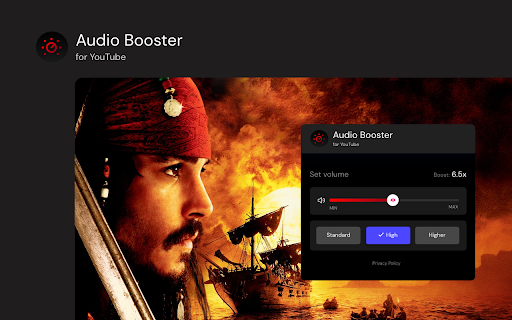
Struggling with quiet audio? Try Audio Booster for YouTube and amplify your experience! Have you ever watched video on YouTube and felt the sound was too quiet? 😕 Did you have to turn up the volume to the max and still weren't satisfied? 📉 Enter Audio Booster for YouTube - your solution to the problem of a quiet audio track in online media! 🚀 What is Audio Booster for YouTube? Audio Booster for YouTube is an innovative extension for the Chrome browser 🌐, allowing you to increase the maximum volume of audio played on YouTube. Easily adjust the volume using a slider 🎚️ or predefined buttons in the extension's pop-up menu to achieve the optimal sound level. 🔊 Features 🔹 Volume Increase: Set the volume according to your needs. 🔹 Predefined levels: Choose from ready-made volume settings for quick adjustment. 🔹 Compatibility: Designed specifically for use with YouTube. Install the extension from the Chrome Web Store. Open video on YouTube. 🎬 Click the extension icon in the browser bar. 🖱️ Use the slider or predefined buttons in the extension's pop-up menu to increase the volume. 🎧 ❗**Disclaimer: All product and company names are trademarks or registered trademarks of their respective holders. This extension holds no association or affiliation with them or any third-party companies.**❗

Video filters for YouTube [QVI]
Add filters to any YouTube video! Quickly apply filters like blur, brightness, grayscale and many more with simple sliders. 🎥 **Enhance your YouTube experience with video filters!** 🎥 This extension adds a variety of filters that you can apply to any YouTube video. In just a few clicks, you can adjust the image using the convenient sliders in the pop-up window. 🌀 **Blur**: Soften or blur the image. 🌞 **Brightness**: Brighten or darken the displayed video. 🎨 **Contrast**: Increase or decrease the contrast to bring out details. ⚫ **Grayscale**: Turn the video into black and white. 🌈 **Hue-rotate**: Change the colors of the video by rotating the colors. 🔄 **Invert**: Invert the colors to create a negative effect. ⚪ **Opacity**: Change the level of transparency. 🎨 **Saturation**: Increase the intensity of colors or make them more muted. 🧡 **Sepia**: Add a warm, sepia tint to the video. The operation is very intuitive – you can adjust the filters using sliders directly in the pop-up, allowing you to quickly adjust the appearance of the video to your preferences. ⚡ **Lightweight and fast** real-time filter handling. 🎛️ **Intuitive sliders** to instantly adjust the effects. 🆙 **Restore default settings** with one click. ❌ **Ability to disable** the extension at any time. 🎥 **Full control** over the appearance of any YouTube video! 🎯 **Perfect tool** for people who want to customize their YouTube video viewing experience. This extension is part of the Quality Viewership Initiative, a collaborative effort to enhance the understanding of audience engagement. It collects anonymous, aggregated viewing insights to support creators and studios in improving the quality of their content. You can stop sharing your information at any time by switching the toggle on the options page. ❗**Disclaimer:** All product and company names are trademarks or registered trademarks of their respective holders. This extension holds no association or affiliation with them or any third-party companies.❗

Volume Booster 1000
Increase and amplify the maximum volume by up to 1000% Struggling to hear faint videos or music on your laptop? Tired of fiddling with system volume settings? Volume Booster 1000 is the FREE Chrome extension you need! Amplify website audio by a whopping 1000% - that's 10 times louder! Features: ✓ Unleash the Volume: Boost website audio to ear-splitting levels, perfect for weak laptop speakers. ✓ Persistent Power: Enjoy your boosted volume even after page reloads - no need to constantly adjust settings. ✓ Clean Interface: Volume Booster 1000 keeps your tabs clutter-free with no additional icons required. ✓ Listen to what you love, at the volume you deserve. Install Volume Booster 1000 today!

YouTube Volume Control
YouTube & YouTube Music volume booster with 3-band EQ, playback speed control, and up to 300% volume boost. 🎵 YouTube Volume Booster & Equalizer (YouTube + YouTube Music) Boost volume up to 300%, control playback speed, and fine-tune audio with precision. 🚀 Overview Looking for a YouTube volume booster with true precision? YouTube Volume Control lets you raise volume up to 300%, adjust playback speed, and shape audio with a built-in 3-band equalizer. Set exact volume values (0–300%), fine-tune bass/mid/treble, adjust stereo balance, and keep your preferences saved across sessions. ✨ Key Features 🔢 Precise Numeric Volume Input: Set exact volume percentages (for example, 87% or 135%) instantly. 💥 Boost Up to 300%: Increase volume beyond YouTube’s default limit for low-volume content. 🎚️ 3-Band Equalizer: Adjust Bass, Mid, and Treble for a custom sound profile. 🎧 Stereo Balance Control: Shift audio to the left or right channel as needed. 📌 Presets + Custom Presets: Use built-in presets or save your own EQ settings. 🔁 Consistent Experience: Settings apply across YouTube tabs and videos. 🎵 YouTube + YouTube Music Support: Works on both platforms. 🌍 27 Languages: Localized for a global audience. 🎨 Designed for You Sleek UI: A clean, semi-transparent design that blends naturally with YouTube. User-Driven Updates: Typed volume values stay in the input field (no annoying resets). Reliable Experience: Stable behavior across videos, tabs, and long browser sessions. 🛠️ Version Highlights v1.0: Initial launch with core volume control. v1.2: Global settings persistence + automatic theme detection. v1.3: Fixed cross-video volume retention. v1.5: Added 300% max boost + 25 languages. v1.6–v1.7: A buggy update was published and then reverted quickly to fix issues (thanks for your patience ❤️). v1.8: Added YouTube Music support; removed extra button flow so updates apply instantly when changing the input value. v1.9: Added direct popup volume input, a full equalizer, stereo balance control, and custom preset saving. v2.1.0 - Improved architecture and performance. - Better long-session stability. - Smarter settings synchronization. - Per-tab / global volume mode improvements. - UI and UX refinements across the popup. 🔒 Privacy This extension does not sell personal data. Core settings are stored in Chrome storage. 📥 Get It Now Upgrade your YouTube listening experience with precise volume control, equalizer tools, and seamless audio customization. 💬 Feature Requests For feature requests or improvements, feel free to contact me.

Volume Booster 1000 MAX - Sound Enhancer
Experience the Ultimate Sound with Volume Booster 1000% MAX - Sound Enhancer Is your computer's sound too low? Or is the sound of what you're listening to too quiet? Can't you hear your favorite YouTube videos or movies even at 100% volume? The most powerful and secure sound control tool is here for you. Our extension doesn't just increase volume; it optimizes it using AI-Safe technology to ensure your speakers are protected and your sound remains crystal clear even at 1000% gain. 🌟 Why we are the #1 Choice: ✅ Extreme 1000% Volume Boost: While others stop at 600%, we take you to the next level. Perfect for quiet videos, podcasts, and any sounds. ✅ AI-Safe™ Protection: Our unique Dynamics Compressor technology acts as a safeguard. It pushes the volume to its limit without causing distortion (cızırtı) or damaging your hardware. Hardware-Friendly! ✅ Flawless Full-Screen Mode: Unlike many competitors that break full-screen video, our extension works seamlessly with all video players. No lag, no extra borders, just pure sound. ✅ Professional Sound Modes: - Normal: Balanced boost for everyday use. - Epic Bass Booster: Deep, rich lows for sound lovers. - Vocal Crystal Clear: Enhances dialogue in movies and podcasts. ✅ Tab-Specific Memory: Adjust the volume for one tab without affecting others. We remember your settings for every site! 🛠 How to Use: Click "Add to Chrome" to install. Pin the icon to your toolbar. Open a video or sound tab and press PLAY. Click the icon and use the Horizontal Slider to boost up to 1000%. Switch between Bass or Vocal modes for the perfect mix. 🎧 Key Features at a Glance: Volume Master: Real-time gain adjustment. Sound Equalizer: Optimized presets for different content. Hardware Guard: Built-in limiter for safe operation. Modern UI: Premium skeuomorphic design with no scroll. Global Shortcuts: Control volume with Alt + Shift + Up/Down anywhere. Join the PRO audio revolution. Whether you're using headphones or laptop speakers, Volume Booster PRO delivers the power you need safely.
