
bkhmfdnoifikoinnhgbalpejgdakdlpc
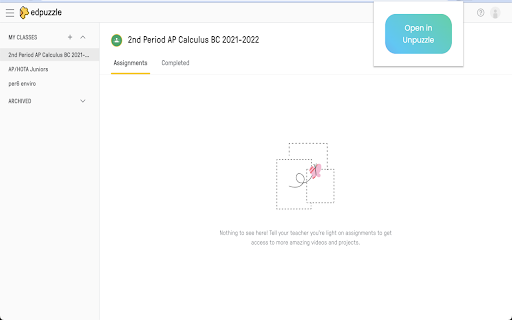
Easily extract Edpuzzle Tokens from site and redirect to Unpuzzle! Extension simplifies process of getting Edpuzzle Token and redirecting to Unpuzzle.net.

Duey.ai — Auto Typer for Google Docs, Slides & Microsoft Word Online
Duey.ai's Auto Typer types your work naturally in Google Docs, Slides & Microsoft Word Online. Includes humanizing tools. Duey.ai Humanizer + Auto Typer for Google Docs, Google Slides & Microsoft Word Online ------------------------------------------------------------------------------------------------------------------------------------ 🚀 Duey.ai v2.4.8 — What's new We added the ability to move the typing window around on your document/slides window. We also fixed a couple issues based on your feedback. ⚡ Type in the background — for real now - Last update warned you that switching tabs slows Duey down. Not anymore: Duey now keeps typing at full speed even when the tab is in the background, minimized, or hidden behind another window. Start a run, go do something else, and come back to a finished document — we'll even notify you when it's done. 🏷️ Progress in your tab - Check how far along a run is straight from the browser tab. Your tab title shows the live percentage — like "[42%] My Doc" — so you can keep an eye on progress from anywhere without switching back. ✍️ More natural typing - Refined the rhythm of typos and corrections so a run reads even more like a real person at the keyboard. 🖼️ Smoother Google Slides - Stray keystrokes no longer slip in while Duey is typing into a slide, for cleaner, more reliable Slides runs. ------------------------------------------------------------------------------------------------------------------------------------ 🚀 Duey.ai v2.4.5 — What's new 🕶️ Stealth Mode - Hide Duey's in-page UI when you don't want it visible to passersby. Toggle the floating pill and the Docs titlebar button independently, or swap the Duey icon for a neutral pencil, file, or clock so a glance at your tab reveals nothing. 🎚️ Adjust speed mid-session - Realized your run is too slow (or too fast) after Duey started? Expand the pill and tune the speed live. Pro users get a smooth slider; everyone gets − / + nudge buttons. ↔️ Move and minimize the pill - Drag the pill anywhere on screen with the new grip handle, or collapse it to a small side tab when you want it out of your way. Click the tab to bring it back. ⚠️ Smarter tab-timing - If you switch away from your document while Duey is typing, Chrome slows things down dramatically. Your tab title now shows a clear warning so you notice from anywhere in your browser — and a one-time tip explains how to keep your run on schedule. 📊 Cleaner Slides output - Typos introduced for realism on Google Slides are now corrected the same way they always have been on Docs. Quality of life - Refreshed extension popup with cleaner branding and real toggle switches - New "Open Duey on this page" button in the popup - Custom typing settings save reliably across sessions - Keyboard shortcut moved to ⌘/Ctrl + Shift + E (rebindable at chrome://extensions/shortcuts) ------------------------------------------------------------------------------------------------------------------------------------ 🤖 Humanize your text in Google Docs and Word Online! 🦾 Let our AI Auto Typer write your Google Docs & Word Online documents for you ⏰ Free up your time by letting this extension write your documents for you ✅ Use our Essay Checker to get AI-powered feedback on your writing ☑️ Generate Citations from any website! Our Auto Typer is a Chrome extension that simulates human-like typing in Google Docs and Microsoft Word Online. You've already done the hard work — researched, outlined, written your content. Duey handles the last mile: getting it into your document with a full Version History, so you can spend your time on what matters. NEW IN 2.2.4 — - Session Summary — See your typing stats at a glance when a session completes: duration, word count, average WPM, and more - Dark Mode — The panel now matches your system theme automatically - Smarter Notifications — Get browser notifications at 25%, 50%, 75%, and 100% progress so you can safely tab away - Dedicated Window Support — Duey detects your window setup and guides you to an optimal configuration for hands-free typing - Paste & Go — Paste your text and the Start button highlights automatically - Improved Reliability — Better handling of extension updates, error recovery, and Word Online free plan tracking - Dark Mode Support for Word Online — Consistent theming across Google Docs and Word Online NEW IN 2.2 — Word Online Support (Pro): Auto Typing and Humanizing now work seamlessly in Microsoft Word Online for Pro users, so whether your workflow lives in Google Docs or Word, Duey has you covered. NEW IN 2.0 — Auto Typer Pro: Our most realistic typing mode yet. Pro simulates natural human typing with adaptive rhythm, context-aware pauses, and realistic error correction — so your sessions are indistinguishable from a real person at the keyboard. Every free user gets one Pro session to try it out. Paired with Duey.ai's proprietary AI, the extension can also humanize your text, making it read more naturally and authentically in your own style. • Free to use — Get started with no limitations on how much it will type for you, no account required. Sign up for free to unlock additional settings, or upgrade to Pro for the most realistic typing experience available. • Works where you work — Supports Google Docs for all users, plus Microsoft Word Online for Pro subscribers. • Save your valuable time — You've already done the hard work of creating your text. Let Duey write it for you so you can get back to research, studying, family, or whatever matters most. • Show your work — Duey writes it keystroke by keystroke, so your document has a full Version History for review. • AI that writes naturally — Can be configured to match your natural writing style and speed. • Humanize your text — Duey.ai's Humanizer makes your text flow like authentic writing, helping you stand out and pass AI detection. • Know how long it will take — Duey tells you the estimated typing time upfront, so you know exactly how much time you're getting back. • Set it and forget it — Start it, walk away, come back to a finished document. Start and stop whenever you want. • Auto Typing in Word Online — The same realistic, human-like typing experience now works natively in Microsoft Word Online. • Humanizing in Word Online — Run Duey.ai's Humanizer directly in your Word Online documents, just like in Google Docs. • Seamless cross-platform workflow — Switch between Google Docs and Word Online without changing your process. • Available to Auto Typer Pro and Duey.ai Unlimited subscribers. • Adaptive typing rhythm — Speed fluctuates naturally instead of staying robotic and constant. • Context-aware pacing — Pauses at paragraph breaks and sentence boundaries, the way a real person stops to think. • Realistic error correction — Occasional typos with natural backspace-and-fix behavior, just like a human would. • Configurable WPM — Set your target speed and Pro builds a realistic typing session around it. • Pre-computed sessions — Your entire session is planned before it starts for smooth, uninterruptible execution. • One-click upgrade — Switch to Pro mode directly from the standard auto typer. • Free trial — Every user gets one Pro session to try, no card required. • Bring your text from wherever you created it and paste it into the extension. • Optionally humanize it with Duey.ai before typing. • Pick your configuration — standard or Pro — and set your preferences. • Open your Google Doc or Word Online document (Pro), click Start, and Duey takes care of the rest. • Writes naturally in Google Docs and Microsoft Word Online (Pro), including pauses and corrections. • Humanize text automatically using Duey.ai's proprietary AI. • Enhance your writing using the Duey.ai app (https://app.duey.ai) to create and humanize your documents. • Check for AI detection using the Duey.ai app (https://app.duey.ai). • Essay Checker for AI-powered writing feedback. • Citation Generator — create citations from any website. • More features coming soon! • Free — Full auto typer for Google Docs with no limitations. Always free. • Free with account — Additional settings and configurations at no cost. • Auto Typer Pro — $5/month for the most realistic typing simulation available, including Word Online support. Every free user gets one Pro session to try. • Duey.ai Unlimited — $9.99/month for Pro typing + Word Online + all Duey.ai tools.

School Cheats
Side by side scripts to help whilst working with schoolcheats.net Find your Edpuzzle token for our Edpuzzle hack to get answers and auto complete assignments, generate open ended answers on https://schoolcheats.net/edpuzzle. Try out the best Wayground hack for answers on https://schoolcheats.net/wayground you can also send flood bots to your Wayground games. Try out the best Edmentum hack for answers on https://schoolcheats.net/edmentum use this chrome extension to skip tutorials and get answers to tests. Find a ton of our Blooket hacks with scripts on https://schoolcheats.net/blooket to get answers and unlock all different types of blooks. Get unlimited tokens, and more! Want to beat everyone at Kahoot? Try our kahoot hack to get answers and win every single game on https://schoolcheats.net/kahoot

betterdeals
Find the best deals while you shop online! BetterDeals automatically compares prices across multiple retailers to help you save money on your purchases. Key Features: - 🔍 Real-time price comparison across major retailers - 💰 Instantly see potential savings - 🚚 Includes shipping costs in comparisons - 🌍 Supports multiple countries and currencies - ⚡ Works automatically on product pages - 🛡️ Zero impact on browsing performance How It Works: When you visit a product page on supported retailers like Amazon, Walmart, Best Buy, and others, BetterDeals automatically searches for better prices. A clean, unobtrusive card appears showing you available deals from trusted sellers. Privacy & Transparency: - No personal data collection - Works completely in your browser Save time and money while shopping online with BetterDeals - your smart shopping companion! Note: This extension may include affiliate links to help support ongoing development and maintenance. Additionally, any sponsored ad links within search engine results will be hidden to prevent potential bugs or issues.

Disable Content-Security-Policy
Disable Content-Security-Policy for web application testing. When the icon is colored, CSP headers are disabled. Use at your own risk. This disables the Content-Security-Policy header for a tab. Use this when testing what resources a new third-party tag includes onto the page. Click the extension icon to disable Content-Security-Policy header for the tab. Click the extension icon again to re-enable Content-Security-Policy header. Use this only as a last resort. Disabling Content-Security-Policy means disabling features designed to protect you from cross-site scripting. Prefer to use report-uri which instructs the browser to send CSP violations to a URI. That allows you keep Content-Security-Policy enabled in your browser but still know what got blocked. https://report-uri.com is a free tool that gives you a web interface to inspect CSP violations on your site.
