
bkffcipebmidpcbhipmblnpmoaofdinh


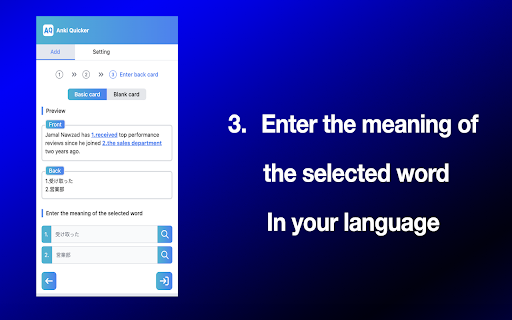
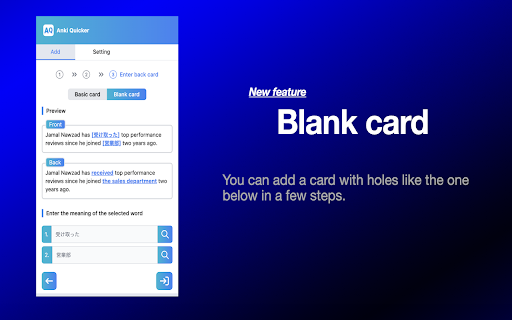

Anki Quicker was developed for users of the study support application called Anki. ⭐️:Anki Quicker (Support for Your English Vocabulary Learning) Anki Quicker is an extension for the popular learning app Anki. 🤖:Simplifying the Laborious Process Normally, to add new English words in Anki, you would have to add a sentence containing the word you don't know, select and highlight the word, look up the meaning and insert it, and then manually add the audio. Anki Quicker automates some of these steps for you. 🔎:Main features ① .Feature for Adding Underlined Cards: This feature allows users to add cards with an English sentence on the front and the meanings of selected underlined words on the back. ② . Feature for Adding Fill-in-the-Blank Cards: This feature enables users to add cards with an English sentence containing blanks (along with its Japanese translation) on the front, and the full English sentence on the back. ❗️:What You Need to Use the Extension - Anki - Anki Connect (Add-ons) L How to Download Anki Connect ① Select [Tools], [Add-ons], [Get Add-ons...] in Anki to open the [Add-on Installation] dialog. ② Enter the code ‘2055492159’ in the text box labeled as ‘Code’ and press ‘OK’ to proceed. ③ If prompted to restart Anki to complete the installation of Anki-Connect, please do so. 👀:Upcoming Updates The automatic insertion of audio is not yet implemented, so look forward to future updates that will include these features. 🙏: Feedback & Suggestions If you have any suggestions for improvements, such as bugs, or ideas for new features, please feel free to contact me through the link below. https://github.com/noah-00/anki-quicker/issues 2024/02/24 version: 1.1.9 Improve ui/ux in the page to fill in the meaning on the back of the card 2024/01/21 version: 1.1.8 Improve ui/ux in last page

Anki QA Generator
Generate high-quality Anki flashcards from any web page using OpenAI. Simply highlight text and create Q&A pairs with one click. A Chrome extension that helps you create Anki flashcards from any text you find online. Select text, right-click, and get AI-generated question-answer pairs sent directly to your Anki. 🔑 Key Features: • Generate flashcards from highlighted text • AI-powered Q&A creation using GPT • Direct integration with Anki through AnkiConnect • Choose your deck • Review cards before saving • Simple right-click interface 🚀 Setup Guide: 1. Install Anki and the AnkiConnect add-on - Open Anki → Tools → Add-ons → Get Add-ons - Enter code: 2055492159 - Restart Anki 2. Get your OpenAI API key from platform.openai.com 3. Add your API key to the extension 4. Keep Anki running while using the extension 💡 How to Use: 1. Highlight any text on a webpage 2. Right-click and select "Generate Anki Cards" 3. Choose your Anki deck 4. Review the generated cards 5. Select which cards to keep 6. Click "Save Selected to Anki" 🔒 Privacy & Security: • API key stored locally in your browser • No data collection • Processing through your OpenAI account • Direct communication with your local Anki Useful for: • Students • Language learners • Medical students • Knowledge workers • Anyone who wants to remember what they read online Note: This extension requires an OpenAI API key and Anki with the AnkiConnect add-on installed. Make sure Anki is running while using the extension.

Quick Anki Adder
Quick Anki card adder with translate, animated picture (.gif), and text-to-speech (TTS ) resources. A quick Anki card adder with translate, animated picture (.gif), and text-to-speech (TTS ) resources. How to Use: https://www.linkedin.com/pulse/quick-anki-adder-chrome-extension-fran%C3%A7ois-souza/ - - - - - Setup - - - - - In order to use this app, you need to have the AnkiConnect (2055492159) add-on and do a little configuration described as follows: “Now, click on the AnkiConnect add-on and then on the Config button. In the windows that show up, there is the field "http://localhost". You need to change this to "*". This is a crucial step to do to make possible the communication between Anki and any website, otherwise, the connection will fail. You can read more about this with the CORS docs provided by the Mozilla 💻.” - - - - - Features - - - - - Instantly translate from selected word/sentence in any website: If you select a text on website a little popup will appers below your selection with the original sentence (that you can highlight any word by click on them) and the automatic translation 🔠; Instantly add a card to Anki: After setting up the target Anki language and deck by clicking the Quick Anki Adder icon, simply select the phrase on the website and click the Add to Anki 🃏 button. That's it! your card was created in a few seconds 🗃️; If you study on a smartphone or in books and collect phrases from there, just add all phrases in one batch option by clicking the 📃 Add multiple phrases button in the popup. It will open a new page where you can paste your sentence on the left side and on the right side the formed sentences will appear that you can highlight. It's an efficient way to add multiple sentences in just a few seconds 📑; You can improve your cards with the amazing free Text-To-Speech (TTS) feature provided by the VoiceRSS API. Just visit the Voice RSS website to request your key and place it in the Quick Anki Adder popup 🗣; You can enhance your cards with funny GIFs provided by GIPHY. Again, to use it, you just need to order a free key from the GIPHY website and place it in the Quick Anki Adder popup 🖼️;

Quick Anki
Add new notes to your Anki decks with a click of a button Add new notes to your Anki decks with a click of a button! At the moment these sites are supported: More sites can be easily added. Say which ones you want :) The project is open-source and any help is welcome! How to use 1. Run Anki Desktop on your computer - https://apps.ankiweb.net/ 2. Make sure AnkiConnect add-on is installed - https://ankiweb.net/shared/info/2055492159. 3. Open one of the supported websites. 4. Find the Anki Deck dropdown and choose the desired deck. 5. Click on the Anki button to add a new note with the front and the back already filled :)

PJO to Anki
Adiciona um botão para automatizar a criação de cartas no Anki à partir das frases do site. Automatize a Criação de Cartas no Anki a partir do PJO! O PJO to Anki é a extensão de navegador que você estava esperando para simplificar sua vida como estudante no site "PJO". Com esta extensão open-source, você pode automatizar a criação de cartas no Anki a partir das frases que você estuda no PJO, economizando tempo e esforço. > Guia de Instalação [IMPORTANTE!!] Essa extensão não funciona sem seguir o passo a passo das configurações descritas no guia de como usar a extensão, então por favor configure a extensão seguindo o guia https://github.com/SecretX33/pjo-to-anki#readme. Recursos Principais: ✨ Integração Simples com o Anki: Configure a extensão com apenas algumas etapas e comece a criar cartas no Anki com o clique de um botão. 📚 Estude com Facilidade: Continue sua jornada de aprendizado no PJO e adicione frases ao Anki com facilidade, sem interrupções. ⚙️ Configurações Personalizadas: A extensão oferece opções de configuração para atender às suas preferências, permitindo que você adapte o processo de criação de cartas de acordo com suas necessidades. ⭐ Desenvolvida pela Comunidade: O PJO to Anki é uma iniciativa da comunidade, não oficial do PJO. Desenvolvido e mantido por entusiastas do PJO, para entusiastas do PJO. 🚀 Open-Source e Gratuito: Totalmente open-source e gratuito para uso, o PJO to Anki é uma extensão construída com paixão para melhorar sua experiência de estudo. Importante: Esta extensão não é afiliada ao PJO de forma alguma. Nenhum suporte ou garantia é fornecido pelo PJO em relação a esta extensão. *Comece a automatizar sua experiência de estudo agora mesmo com o PJO to Anki!* Se você é um estudante dedicado que utiliza o PJO para aprender e precisa integrar suas frases ao Anki, esta extensão é essencial para o seu arsenal de ferramentas de estudo. Economize tempo, simplifique seu processo de aprendizado e alcance o sucesso acadêmico com o PJO to Anki. Código fonte: https://github.com/SecretX33/pjo-to-anki
