
bkbfonphcnplohammgnjjbgabboooiig
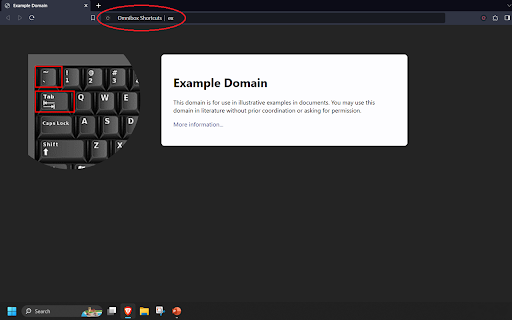
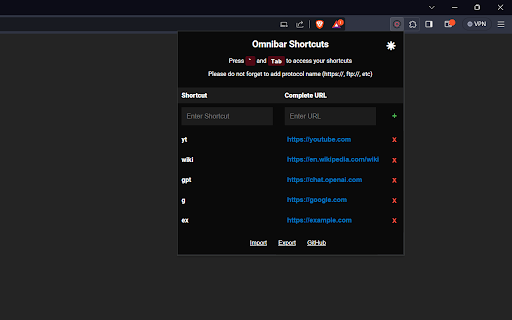
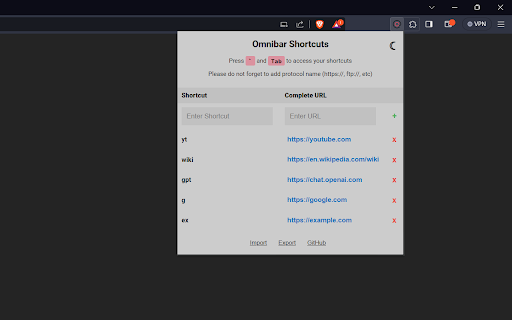
Press ` and then press Tab in the Omnibar to access your shortcuts Elevate your browsing experience with Omnibox Shortcuts – the ultimate Chrome extension for keyboard enthusiasts! Say goodbye to cumbersome bookmark clicks and embrace the speed of instant access.⌨️⚡ Quickly access your favorite websites / URLs by simply typing a small keyword / acronym associated with them in the search bar. ■ Assign shortcuts / short-forms to URLs. • Omnibox Shortcuts allows you to map keywords to websites and URLs. • You can add these shortcuts from the extension's popup UI. • Type [`] and press [Tab] to enter keywords in Chrome's omnibar (address bar). • Type a keyword and press enter to access the assigned website. • Much faster than clicking on bookmarks as you never have to leave your keyboard. • The keys to access the shortcuts ( [ `] and [Tab] ) are set so that they are easy to press but cannot be activated accidentally. NOTE: the [`] key is usually located right above the [Tab] key. ■ Supports extended paths and URL parameters. • For example if the following the keyword 'g' is assigned to 'https://google.com', typing 'g/search?q=hello' will automatically imply 'https://google.com/search?q=hello'. ■ Ability to import and export your Shortcuts. • Retain all your data when you shift browsers / devices by exporting it from the old browser / device and then importing it into the new browser / device. • Export: All of your data is exported into your Clipboard as a JSON string. • Import: Import your data by pasting the exported JSON string. 🔐 The extension stores all the data locally on your computer.

Onlyshortcuts - Quick access to links with shortcuts
Reach frequently used web links faster by using pre-set, easy-to-remember shortcuts instead of typing out the full URL. Sometimes typing a URL is faster than opening a bookmark. ⚡️Onlyshortcurs extension is built for people who often access some websites this way. The extension makes it even quicker, more reliable & predictable. 1. Set the shortcut and the link it should open (like "e" = example.com); 2. Type the shortcut into the browser search bar and hit ↵Enter; 3. Instead of your search engine page, the extension opens the page you defined. ✅ Extension RUNS LOCALLY on your device. No data/request is ever sent or received. Note: to achieve a natural feel, and due to technical limitations, the search results page actually opens. Then the extension reads your search request. If it matches one of the shortcuts, the page gets immediately replaced with the set page. This is why the extension requests access to your search engine page. 💻 Browsers: Chromium browsers, FF and Safari 1. Get straight to the needed page (avoid home, welcome, and other pages on your way to your everyday content). Example: Open your project management application boards bypassing the home page 2. Open the same pages with different accounts. Example: Google uses different URLs to open different accounts for Gmail, Calendar & other products. You can set 'g1' to open your personal Gmail and 'g2' - for the work one. 3. Open your company page without typing the exact URL. Example: Usually, organizations have multiple pages on their domain. SaaS companies can additionally have app subdomains. Because of this, when you type http://company.com/ or http://app.company.com/, many suggestions appear, which do not always match what you need. Set 'app' for your SaaS app page, 'ccom' for the company home page. It makes entering the page quick and reliable, just type the shortcut and you're guaranteed to open that exact page. 1. To avoid coincidence with your real search requests use short text for your shortcuts that is unlikely to ever become the word you search for. 2. You may use special characters at the beginning of the shortcuts to make it even less likely to be your search request. For example, you can use a dash '-ccom'.

Address Bar Shortcuts
Use shortcuts in the address bar to redirect to commonly used sites. Why waste time typing out long URLs or sifting through bookmarks? With Address Bar Shortcuts, you're just a couple of keystrokes away from your favorite sites. Enhance your productivity with our browser extension that turns your address bar into a powerful tool for quick navigation. By creating simple keyword shortcuts for your frequently visited sites, you can access them instantly, saving time and streamlining your online workflow. 1. Create a Shortcut: Decide on a keyword and link it to your desired URL. (e.g., "fb" for Facebook.com). 2. Launch Site: Type your shortcut into the address bar, and hit Enter. - Custom Shortcuts: Easily assign keywords to your most-visited websites - Instant Access: Simply type your shortcut into the address bar and press Enter to be redirected immediately. - Privacy-Focused: Operates entirely on your local device with zero data transmission to ensure your privacy is maintained. By eliminating the need to navigate through bookmarks or type lengthy URLs, our extension offers a quicker, reliable, and user-friendly web experience right from your browser's address bar.

Star
Star it if you like it! A pretty handy bookmark manager! A simple and handy bookmark manager, built as Chrome extension. Manage bookmarks with tags and categories, synchronize your bookmarks across platforms and browsers. With this extension, you will be able: - When you find one website useful, you can add it into your collection. - You can create handy notes in the collection - You can mark the item in collection with tags and categories - You can search items in collection with keywords or by categories, tags and names - You will be able synchronize your collection across platforms. - Login with Google account or a Github account. - Use CSE(Client Side Encryption) to keep everything hidden.

Keyword Based Navigator
Navigate to URLs based on shortcuts and keywords Description for the Keyword Based Navigator Chrome Extension The Keyword Based Navigator is an innovative Chrome extension designed to enhance your browsing efficiency by enabling keyword-based navigation directly from the Chrome omnibox. This tool allows you to set up custom keywords that act as shortcuts to your favorite websites, streamlining how you access information online. Note: If you can't upload the JSON file, right-click on the extension and select options to open it in a new window. This will enable you to upload the JSON file. In the address bar, type pkeywordvalue To perform a google search based on json keyword: p g monkey - Keyword-Based Navigation: Simplify your web browsing by assigning keywords to URLs. Enter a keyword into the Chrome omnibox followed by a specific query to quickly navigate to the linked site. - Omnibox Integration: Fully integrates with the Chrome address bar, utilizing it as the command line for entering keywords and search terms, merging seamlessly with your browsing habits. - Dynamic Keyword Management: Easily add, modify, or remove keywords through a user-friendly options page. This feature supports dynamic updates to your keyword list without needing to restart the browser or reload the extension. - JSON Configuration Support: Import and export your keyword configurations via JSON files. This functionality allows for backup, recovery, and sharing of settings between different devices or with other users. - Efficient URL Management: Organize and maintain your URLs associated with keywords through the extension’s intuitive management interface, ensuring your navigational shortcuts are always up to date. Ideal for: - Power Users: Those who love efficiency and want to reduce the time spent typing long URLs or navigating through bookmarks. - Professionals: Enhance productivity by quickly accessing frequently used business tools and platforms. - Students and Researchers: Easily switch between educational resources and research sites. - Everyday Browsing: Streamline access to daily news sites, social media, and more with simple keywords. 1. Install the Extension: Add Keyword Based Navigator to Chrome from the Chrome Web Store. 2. Configure Keywords: Use the options page to assign keywords to your favorite URLs. 3. Navigate Efficiently: Start using the omnibox to navigate faster than ever before. Keyword Based Navigator is not just a tool; it's a workflow enhancer for anyone who spends significant time online. It reduces the cognitive load and physical effort needed to access information, making browsing not only faster but also more enjoyable. Transform your Chrome omnibox into a powerful command tool with Keyword Based Navigator, and experience a smarter way to browse the web. v1.2 : Minor issues fixed and added an edit functionality for existing keyword.
