
bkanngdinjghfcfgpcbdjckpajacpnbb
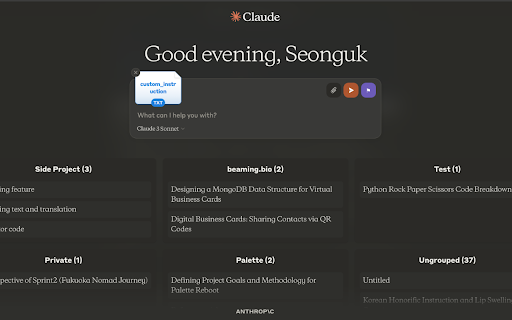
This program will not work with Claude's Projects feature update, as the structure of the site has changed. A new update to match the structure will be coming soon. -3rd July 2024- Unlock the full potential of your conversations with Claude AI using Claude Powertools, the ultimate extension for power users. This powerful toolbox equips you with advanced features to customize and streamline your Claude experience. #### Custom Instruction Injector - **Effortless Customization:** Easily inject custom instructions or prompts before starting a chat by clicking the blue button next to the prompt input field. - **Personalized Behavior:** Tailor Claude's responses with your personalized guidelines and preferences. This ensures that Claude behaves exactly how you want it to during conversations. - **Quick Access:** Save frequently used instructions for quick access and reuse. Your custom instructions are stored locally, making them readily available whenever you need them. #### Chat History Manager - **Structured Organization:** Organize your chat conversations into structured groups or categories for better manageability. - **Topical Grouping:** Get a clear overview of recent and important chats with topical grouping. This helps you quickly find and refer to specific conversations. - **Easy Navigation:** Easily navigate between chat groups and expand to view more details, maintaining a tidy and well-organized chat history. - **Enhanced Searchability:** Simplify the process of finding older conversations by grouping them under meaningful categories. #### Custom Instructions 1. **Inject Instructions:** Click the blue button next to the prompt input field to open the custom instruction injector. 2. **Enter Instructions:** Type in your custom instructions or prompts. 3. **Save and Reuse:** Save these instructions for future use. They will be stored locally and can be quickly accessed whenever needed. #### Grouping Conversations 1. **Name Your Groups:** In the chat title, add the group name followed by `::` and then the chat title. For example, `Project Alpha::Meeting Notes` will group the chat under "Project Alpha". 2. **View Groups:** Your conversations will now be displayed in groups, making it easier to manage and find specific chats. Harness the power of customization, organization, and productivity – install Claude Powertools today and take your Claude AI experience to new heights!

Claude Limit & Usage Tracker - ClaudeKarma
Track your Claude AI usage limits at a glance. See session and weekly limits with a beautiful toolbar icon. Track your Claude usage and Claude limits the moment they change. ClaudeKarma is the Chrome extension every Claude AI user should pin. It puts your 5-hour session limit, your 7-day weekly cap, your per-model usage and Anthropic's peak hours one click away from any tab. Stop guessing how many hours of Claude you have left. Stop hitting "you have reached your limit" mid-prompt. Free, local-first, privacy-respecting. Works with Claude Pro, Claude Max 5x, Claude Max 20x, Team and Enterprise. Peak hours drain your Claude session 3 to 5x faster (weekdays 5 to 11 AM Pacific Time, per Anthropic's official schedule). ClaudeKarma shows a live peak/off-peak banner with a countdown to the next change, so you can shift your heavy work to off-peak windows. The schedule is fetched from a public configuration file and updates automatically when Anthropic adjusts it. No extension update required. For Pro and Max plans, the banner correctly reflects Anthropic's May 2026 change: peak hours no longer impact Claude Code on those plans, only chat sessions. Live Session Gauge: a circular gauge with the percentage of your 5-hour Claude limit used, color-coded green to red as you approach the cap. Per-Model Breakdown: track All models, Opus, Sonnet, Haiku and Claude Design as stacked bars on your weekly cap. Daily Routines Tracker: monitor your scheduled Claude Code routines (Max plans, X / 15 per day). Plan Badge: see your tier at a glance (Pro, Max 5x, Max 20x, Team, Enterprise). A GitHub-style hourly grid that shows when you actually use Claude across the week or the month. Spot your patterns. Plan around peak. Work smarter. A small progress system that tracks your milestones from your first install to surviving a 90% session usage spike. Six levels: Tracker, Daily, Power, Halfway, Marathoner, Foresight. A subtle star badge in the popup header, with a popover explaining where you are and what unlocks next. Toggle off in settings if you prefer it hidden. The toolbar icon shows two concentric rings: - Outer ring: 5-hour session limit - Inner ring: 7-day weekly limit (all models) Colors shift from green to yellow to orange to red as you approach your Claude limits. At 90% and above the icon blinks to grab your attention before you hit the wall. Smart browser notifications fire at 75%, 90% and 100% (configurable, all off by default if you prefer no interruptions). The popup, tips page and update page now fully support light mode. A toggle in the header cycles between auto (follows your OS setting), light and dark. Your preference is saved and applied instantly with no flash on open. ClaudeKarma keeps your data on your device. Your usage history, your settings, your Karma progress all live in your browser, in chrome.storage.local. The extension makes only two outbound network calls during normal use: one to Claude.ai to read your own usage data (using your existing session, no password ever stored), and one to a public peak hours configuration file on tokenkarma.app (no auth, no cookies, same response for every user). No analytics, no third-party tracking SDKs, no fingerprinting inside the extension. When you uninstall, Chrome opens a short feedback page on tokenkarma.app where the extension version, your browser language and your operating system are passed as plain query parameters. You can close the tab and we never see anything. Full transparency on this and everything else: https://tokenkarma.app/claudekarma/privacy - NEW: Light mode with auto, light and dark options, follows your OS by default - NEW: Theme toggle in the popup header, preference saved across sessions - Improved contrast on small text in both dark and light modes for better readability - Fixed usage bar tracks and gauge ring invisible on light backgrounds - NEW: Karma Levels progress system with milestone unlocks - NEW: Live peak hours schedule fetched from tokenkarma.app, updates without an extension push - FIX: peak hours now anchored to Pacific Time so the schedule stays correct year-round, including during US daylight saving transitions - Smarter peak banner for Pro and Max plans (Anthropic's May 2026 Claude Code update applied automatically) - Doubled 5-hour Claude Code limits reflected automatically (Anthropic May 2026 increase) - Refreshed extension name in the Chrome Web Store for clearer search discoverability - Optional uninstall feedback page so you can tell us what we got wrong - An active Claude AI account on claude.ai - You must be logged into Claude in your browser ClaudeKarma is the first product in the TokenKarma family. More AI usage trackers are on the way for ChatGPT, Gemini and other tools, with cloud sync planned for the long-term roadmap. Free, simple educational tips at tokenkarma.app/tips. Independent project. Not affiliated with Anthropic.

ClaudeBuff - Enhanced UI for ClaudeAI
Make your ClaudeAI look more personalized and easier to use ClaudeBuff is an extension enhancing ClaudeAI UI with appearance options and conversation navigation: 🎨🎨🎨Theme Color Personalize your ClaudeAI environment by selecting your preferred color scheme. Choose from a palette of colors that suits your taste. 🖼️🖼️🖼️Background Image Upload your favorite picture, adjust the opacity of the background image to ensure optimal readability of the chat content. Let's create your unique and inspiring chat environment. 🗛🗛🗛Text Customization - Font Selection: Choose from a variety of fonts to suit your preferences. - Font Size: Adjust the text size for comfortable reading. - Text Styles: Apply bold, italic, or underline styles. 🔃🔃🔃Chat Navigation Navigate through your conversations with ease using these intuitive shorcuts: - Scroll up to the beginning of the conversation. - Scroll up to the previous prompt in the chat. - Scroll down to the next prompt in the chat. - Scroll down to the latest prompt in the conversation. 🔤🔤🔤Prompt Hotkeys Allow you to reuse your previous prompts in the chat efficiently: - Ctrl + Shift + 🔼: Use your first prompt in the chat. - Ctrl + 🔼: Use your previous prompt. - Ctrl + 🔽: Use your next prompt. - Ctrl + Shift + 🔽: Use your last prompt in the chat. 🖥️🖥️🖥️Adaptive Chat View Expands conversation view from default to wider or full-width, enhancing readability and user experience across different devices. Use ClaudeAI in your own ways

Stylevant – AI Prompt Optimizer for ChatGPT, Claude, Gemini & 50+ AI Tools
AI Prompt Optimizer for ChatGPT, Claude & Gemini. Upgrade your prompts instantly with one click. Stylevant is a browser-based AI prompt upgrader and prompt engineering assistant that works directly inside ChatGPT, Claude, Gemini, Grok, Copilot, and 50+ leading AI platforms. If you use AI for writing, coding, research, image generation, video creation, or business tasks, Stylevant helps you get dramatically better results with one click. Stop rewriting prompts. Stop settling for average AI responses. Stylevant transforms rough instructions into advanced, structured, high-performance prompts tailored to the exact AI model you’re using. Whether you're a founder, developer, content creator, student, or designer, Stylevant upgrades your AI workflow in seconds. ✨ One-Click AI Prompt Enhancement Instantly convert basic text into a professionally engineered prompt optimized for reasoning, clarity, creativity, and accuracy. Works as a ChatGPT prompt enhancer, Claude prompt improver, Gemini optimizer, and more. 🧠 Built-In Prompt Engineering Styles Choose from specialized enhancement modes like Default, Creative, Professional, Image Maker, and Python Expert — perfect for AI writing, AI coding, visual generation, structured research, and advanced reasoning tasks. ⚡ Seamless AI Workflow Integration Stylevant works directly inside your favorite AI chat platforms. No copy/paste. No tab switching. Just click and upgrade your prompt instantly. 📊 Usage Tracking & Prompt History View recently enhanced prompts, manage Basic and Thinking upscales, and optimize your daily AI productivity directly from the extension popup. 🔒 Privacy First Stylevant only processes text you explicitly choose to enhance. No browsing history tracking. No personal chat data collection. Stylevant supports one of the largest ranges of AI platforms available in any AI Chrome extension. For AI chat and conversational models, Stylevant works across the most popular assistants and model platforms — including ChatGPT, Claude, Gemini, Grok, and Copilot — plus many emerging tools and open-model providers. This makes it one of the most versatile prompt upscalers available. For AI research and knowledge workflows, Stylevant integrates smoothly with tools like Perplexity, Poe, NotebookLM, Typeform, and a range of Google Labs experiences — helping you generate stronger queries, deeper analysis prompts, and more structured outputs. For creators, it supports leading AI video and content platforms — helping you produce better scripts, shot lists, hooks, scene prompts, and revisions faster. For designers and image makers, Stylevant works with popular image-generation and design tools to improve visual direction, consistency, and prompt quality. For developers, it runs inside modern AI coding assistants and app builders — helping you write cleaner specs, generate better code prompts, and debug more effectively without leaving your workflow. For music and voice creation, it also supports leading audio tools for songwriting prompts, production direction, and voiceover scripts. 1. Install the Stylevant Chrome extension. 2. Open any supported AI platform (ChatGPT, Claude, Gemini, etc.). 3. Type your rough idea or instruction. 4. Click the Upscale button in the chatbox. 5. Instantly get a professionally optimized AI prompt. If you're searching for: • a better ChatGPT extension • an AI prompt optimizer • a prompt engineering tool • an AI writing assistant • an AI coding assistant • an AI image prompt enhancer • or a productivity tool for AI Stylevant is built for you. Upgrade your next prompt in 5 seconds.

AI Prompt Helper for ChatGPT & Claude - PromptSloth
Improve prompts with one click. 2000+ expert prompt templates. Works with ChatGPT, Claude, and every AI tool. Make your AI prompts better with one click. PromptSloth is a Chrome extension that helps you write better prompts for ChatGPT, Claude, Gemini, and any AI tool you use. ONE-CLICK PROMPT IMPROVEMENT A small helper icon appears in every AI chatbox (ChatGPT, Claude, Gemini, Perplexity, etc.) Click it to improve your prompt before sending. Get better, more detailed AI responses without learning prompt engineering. 2000+ EXPERT PROMPT TEMPLATES Type // anywhere to open the template library. Browse templates for: - Copywriting & Content Creation - Coding & Development - Email & Professional Writing - Research & Analysis - Marketing & SEO - Creative Writing - Business & Strategy - Education & Learning Insert any template with one click - no copy/paste needed. WORKS EVERYWHERE YOU USE AI - ChatGPT - Claude - Google Gemini - Perplexity AI HOW TO USE 1. Install the extension 2. Go to ChatGPT, Claude, or any AI tool 3. Click the PromptSloth icon in the input box to improve your prompt 4. Or type // to browse and insert templates 5. Get better AI responses Get started in seconds. No signup, no setup, just install and improve your AI prompts.
