
bjpnbgcclgjolakojhmefhebcgppmlka
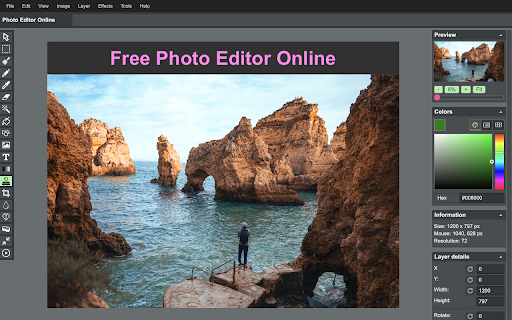
Online image editor lets you create, edit images, graphic design using HTML5 technologies. No need download or have obsolete flash. ➤ Features 🔹Files: open images, directories, URL, data URL, drag and drop, save, print. 🔹Edit: Undo, cut, copy, paste, selection, paste from clipboard. 🔹Image: information, EXIF, trim, zoom, resize (Hermite resample, default resize), rotate, flip, color corrections (brightness, contrast, hue, saturation, luminance), auto adjust colors, grid, histogram, negative. 🔹Layers: multiple layers system, differences, merge, flatten, Transparency support. 🔹Tools: pencil, brush, magic wand, erase, fill, color picker, letters, crop, blur, sharpen, desaturate, clone, borders, sprites, key-points, color zoom, replace color, restore alpha, content fill. 1. Basic: resize, crop, flip, image adjustments, apply filters, add stickers, support layers, paths, multiple files and pixel art. 2. Layer Styles: drop shadow, color and gradient overlays. 3. Transform: rotate, scale, move. 4. Text: insert and edit your text. Many beautiful fonts. 5. Pen: create shapes or paths by bezier curve. 6. Painting: brush, pencil, eraser tools. 7. Selection: copy, cut, delete, fill, and stroke. 8. Flood Fill/Gradient: fill area with single color or gradient. 9. Eyedropper: sample colors from image. 10. Tuning: blur, sharpen, and smudge. 11. Works with Google Drive. You can also click "More Apps" to see other great extensions we have developed. These are just other extensions we have developed that are not included in Photo Editor Online. By design, your data stays at all times on your Google account, never saved in our database. Your data aren’t shared with anyone, including the add-on owner. We complies with privacy laws (especially GDPR & California Privacy Act) to protect your data.

DeepMaker - AI Image Editing and Creative Tools
Advanced AI tools for image editing, enhancement, and generation. Create, edit, and transform images with cutting-edge AI models. DeepMaker offers a series of advanced AI image tools: background remover, image enhancer, object eraser, image editor, image generator, avatar creator, face swapper, tattoo generator, etc. Based on cutting-edge AI models like DeepSeek plus our unique creativity and algorithms, we continuously create high-quality AI creative tools. The Key Features: One-click intelligent background remover while perfectly preserving subject details, suitable for e-commerce products, portraits, and more. Advanced edge detection technology ensures precise and natural results without manual adjustment. Enhance image clarity and detail, making blurry photos sharp again. Intelligently optimize color, contrast, and sharpness for professional-grade photo restoration with one click. Supports old photo restoration, low-light enhancement, and more. Provides professional editing features like intelligent cutout, background replacement, color adjustment, and more, making image editing easier. Integrates multiple AI technologies for a one-stop image processing solution meeting various creative needs. Generate stunning high-quality images with just simple descriptions. Supports various artistic styles and scenes. No complex design skills needed to turn creativity into reality. Suitable for marketing materials, social media, artistic creation, and more. 6️⃣ AI Tattoo Generator Customize professional profile photos online and create business-level portraits 8️⃣ AI Watermark Remover Smart watermark removal, restoring flawless high-definition original images. Intelligently removes transparent watermarks that obstruct clothing details, with AI automatically completing the covered pattern textures. Use the DeepMaker AI face swap tool to easily replace faces in photos and enjoy limitless creative fun with face swapping! Predict the future appearance of your baby and experience intelligent gene fusion 🔒 Secure & Private: Your data is protected with top-tier security measures, ensuring your conversations and documents remain confidential.

Image Editor
Install for edit your images quickly. Install this extension & edit your Photos quickly. Dont pay for Photoshop again, use this free photo editing software today! Need to edit your photos? Our software Image Editor supports the most popular photo formats such as JPG/ JPEG / PNG / GIF Download your favorite photos from Instagram and Whatsapp, save them onto your computer and then begin editing your photos today. You can download and edit any image/images using our photo editor software. Print out your favorite photos later on after you have finished the photo editing process. After you finish editing your photos, you can display them in a photo gallery. Our photo editor provides plenty of features such as Adding rounded corners to your photos Change the brightness of your photos Change the contrast Add Filters to the photo Blur the photo if you want a more historical feel To begin using our software, simply install and open the photo you wish to edit. Disclaimer: Please note this extension is NOT made by Google and is made by an independent development team. All copyrights belong to their respective owners. Google doesn’t endorse or sponsor this Chrome extension. Image Editor is not owned by, is not licensed by and is not a subsidiary of Google Inc.

Photo Collage Maker
Transform photos with Photo Collage Maker, your go-to online image editor & picture montage creator. Whether you're designing the perfect image collage maker masterpiece, crafting captivating wallpapers, or aiming to stand out on social media, this tool is an ultimate companion. With an array of features designed for both beginners and seasoned pros, our extension ensures your creative process is as enjoyable as it is impressive. 🌟 Why Our Extension Stands Out ➤ Simplified User Experience: Dive into an intuitive interface that makes navigating through options a breeze. ➤ Diverse Templates: Starting with the photo collage maker photo designs, discover the ideal canvas for your project. ➤ Advanced Editing Tools: Tailor every detail with precision, from picture photo collage maker adjustments to pic collage refinements. 🔺Expansive Template Selection: Kickstart your creations with a variety of layouts that cater to every theme and occasion. 🔺 Effortless Import: Easily add images with a drag-and-drop feature or import them directly from Google Photos for the photo grid maker projects. 🔺Customizable Elements: Fine-tune your masterpiece with advanced editing options, ensuring every element aligns with your vision. 🔸Elevate Instagram stories using the pic collage feature. 🔸Design eye-catching Facebook covers. 🔸Craft personalized wallpapers with the photo collage maker for wallpapers, showcasing your unique style. Make the most of the online photo collage maker to access and work on projects from anywhere. Our platform integrates smoothly with Google Photos, simplifying the process of importing your memories. Additionally, our online-image-editor provides the tools you need to refine each image to perfection. Whether creating a picture collage, embarking on a digital collage, or compiling side by side pictures, our tool offers the canvas you need. Dive into a wide selection of collage templates and backgrounds, exploring all the possibilities for creative expressions with our collage photo maker. 🎨 Editing and Enhancement Go beyond the basics with the app's built-in photo editor. Apply filters, adjust lighting, or add meaningful text with ease. Whether you're aiming for a subtle touch-up or a complete overhaul, the online image editor is equipped with everything you need to elevate the best images. 🔄 A Collage Builder for Every Idea ❗️Image Collage Maker: Seamlessly blend images into captivating creations. ❗️Pic Editor Online: Fine-tune images with a comprehensive suite of editing tools, ensuring each photo is picture-perfect. ❗️Online Collage Design: Experiment with layouts and designs effortlessly in the browser, bringing one's vision to life. 1️⃣ Download an extension from the Chrome Web Store. 2️⃣ Choose from an extensive template selection, including special designs for collage backgrounds and more. 3️⃣ Upload your images, customize your layout, and explore various editing tools. 4️⃣ Share a masterpiece with the world, inspiring creativity and innovation. This extension is more than a tool; it's a gateway to a community that shares your passion for creativity. From commemorating special moments to experimenting with new designs, this platform allows you to tell stories, capture memories, and express your unique artistic vision. 💖 Your Creative Companion Opting for Photo Collage Maker means choosing limitless creativity. Whether you're working on a personal project, designing for social media, or exploring new artistic avenues, image editor online is designed to fulfill all your creative needs. With its user-friendly interface and robust features, Photo Collage Maker redefines the possibilities of photo editing. 🚀 Start Your Creative Journey with Photo Collage Maker 📌 Dive into the world of art today and transform your approach to photo creation. 📌 Download the extension now and unlock the doors to endless creativity, whether you're creating keepsakes, social media content, or exploring artistic expressions. 🌐 Draw inspiration from a worldwide community of users. 🌐 Explore galleries filled with diverse creations, share your own works 🌐 Connect with others who share this passion for creativity. 🌐 Global exchange not only broadens creative horizons but also enriches one's own artistic expression.

Photo editor PhotoStudio for images
PhotoStudio to create and edit photos and images online PhotoStudio is a photo editor to modify any image, use your camera to take pictures, import them, and edit any kind of images and graphics. It provides a flexible area with a multitude of photo editing features, effects and filters. Moreover, it scans and collects the webpages you browse in the Internet. These webpages are uploaded to our servers in order to know if they contain image files that can be edited using our extension integrated with our online app. Its main features are: - Take pictures from your PC or laptop camera. - Import pictures to modify them. - Filters, which determine the atmosphere of pictures and help convey the right message for your creative. - Custom filters, that can be created by anyone using LUTs (Lookup Tables) from popular apps like Photoshop, GIMP or Lightroom. - Overlays, which can be used to create neat lighting effects such as lens flare, bokeh or light leaks. It can also be used to furnish pictures with textures like crumpled paper or plaster. - Adjustments like brightness, contrast or clarity so that users can tune their images and graphics to produce stunning creatives. - Transform effects like cropping, flipping and rotation operations. - Allow to quickly add text to any picture or creative. The corresponding font library can easily be exchanged, reduced, or expanded. - Provide Stickers. - Brush, which is optimized for touch screen interaction and supports different brush strokes that can be edited in terms of thickness and color. - Download or share the pictures modified. PhotoStudio is an adaptation of the IMGLY PhotoEditor to the RedcoolMedia platform. It is open source.
