
bjnobgdfhefpilajplncgjjeopakpepc


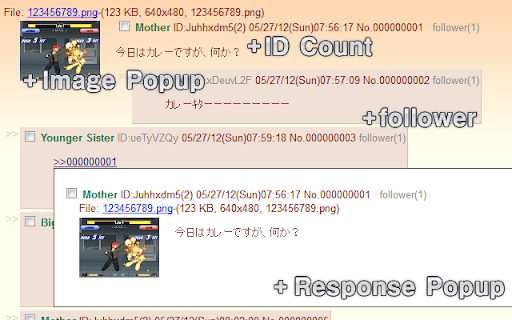

----- Sub function (Setting required) ----- ⚙️Expand thumbnail image. ⚙️Expand MediaPlayer. ⚙️Expand shortened URL. ⚙️Replace text to hyperlink. ⚙️Override Referer and UserAgent. (obsoleted in MV3) ⚙️Customize by JavaScript. (Developer mode only) ----- (2024/12/02) ----- Fixed "The extension is directing users to pornographic sites." issues. the BbsBorad is no work by default. If user have visited voluntarily relevant BBS even once, the BbsBoard unlocked.

Illust Downloader for pixiv.net
You can easily download images, comics, and novels from pixiv.net! *This extension is unofficial and is not affiliated with Pixiv Inc. "pixiv" is a registered trademark of Pixiv Inc. *As of May 17, 2025, this extension has been renamed to "Illust Downloader." [About Illust Downloader] Illust Downloader is an extension that allows you to automatically assign file names and download illustrations, manga, and novels from Pixiv. It also offers features to enhance your Pixiv experience, such as the ability to enlarge illustrations directly on the gallery page. [Introducing Illust Downloader EX] The basic features of Illust Downloader are available for free indefinitely. However, by purchasing a license (¥195 per month), you can upgrade to Illust Downloader EX. Illust Downloader EX allows you to download Ugoira (animated illustrations) as video files (AVI, WebM, etc.), APNG, GIF animations, SVG, and more. Additionally, it offers advanced features such as organizing illustrations into folders based on criteria like artist or time, compiling manga into ZIP files, identifying downloaded items directly on the gallery page, batch downloading, and many other convenient functionalities. The premium features are available for a one-month free trial, so feel free to try them out. [Regarding Bugs and Suggestions] If you encounter any bugs, have suggestions for improvements, or other requests, please use the "Feedback, Suggestions, and Bug Reports" option within the Illust Downloader settings to get in touch with us.

Drag image To Save
Just drag it! ----------------------------------------------------- Easiest way to save a picture!!!! Easy On/Off! This extension is given as a tribute rather than for profit, so enjoy it. ----------------------------------------------------- behavior * You can choose where to save it OR use chrome's default download location * Note: linked images (i.e. an image that when you press it a link is opened) have a default chrome behaviour when you drag it (open the link). If you want to save the pic, you have to right click it, select 'open image in new tab' and then drag the image on the new tab). This is done to avoid changing chrome's default behaviour. ----------------------------------------------------- Chrome's download location option is in: Settings->Advanced->Downloads Check -> "Ask where to save each file before downloading" -----------------------------------------------------

KuroTwi
This is an application that allows you to freely place Twitter timelines, RSS feeds, etc. KuroTwi is a Twitter client for Google Chrome Extensions. The feature of this client is that you can freely arrange multiple timelines on the screen.

Translate Anywhere
Translation into multiple languages, including full pages. High-accuracy AI translation and proofreading available. With Translate Anywhere, you can easily translate text through the icon in the top-right corner of your browser or from the context menu. You can also translate entire web pages at once. In addition, you can select specific text on a page and translate it directly via the right-click menu. The extension supports a wide range of languages, including English, Chinese, Korean, French, German, Italian, Spanish, Portuguese, and many more. It also offers high-quality translation and proofreading powered by ChatGPT and DeepL. ※ If the Translate Anywhere icon is not visible in the top-right corner, click the puzzle-shaped icon and pin the Translate Anywhere icon to your toolbar.
