
bjnioomanlbaahlfnkfjbjjfaecagbll


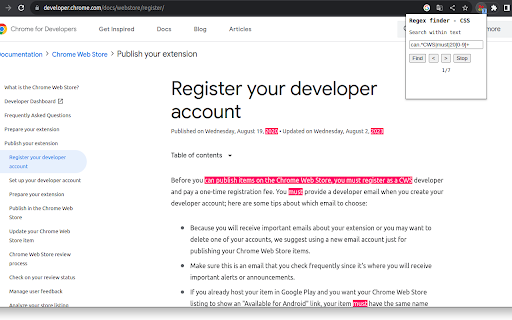

Regex finder based on CSS Custom Highlight API. Type a valid regex in the search field to highlight matches on the page. Regex finder is a find/search tool that uses the new CSS Custom Highlight API. Dynamic web pages like YouTube should work in addition to static pages. The extension is targeted at advanced users who are already familiar with regex matching. No bells and whistles are included. Matches are highlighted using red background color. Total match count is displayed to user. Instructions: Navigate to a web page and click the extension icon. Type in a valid regex and press Enter or Find button to start matching. Press the Stop button to remove highlights and to stop program execution. Press Enter or Find to restart. Press Next or Prev buttons to navigate through matches. Use Chrome Task manager (Ctrl + Esc) in case of CPU consuming regex. Known limitations: - iframes are not supported - soft hyphens may cause problems if not included in regex - textarea elements are not supported because of restrictions in API. For instance, GitHub seems to use textarea in it's 'code' page. - only tested with some English and Scandinavian websites - currently there are "g" and "i" flags hard coded in regex object constructor, meaning global search and ignore case. - hardcoded 9000 maximum matches.

Find whatever - regex & auto re-find
Enhance your browser's find capabilities.Case recognition、Word recognition、regular expressions、Listen for DOM changes in real time ## Core Capabilities - Piercing search: Able to directly enter Shadow-DOM, iFrame, and SVG internals. - Dynamic real-time monitoring: Optimized based on MutationObserver, it monitors the page in real-time. When you turn pages, switch Tabs, or trigger dynamically loaded Tooltips, new results will pop up automatically. - Hardcore regex support: Supports regular expressions (configurable Unicode mode), and built-in "regex blacklist" logic to prevent browser hangs caused by incorrect regex. - Status auto-alignment: Automatically refresh results when switching tabs, ensuring the search status is always up to date. - Support cross-tag search: Easily find corresponding text even in complex structures. ## Developer-friendly features - Highlighting fully controllable: Uses the browser's native ::highlight API with excellent performance. You can customize background color, text color, and underline styles in the settings page. - UI non-interference: The panel supports dragging, frosted glass effects, dark mode, and custom theme colors. -One-click extraction: All matched results support one-click copying to the clipboard, convenient for secondary processing. ———————————————————————————————————————————————— 浏览器查找增强工具,专注解决复杂网页搜索痛点。 github:https://github.com/ImSwordTooth/findwhatever 欢迎提 issue 😄

RegexGSC: Exact Match Regex Generator for GSC
The ONLY Google Chrome extension that creates exact match regex patterns for Google Search Console. RegexGSC solves a critical problem for SEO professionals: creating perfect EXACT MATCH regex patterns for Google Search Console. No other tool or extension does this! - 𝐏𝐞𝐫𝐟𝐞𝐜𝐭 𝐄𝐱𝐚𝐜𝐭 𝐌𝐚𝐭𝐜𝐡 𝐏𝐚𝐭𝐭𝐞𝐫𝐧𝐬 - Generate the correct ^(keyword1|keyword2)$ pattern that matches ONLY your specified keywords, nothing more - 𝐌𝐮𝐥𝐭𝐢𝐩𝐥𝐞 𝐊𝐞𝐲𝐰𝐨𝐫𝐝𝐬 𝐒𝐮𝐩𝐩𝐨𝐫𝐭 - Enter unlimited keywords to create comprehensive exact match filters - 𝐙𝐞𝐫𝐨 𝐑𝐞𝐠𝐞𝐱 𝐊𝐧𝐨𝐰𝐥𝐞𝐝𝐠𝐞 𝐑𝐞𝐪𝐮𝐢𝐫𝐞𝐝 - Simply enter your keywords and get the correct pattern instantly - 𝐆𝐒𝐂-𝐂𝐨𝐦𝐩𝐚𝐭𝐢𝐛𝐥𝐞 𝐅𝐨𝐫𝐦𝐚𝐭 - Patterns work flawlessly in Google Search Console's regex environment - 𝐒𝐭𝐚𝐫𝐭𝐬 𝐖𝐢𝐭𝐡 𝐏𝐚𝐭𝐭𝐞𝐫𝐧 - Filter queries beginning with specific keywords - 𝐄𝐧𝐝𝐬 𝐖𝐢𝐭𝐡 𝐏𝐚𝐭𝐭𝐞𝐫𝐧 - Filter queries ending with specific keywords - 𝐄𝐱𝐜𝐥𝐮𝐝𝐞 𝐏𝐚𝐭𝐭𝐞𝐫𝐧 - Create negative patterns to filter out unwanted queries Without exact match patterns, your GSC data analysis includes partial matches and irrelevant variations, leading to: - Inaccurate performance metrics - Misleading keyword insights - Wasted time analyzing irrelevant data - Flawed SEO strategy decisions RegexGSC is the ONLY tool built specifically to solve this problem. - SEO Professionals analyzing query performance - Content Strategists tracking specific target keywords - Digital Marketers measuring campaign impact - Analytics Teams requiring precise data segmentation - Anyone frustrated with GSC's limited filtering options - Works entirely in your browser - no data sent to any server - No tracking, no analytics, no data collection - Minimal permissions - only clipboard access for convenience

Chrome Regex Search
Use Chrome Regex Search extension with regular expressions for advanced find in Chrome Unlock the true power of text analysis with the Chrome Regex Search extension. This advanced chrome extension regex search tool is the definitive solution for anyone who needs to perform deep, pattern-based searches directly within Chrome. The chrome regex search tool revolutionizes how you interact with web content. Looking for grep regex power directly in your browser? This innovative regex search chrome extension seamlessly replaces the standard Ctrl+F hotkey, giving you the command-line precision of grep in a simple, graphical interface. Your familiar chrome ctrl f regex keyboard shortcut now activates a far more powerful search panel. For users asking how to do a in text search of chrome that goes beyond simple words, the answer is here. The chrome find in page regex functionality allows you to use complex regular expressions to find exactly what you need, making the chrome regex search an indispensable tool. Looking for grep regex capabilities in your browser? The google chrome regex search extension brings that powerful functionality to Chrome. This chrome regex find tool provides grep-like power with a user-friendly interface, making advanced text search accessible to everyone. 🔍 Advanced Search Capabilities - 🔥 Regex Power: Full regular expression support with case-sensitive/insensitive options - ⚡ Smart Filtering: Automatically excludes navigation elements (headers, footers, menus) - 🎯 Content-Focused: Searches only main content, skipping UI elements and hidden sections - 🔄 Progressive Highlighting: Non-blocking search that highlights matches progressively - 📊 Match Counter: Real-time match counter showing current/total matches ⌨️ Keyboard Shortcuts & Navigation - 🎹 Vim-Style Navigation: `n` for next match, `N`/`Shift+n` for previous match - 🔄 Regex Toggle: `Ctrl+Shift+R` / `Cmd+Shift+R` to toggle regex mode - 🚀 Instant Access: `Ctrl+F` / `Cmd+F` opens the enhanced chrome find regex panel - 🛑 Quick Close: `Escape` key to close search instantly - ⏭️ Enter Navigation: `Enter` for next match, `Shift+Enter` for previous match 🎨 Chrome-Native Experience - 🎨 Native UI: Perfect visual match to Chrome's built-in find bar - 🌙 Theme Support: Automatic light/dark mode adaptation - 🎯 Floating Panel: Non-intrusive overlay that stays out of your way - 🔧 Professional Design: Clean, modern interface with intuitive controls ⚡ Performance & Optimization - 🚀 Lazy Highlighting: 90-99% memory reduction with intelligent highlighting - ⚡ Non-Blocking: Search runs in background without freezing the page - 🔄 Debounced Input: 300ms delay prevents excessive searches - 🧠 Regex Caching: Smart caching for frequently used patterns - 🗑️ Memory Management: Automatic cleanup to prevent memory leaks 🛡️ Reliability & Compatibility - ✅ Manifest V3: Built with modern Chrome extension standards - 🔒 Security: No external dependencies, pure vanilla JavaScript If you are learning how to search for words in text on chromebook with greater efficiency, this chrome search regex extension is your answer. The regex chrome extension is fully optimized for Chrome OS, providing a native look and feel. The chrome regex find in page experience on a Chromebook is seamless. Here are practical examples of how the chrome extension regex search tool can solve common problems: 1️⃣ Regex Extract Email Addresses 💡 Pattern: `\b[A-Za-z0-9._%+-]+@[A-Z0-9.-]+\.[A-Z]{2,}\b` 💡 Use: Find all contact information on a webpage for lead generation. 3️⃣ Regex Multiple Lines 💡 Pattern: `line one[\s\S]*line two` 💡 Use: Find text that spans across line breaks, perfect for code review. 5️⃣ Regex Find Capitalized Words 💡 Pattern: `\b[A-Z][a-z]+\b` 💡 Use: Extract proper nouns and names from large text blocks. Master the basics with this quick reference guide: ➤ `.` matches any single character (except newline) ➤ `\d` matches any digit (0-9) ➤ `\w` matches any word character (a-z, A-Z, 0-9, _) ➤ `\s` matches any whitespace (space, tab, newline) ➤ `[abc]` matches any character in the brackets (a, b, or c) ➤ `[^abc]` matches any character NOT in the brackets ➤ `*` matches 0 or more of the preceding element ➤ `+` matches 1 or more of the preceding element ➤ `?` matches 0 or 1 of the preceding element ➤ `{n}` matches exactly n occurrences ➤ `^` matches start of string/line ➤ `$` matches end of string/line ➤ `|` acts as OR operator (cat|dog) This product is the ultimate response to the query of how to do a in text search of chrome. It replaces a basic tool with a professional-grade instrument. The regex search chrome extension turns your browser into a sophisticated data exploration platform. It also perfectly solves the problem of how to search for words in text on chromebook. Chromebook users no longer have to accept an inferior search experience with this chrome search with regex capability. Discontinue tolerating limitations imposed by primitive term-location utilities. Embrace the next generation of in-browser content examination with this sophisticated regex search in chrome extension. Select the install button and encounter the remarkable improvement immediately. This all-inclusive google chrome search regex resolution will permanently alter your information retrieval methodology, providing unprecedented precision and efficiency for all your investigative requirements. The chrome regex search extension automatically synchronizes across your Chrome account, maintaining your preferred settings regardless of device.

Regex Manager
Regex Manager: Your Regex Toolbox in Chrome Stop Wasting Time Searching for and Retyping Regex! Right click in the input and select Regex Manager, or click the extension icon. Are you a developer, tester, data analyst, or anyone who frequently uses regular expressions online? Tired of constantly digging through old notes, searching online forums, or painstakingly retyping complex patterns? Regex Manager is here to streamline your workflow! Regex Manager is a powerful yet simple Chrome extension that provides a convenient side panel to store, organise, and instantly access all your frequently used regular expressions. Think of it as your personal, searchable regex library, always available right within your browser. Save Precious Time: Stop retyping! Insert your saved regex patterns directly into any input field or textarea on any webpage with a single click. Stay Organised Effortlessly: Assign titles, descriptions, categories, and subcategories to your patterns. No more cryptic notes – find exactly what you need, when you need it. Reduce Errors: Store your tested and validated regex patterns. Avoid typos and mistakes that come from retyping complex sequences. Centralised Management: Easily create new patterns, edit existing ones, or delete those you no longer need through an intuitive interface. Quick Access: Open the Regex Manager panel via the extension toolbar icon or by right-clicking within an input field for context-aware access. Copy with Ease: Need the pattern elsewhere? A quick "Copy" button sends it straight to your clipboard. Bulk Import/Export: Manage larger collections efficiently by importing patterns from a CSV file or exporting your entire library for backup or sharing. Get Started Quickly: Includes optional demo data with useful examples to show you how it works and provide inspiration. You can delete and import demo data anytime leaving your custom data intact. Save your useful regex patterns in the Regex Manager side panel, giving them clear names and descriptions. When you need to use a pattern on a webpage, simply click inside the target text field (input box, textarea). Open the Regex Manager panel. Find the pattern you need (use categories/subcategories to filter if you have many!). Click "Insert" – the pattern appears instantly in the focused field! Improve your productivity and make working with regular expressions a breeze. Install Regex Manager today!
