
bjfoplibeabdkfmbanlocafjlbbimgai


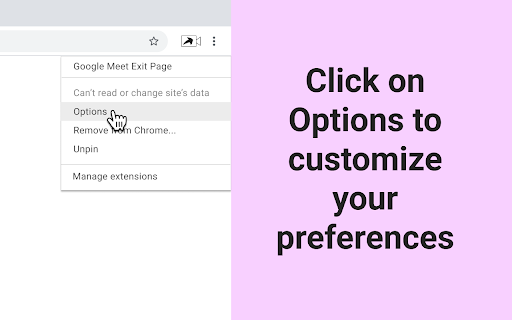

Configure the exit page after ending a Google Meet call. Configure the exit page that should be visible after a user ends a Google Meet call. A user will have to click the 'Leave call' button from Google Meet to then be redirected to the other page. This is useful if you always need to visit the same page after every meeting, or have a similar requirement. The exit page can be configurable from the extensions' Options page. You can also configure if the exit page needs to open in a new tab or the same tab.

YouTube Ads Skipper
This extension is made for YouTube Ads for Skipping purpose. It waits for ads video and ads strip on YouTube.com and automatically… This extension is made for YouTube Ads for Skipping purpose. It waits for ads video and ads strip on YouTube.com and automatically skips ads video and ads strip visible on video within a second

Ad Blocker for Amazon
Use command to hide sponsored items and ads on your Amazon search screen Use command to hide sponsored items from your amazon search screen. Command: Ctrl + Shift + x (window) / Command + Shift + x (Mac)

Structy Problem Tracker
Track your Structy problem solving progress with ratings and notes Structy Problem Tracker Objective: Structy Problem Tracker is designed to help you master coding interview problems on structy.net by providing a powerful, interactive tracking and review system—right in your browser. Features Automatic Problem Detection: Instantly recognizes the Structy problem you’re viewing and lets you track your progress for each problem individually. Smart Progress Tracking: Confidence Rating: Rate your confidence (1–5) after each attempt. Notes: Add personal notes for each problem. Checkboxes: Track if you watched the Approach Video, Walkthrough Video, or used the Solution. Spaced Repetition Reminders: Calculates your next recommended attempt date based on your confidence rating (e.g., “Next attempt: 3 days from last completed”). Highlights when a problem is due or overdue for practice with clear, color-coded alerts. Summary Card: See a clean summary of your last attempt, next attempt, confidence, checkboxes, and notes for each problem. “Reset & Edit” lets you update your progress at any time. Data Management: Reset Data: Remove tracking data for the current problem. Delete Individual Problems: Remove any problem from your history in the “View All Data” table. Comprehensive Problem List: “View All Data” shows a sortable table of all tracked problems, with: Problem name (clickable to open the problem) Overdue status (PRACTICE OVERDUE / PRACTICE TODAY) Last completed date Next attempt date Confidence rating Checkboxes (with icons) Notes (viewable in a modal) Delete action (trash icon) Smart UI: Automatically shows the summary card or form based on your progress for the current problem. If you’re not on a Structy problem page, the extension shows your full problem list and a quick link to Structy. Modern, Accessible Design: Clean, responsive UI using Tailwind CSS and Font Awesome icons. Works seamlessly in Chrome’s popup window. Perfect for anyone using Structy to prepare for coding interviews, this extension helps you build a habit of spaced repetition, track your learning, and never lose sight of your progress! ### v1.4.0 (Current) - ✨ **Major Error Handling Improvements**: Fixed "Could not establish connection" errors - �� **Enhanced Content Script Management**: Automatic injection and retry logic - 🛡️ **Robust Message Passing**: Better communication between popup and content script - 🎯 **Improved Reliability**: Extension works even when timer features aren't available - ⚡ **Performance Optimizations**: Faster loading and better error recovery ### ⏱️ **Built-in Timer Feature** - **Floating Timer**: Added a persistent timer that can be toggled on/off while working on Structy problems - **Timer Controls**: Start, pause, and reset functionality with intuitive controls - **Time Tracking**: Automatically tracks time spent on each problem and saves it with your problem data - **Visual Timer**: Clean, modern timer interface that floats over the Structy website - **Persistent State**: Timer visibility preference is remembered across browser sessions ### 📊 **Enhanced Data Management** - **Export to CSV**: Export all your problem data in CSV format for external analysis - **Export to JSON**: Export data in JSON format for backup or migration - **Import Data**: Import previously exported data to restore your progress - **Data Reset**: Option to reset all stored data if needed ### 🎨 **UI/UX Improvements** - **Modern Design**: Updated interface with improved styling and layout - **Better Navigation**: Enhanced navigation between different views - **Responsive Layout**: Improved layout that works better on different screen sizes - **Visual Indicators**: Better visual feedback for overdue problems and completion status ### 🔔 **Smart Notifications** - **Daily Reminders**: Receive notifications when it's time to practice problems again - **Intelligent Scheduling**: Notifications based on your confidence ratings and spaced repetition - **Background Processing**: Notifications work even when the extension popup is closed ### 📱 **Enhanced Problem Tracking** - **Overdue Indicators**: Clear visual indicators for problems that need attention - **Time Spent Display**: See how much time you've spent on each problem - **Improved Notes**: Better notes section with persistent storage - **Completion Tracking**: Track which learning resources you've used (approach videos, walkthroughs, solutions) ### Performance - **Faster Loading**: Optimized data loading and storage operations - **Better Memory Management**: Improved memory usage and cleanup - **Efficient Storage**: More efficient use of Chrome's storage API ### Reliability - **Error Handling**: Better error handling and recovery - **Data Validation**: Improved data validation and integrity checks - **Cross-tab Synchronization**: Better synchronization across multiple tabs ### Compatibility - **Chrome Manifest V3**: Updated to use the latest Chrome extension manifest version - **Modern APIs**: Updated to use modern Chrome extension APIs - **Better Permissions**: Streamlined permission requirements - Fixed issue with timer not persisting across page refreshes - Resolved problem with data not loading correctly on some Structy pages - Fixed notification timing issues - Corrected display issues with overdue problem indicators - Fixed export/import functionality edge cases - **Browser**: Google Chrome 88 or later - **Permissions**: Storage, notifications, and active tab access - **Website**: Compatible with structy.net problem pages 1. Download the extension from the Chrome Web Store 2. Click "Add to Chrome" to install 3. Navigate to any Structy problem page 4. Click the extension icon to start tracking your progress ### Timer Feature 1. Click the timer button in the extension popup to toggle the floating timer 2. Use the timer controls to start, pause, or reset your session 3. Time spent is automatically saved when you rate a problem ### Data Export/Import 1. Click "View All Problems" in the extension popup 2. Use the export buttons to save your data 3. Use the import button to restore previously exported data ### Problem Tracking 1. Navigate to any Structy problem page 2. Rate your confidence (1-5) 3. Check off resources you used 4. Add notes about your approach 5. Click "Save" to store your progress We're already working on features for future versions: - **Statistics Dashboard**: Detailed analytics and progress visualization - **Study Plans**: Custom study schedules and goals - **Problem Categories**: Organize problems by difficulty or topic We'd love to hear from you! If you have suggestions, bug reports, or feature requests, please reach out to us. Release Notes - Version 1.2.0 New Features Data Import/Export Added ability to export all problem data in two formats: JSON Export: Complete data export in JSON format CSV Export: Tabular data export in CSV format Added data import functionality: Support for both JSON and CSV file formats Automatic merging with existing data Validation and error handling for imported files UI Improvements Added new data management controls in the "View All Problems" view: Export JSON button (Blue) Export CSV button (Green) Import Data button (Orange) Improved visual hierarchy with distinct button colors: Export JSON: Blue (#3498db) Export CSV: Green (#16a34a) Import Data: Orange (#f59e42) Back button: Orange (#e67e22) Enhanced button hover states for better user feedback Technical Changes Implemented file handling for import/export operations Added CSV parsing and generation utilities Enhanced error handling for file operations Improved data validation for imported files Added automatic page refresh after successful import Bug Fixes Fixed event listener attachment for dynamically rendered buttons Improved error messaging for invalid file imports Enhanced data merging logic to prevent data loss Data Structure The export/import functionality maintains the existing data structure: Apply to popup.html } User Guide Exporting Data Click "View All Problems" Choose either "Export JSON" or "Export CSV" File will automatically download Importing Data Click "View All Problems" Click "Import Data" Select a JSON or CSV file Data will be merged with existing records Page will refresh to show updated data Note: This update is backward compatible. All existing data will be preserved and can be exported in either format. Release Notes - Version 1.1.0 New Features Timer Integration Added built-in timer to track time spent on each problem Timer persists across page reloads Timer can be toggled on/off from the navigation bar Time spent is automatically saved with problem data Timer display shows in MM:SS format UI Improvements Redesigned summary card with two-column layout: Left column: Problem details (last completed, next attempt, time spent) Right column: Checklist items (videos watched, solution used) Overdue status moved to top for better visibility Notes section positioned below columns Added time spent column to "View All Problems" table Improved visual hierarchy and information organization Technical Changes Added timer state management in content script Implemented timer persistence using chrome.storage Updated data structure to include timeSpent field Enhanced message passing between popup and content script Added error handling for timer-related operations Bug Fixes Fixed timer visibility persistence across page reloads Improved timer state synchronization between popup and content script Enhanced error handling for message passing Data Structure Update

YTControl+
Get ready to experience the best of youtube with YTControl+. Introducing YTControl+: Your Ultimate YouTube Enhancement Chrome Extension! Experience YouTube like never before with YTControl+, the all-in-one Chrome extension designed to supercharge your YouTube watching experience. Unlock a world of convenience and customization with a suite of powerful features that put you in control. 📸 Capture the Moment: Say goodbye to the hassle of third-party tools or shortcuts. With YTControl+, you can now effortlessly take screenshots of your favorite YouTube moments without leaving the page. Capture stunning visuals, hilarious memes, and inspiring quotes with just a click. 🚀 Speed Up Your Experience: Tired of waiting? Speed up or slow down videos to your heart's content, with the freedom to go beyond the limits of standard playback speeds. Accelerate to lightning-fast 2x speeds or savor every detail in slow motion – YTControl+ lets you choose the tempo that suits your mood. 🔄 Ad-Free Bliss: Breeze through your YouTube sessions without interruptions. YTControl+ automatically skips ads for you, so you can enjoy uninterrupted content. No more waiting, no more distractions – just pure, seamless viewing pleasure. 🚫 End Screen Cards, Be Gone: Bid farewell to those pesky end screen cards that linger when all you want is a smooth transition to your next video. YTControl+ wipes away end screen cards, ensuring a seamless transition from one video to the next. 📺 PiP (Picture-in-Picture) Magic: Never miss a moment of YouTube, even while multitasking. YTControl+ empowers you with a built-in Picture-in-Picture player, letting you shrink your video to a convenient floating window. Continue watching, take notes, or browse other tabs – all at the same time. 🌐 Stay Connected: Follow us on social media to stay updated on the latest features, tips, and more! Twitter: https://twitter.com/theAlphaCoder06 YouTube: https://www.youtube.com/@theAlpha.06 YTControl+ is your gateway to a more immersive and tailored YouTube experience. With a user-friendly interface and intuitive controls, it's never been easier to personalize your video watching journey. Elevate your YouTube sessions to new heights with YTControl+ – the must-have Chrome extension for true YouTube aficionados. Upgrade your YouTube experience today with YTControl+ and take command of your content, your way. Download now and unlock a world of possibilities!
