
bjfahljdfdnnigpoifcknlnlhanfhhkk
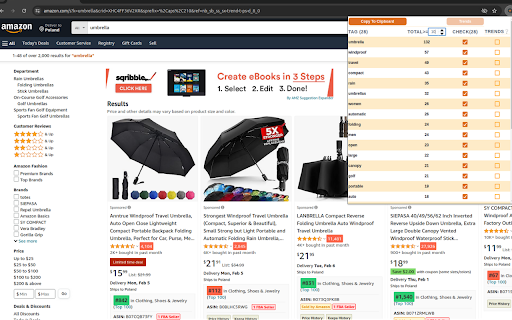
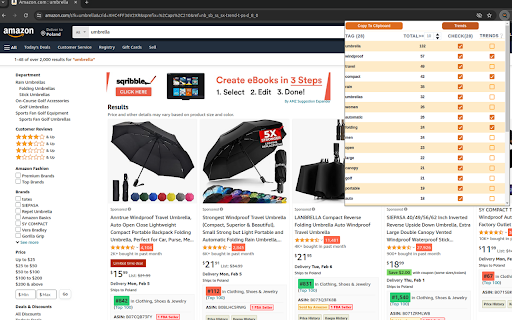
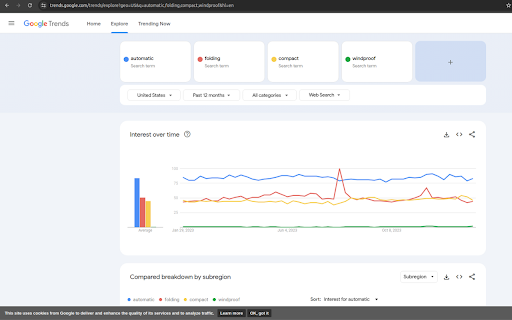
SEO Tool for Analyzing Words in Amazon Products Titles and Subtitle with Easy Checks in Google Trends Maximize Your E-Commerce Potential with Precision - Introducing a trans-formative Chrome extension designed specifically for e-commerce entrepreneurs, digital marketers, and SEO professionals. This powerful tool streamlines the process of optimizing Amazon product titles by leveraging the insights of Google Trends. In-Depth Analysis of Amazon Product Titles: Instantly evaluate the effectiveness of keywords used in Amazon product titles. Understand how these keywords perform in terms of search engine optimization (SEO) and e-commerce success. Seamless Integration with Google Trends: Directly access Google Trends data for any keyword in an Amazon product title. This feature allows you to gauge the popularity and search volume of keywords over time, aiding in strategic decision-making. User-Friendly Interface: Enjoy a clean, intuitive interface that makes SEO analysis straightforward and accessible, even for beginners. Real-Time Data Insights: Stay ahead of the competition with real-time data. Make informed decisions based on the latest keyword trends and consumer search behaviors. Competitive Analysis: Compare your product titles with competitors’ to identify areas for improvement and unique opportunities to stand out in the Amazon marketplace. Why Choose Our Extension? Boost Visibility: Enhance the discoverability of your Amazon products by optimizing titles with high-performing keywords. Data-Driven Decisions: Make smarter, data-informed decisions to increase traffic, improve conversion rates, and maximize sales. Save Time: Streamline your SEO efforts with an all-in-one tool that reduces the need for multiple platforms and manual research. Stay Competitive: Keep up with evolving market trends and consumer preferences by accessing the latest data. Empower your Amazon presence with a tool that bridges the gap between keyword analysis and market trends. Our extension is not just about analyzing words; it's about unlocking the potential of every product title. Try it today and experience the difference data-driven SEO can make!

SellerSprite - Amazon Research Tool
Join over a million sellers using SellerSprite to research, analyze, and optimize smarter — directly from your browser. Built on powerful data and AI, SellerSprite's Chrome Extension mirrors 80% of the full web app’s functionality. From product research to keyword analysis and competitor tracking, streamline your Amazon FBA business with real-time insights —all without leaving the Amazon page. In a single view, you can instantly spot high-potential products, analyze top competitors, uncover hidden keywords, and filter by sales, ratings, BSR, and more — without ever switching tabs. Key Features 📊 Deep Market Insights - Analyze subcategories with 16+ data points: demand, competition, supply/demand ratio to instantly spot high-potential niches and blue-ocean markets - Access granular BSR analytics with Top 400 rankings—track performance by parent and child ASINs, analyze variant-level sales distribution, and identify underexploited long-tail demand with precision - Customize your own product lists to batch-research trends, volume, and seasonality 🔑 Smart Keyword Tools - Discover high-converting long-tail keywords and build optimized listings - Track organic & sponsored keyword rankings in realtime - Reverse-search competitor ASINs to uncover hidden keyword strategies 🎯 Competitor Intelligence - Track BSR and sales across global sites - Detect brand infringement risks and benchmark strategies - Analyze reviews with AI and generate optimization suggestions ⚙️ Bulk Efficiency Tools - Download images, reviews, and selling points in one click - Collect ASINs and invite reviews in batches - Save hours with automation and smart scraping 💡 Why Sellers Choose SellerSprite - Feature-rich extension with 80% of full functionality — built into your browser - Real-time insights directly on Amazon pages - Trusted by over 1,400,000 Amazon sellers worldwide - Works with all major Amazon marketplaces ✅ Free to install — start exploring today! 1. Install the Extension • Download the SellerSprite Chrome Extension from the Chrome Web Store. 2. Create a Free Account • Sign up or log in. • New users get a 3 day-free trial of premium services. 3. Start Researching • Visit any Amazon product page to activate the extension. • Uncover competitor strategies, analyze product performance, and explore market trends. • Access in-depth historical data on pricing, sales, and keyword rankings to make informed decisions.

Titans Quick View - Amazon Niche Finder
Niche & Keyword Research Tool, Amazon Quick View BSR Data for Amazon KDP & MBA This Titans Amazon Quick View works on all Amazon marketplaces. This extension will help you with niche & keyword research for Amazon FBA, KDP and Merch by Amazon. TOP EXTENSION BAR DATA FEATURES: * Average Amazon BSR (Best Seller Rank) * Average BSR calculation * Average price calculation * Average reviews calculation * Keyword / Niche Score calculation * Download data option SINGLE PRODUCT BOX DATA FEATURES: * Main BSR & Sub BSR * Type of Book * Page count * Book size * Publish date You can simply click the download button, and it will create an excel file with all ASINs, Author/Seller names and all Titles for every product on the home page. You can use this for research and best of all for ads creations to target all the best sellers directly as a product campaign, a keyword campaign targeting their author name as well as the book title. This keyword niche score is an algorithm that I have been perfecting over the last year and use daily for research. It is recommend finding niches with a score of 62% and higher. This algorithm takes into account all listings on the first page and goes through how many exact product results there are, how many results on the first page, what all the prices are and the average, what the reviews are and the average, what all individual BSR are and the average and then uses all the data combined into a very thorough algorithm to determine how easy it will be to compete and rank on page 1 and what keywords to use for ads to get the best traction in rankings. You can't simply rely on just how many results and some BSR data. What is the results and BSR is good, but every book on page 1 has a TON of reviews, or MOST books have some low price that you can't really compete with, especially with no reviews and no ads... The algorithm takes everything into consideration. Imagine how much easier publishing book with Kindle Direct Publishing can become. No more guess work on Amazon search pages, no more time consuming copy & pasting, no more endless calculations. I hope this brings you lots of ease and success with your KDP Amazon journey.

Amazon ASIN Keyword Rank & Index Checker
Amazon ASIN Keyword Rank & Index Checker enhances sellers and marketers tracking of product ranking and indexing. Amazon ASIN Keyword Rank & Index Checker enhances sellers and marketers'tracking of product ranking and indexing. Do you need help getting the product index in search results? Extfy Offers an ASIN-based keyword ranking and indexing checker tool. This free ASIN-based keyword ranking and indexing checker extension shows your product's current position when searching for relevant keywords and tracks its position changes over time. This extension also checks the sponsor product listing. If you select the sponsor list, it provides you with the relevant data. Use this extension to monitor the impact of your advertising campaigns and listing optimizations on your organic ranking and consistently improve it. This extension offers three convenient methods: Single ASIN, Multiple ASIN, and Batch File Upload: Single ASIN: Using a single ASIN feature, users can easily track a specific product's keyword ranking and indexing status by entering a single ASIN. Ideal for focused insights and optimizing individual listings. Multiple ASINs: Input multiple ASINs to monitor keyword rankings across several products simultaneously. Gain accurate insights to manage and optimize various listings efficiently. Batch File Upload: For bulk keyword tracking, upload a CSV file containing multiple ASINs. A sample CSV format is provided for convenience. These features allow you to check keyword rankings in bulk quickly. Export your ranking and indexing results to Excel or CSV for further analysis and reporting. If you're worried about whether your listed product is indexed and which keywords it ranks highest for, this extension is made for you. Select your marketplace location, input the product ASIN number, and enter your desired keywords for ranking insights. That's it! This extension will provide valuable data, including the percentage indexed, average page rank, average product rank, and average competing products. Higher search results will lead to increased sales through organic, unpaid traffic. As your products increase in the search rankings, you'll attract more and better potential customers, resulting in increased traffic and higher sales figures. Explore the features of our Chrome Extension: - Multi-Marketplace Support - Track Keyword Rankings - Check Multiple keywords - Index Checker - Real-Time Updates - Sponsored Product Listing Tracking - Effortless Listing Optimization - Export Results - User-Friendly Interface Don't wait! Experience the power of data-driven success today. Try it today and unlock the potential of data-driven success. Add this extension to Chrome to your PC now. Our support team is here to help if you have any questions. You can easily reach out to our developers for guidance or clarifications. Remember to explore our comprehensive help page section for additional resources and advice.

SEO | ASO | Search Ranking & Keyword Tool
SEO & ASO optimization tool. Complete on page ASO & SEO Analysis. Find rankings, ratings & short description Play Store, Google SERP 🔍 𝗢𝗽𝘁𝗶𝗺𝗶𝘇𝗲 𝗬𝗼𝘂𝗿 𝗦𝗘𝗢 & 𝗔𝗦𝗢 𝗘𝗳𝗳𝗼𝗿𝘁𝗹𝗲𝘀𝘀𝗹𝘆 𝘄𝗶𝘁𝗵 𝗢𝘂𝗿 𝗖𝗵𝗿𝗼𝗺𝗲 𝗘𝘅𝘁𝗲𝗻𝘀𝗶𝗼𝗻! Track keywords on Google SERP and Play Store instantly. With this all-in-one SEO ranking toolbar and ASO keyword tool, you can analyze rankings, ratings, descriptions, installs, and on-page SEO in just a few clicks. Forget manual rank checks—our search ranking tool gives you real-time insights into keyword positions and competitor strategies. Perfect for marketers, developers, and SEO specialists. Analyze Title tags, Meta descriptions, and result snippets. Track indexed pages, Core Web Vitals, and SERP result count. Interlinking and outgoing link checker (Ahrefs-style attributes). One-click detailed SEO report for deep analysis. Detect gaps in page rankings Track rankings for your own site by adding a URL in config Check keyword rankings from 1 to N with installs, ratings, and character counts. Get AppVector Keyword Difficulty Score and ASO keywords suggestions. Generate keyword tables from Title and Short Description using our ASO keyword tool. Track images, videos, and review URLs. With one click, run a complete site SEO analysis: Page Speed Insights Detailed image data with missing alt text Use the search ranking tool to get: Exact SERP result count for any keyword. Live search rankings for websites across regions. All-in-one SEO ranking toolbar for on-page audits. Integrated ASO keyword tool for Play Store optimization. Smart SEO search keyword tool for competitor analysis. Accurate search ranking tool for SERP tracking. 👉 Optimize your search & app strategies with ease—download our Chrome extension today
