
bjdlhnaghjcjihjiojhpnimlmfnehbga



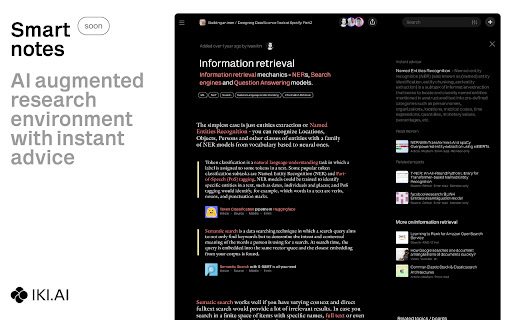
This extension provides quick saving of the links to webpages you browse to iki.ai knowledge hub. You can also save highlights (just select text and press right button - save to iki) and your notes on these materials to catch up with the core ideas later on. iki.ai is a web service designed as a knowledge hub for professionals where they can store and share important knowledge in the form of links with metadata, notes, highlights and AI generated summaries. The core functional of the service includes personal library, knowledge feed with recommended materials, community with peers, collections and search on the service index. We are working on the new features like Smart notes with instant recommendations for AI augmented research and self-organizing library with custom shelves. To start using this extension you need to register in iki.ai web service - this can be done with Google, Facebook or Linkedin profile or with an email. For now all the functional provided is free of charge.

Writeseed - Smart AI Assistant
Writeseed - Your Personal AI Assistant on Every Website Powered by ChatGPT Introducing Writeseed, the Chrome extension that brings the power of ChatGPT, your personal AI assistant, to every website you visit. Say goodbye to information overload, writer's block, and the hassle of searching for content inspiration. With Writeseed by your side, online productivity and creativity reach new heights. 1. Seamless Integration: Writeseed seamlessly integrates into your Chrome browser, instantly transforming it into a versatile writing companion on every website. Whether you're composing emails, drafting reports, or engaging with social media, Writeseed is there to enhance your writing experience. 2. Content Suggestions and Ideas: Experience the remarkable creative capabilities of ChatGPT as Writeseed generates content ideas, suggestions, and even complete sentences to kickstart your writing process. It's like having a brainstorming partner available whenever you need it. 3. Contextual Assistance: Writeseed's AI assistant is trained to understand the context of your web browsing. It offers suggestions and insights that are directly relevant to the webpage you're on, ensuring that your content is not only inspired but also tailored to the topic at hand. 4. Real-time Grammar and Spelling Checks: Never submit a typo-ridden comment or email again. Writeseed provides real-time proofreading, correcting your grammar and spelling as you type, so your online interactions are always polished and professional. 5. Research Made Easy: Need to extract information from an article or webpage? Writeseed can summarize long texts and provide concise, easy-to-understand briefs, making research and data collection a breeze. 6. Multilingual Capabilities: Writeseed is your global writing companion, offering support in multiple languages, breaking down language barriers, and empowering you to communicate effectively in any tongue. 7. User-Friendly Customization: Tailor Writeseed's assistance to your preferences. Adjust its tone, style, and level of involvement to ensure it perfectly aligns with your writing style and needs. 8. Privacy and Security: Your online privacy is paramount. Writeseed respects your data and employs robust security measures to safeguard your online interactions. With Writeseed, you'll never be alone while browsing the web. It's the ultimate AI-powered companion, offering inspiration, guidance, and support on every website you visit. Whether you're a student, professional, or content creator, Writeseed is your secret to online productivity and creativity. Elevate your online writing and communication with the power of ChatGPT and Writeseed. Say hello to a new era of effortless online interactions. Try it today, and let your words flow effortlessly on every website you explore.

Saner.AI - Capture information instantly
Saner.ai seamlessly captures, organizes information and generates insights, thus freeing up your time to focus on what's matter. We believe that information capturing should be fast & convenient. These beliefs have driven us to develop features such as: - Capture directly via a side panel note that follows you across the web - Take notes using keyboard shortcuts or with just two clicks - Quickly label notes with Auto-tag functionality - Easily show/hide notes to maintain focus flow - All notes are automatically stored in the Inbox of Saner.ai.

Chat with Desksense AI Powered by GPT4
The Ultimate AI Assistant with GPT-4 powered responses. Answers any queries, summarize articles, create emails, content & AI images. Desksense ChatGPT AI app provides Free Chat GPT & GPT-4 access, AI writer for Email, Blogs, Articles, Tweets, Linkedin posts, Facebook Posts, Replies and more. Desksense AI uses OpenAI ChatGPT to summarize Youtube videos & Blog in one-click. Desksense AI app revolutionizes your online search experience by integrating Open AI ChatGPT alongside your Google search engine. With Desksense you can access instant AI-generated responses, providing valuable insights and information right alongside the search results you're browsing. With just a CMD+ I OR CTRL+ I Desksense makes it easy for you to access the ChatGPT on any website. Use "Shortcuts" for Advanced users. 👉👉 Save ANY ChatGPT, GPT-4, Claude3 OR Genini Pro response to your Desksense Account in one-click. 👉 [New Update] Desksense comes with new Chat GPT models like; GPT-4-o-mini and other LLM's like Claude3, Gemini Pro & Llama 3version. 👉 [New Update] Desksense comes AI Image Analyzer 👉 Desksense iOS App is now live in App Store. 👉 New AI Summarizer is now live with upload file feature. 👉 AI Writer for ANY content with ChatGPT-4, GPT-4-o-mini, Claude 3 & Gemini Pro option (Emoji, character limit included with a different lanuage model.) 👉 FREE AI Chatbot integrated with ChatGPT & GPT-4 in web app 👉 Get ChatGpt AI response or replies with 'Tone' and 'Emoji' 👉 Unlimited AI response on Google Search 👉 One-click AI summarizer for Youtube videos 👉 One-click AI summarizer for ANY website 👉 ChatGPT AI Image generator using Dall-E 👉 Save ChatGPT response in your account for later use. 👉 Save your frequently used prompt(s) 👉 List of 100+ preset prompts and option to edit and save in your account. 👉 Easy Access with CMD + I OR CTRL + I on ANY website 👉 Grow your Social Media presence using Desksense AI response in LinkedIn posts, Twitter & Facebook posts. 👉 Write faster and smarter emails on Gmail, Tweets, Linkedin Posts and Facebook posts 👉 Generate online content, video script, hashtags & keywords and topics for blog posts, articles and socials using Desksense AI ChatGPT App. 👉 Share your saved response to social media using our Desksense Web App 👉 Copy to clipboard, Save, Favorite and add tags to ChatGPT responses as Card. 👉 Desksense Chat GPT & GPT 4 Android Mobile App 👉 Auto Dark/light mode 👉 Change the Tone of your response and include emoji when needed. 👉 AI Chatroom Collaboration with your Team 👉 AI Chatbot in Extension 👉 AI Content Generator - AI Email Writer, AI Article Writer using ChatGPT, GPT-4, GPT-4-o-mini, Claude3 and Gemini Pro., AI Code Generator, AI Social Media Post Generator and more... Are you a busy professional juggling multiple tasks? A student striving for academic excellence? Or someone seeking to optimize their daily routines? Look no further! Desksense is here to revolutionize your digital experience. Desksense is a powerful chrome extension that leverages the ChatGPT API to enhance your productivity. It provides a range of AI applications, including ChatGPT & GPT-4 AI chatbot, summarizers, AI writers, and more, accessible on any website. Yes, Desksense is completely free to download and use. Every free user gets 5000 Word limit for month. No, you do not require a separate ChatGPT account. Simply sign up for free at Desksense.com to access the extension. Yes, Desksense chrome extension works seamlessly in all countries, ensuring that users worldwide can benefit from its features. To install Desksense on your browser, you will need to follow these steps: 1) In your browser open the browser's app store or extension store 2) Search for the Desksense in the browser's app store or extension store (or click for : Google Chrome | Edge) 3) Click on the "Add to Browser" or "Install" button to begin the installation process. 4) Follow the prompts to give the extension permission to access certain parts of your browser, if prompted. 5) Once the installation is complete, you will be redirected to our onboarding page 6) That’s it ! you are done :) Please pin the ext. on top bar to get on-time updates. If you have any questions, please feel free to reach us at support@desksense.com === VERSION 1.0.13 ==== * NEW FEATURE: AI Writer for ANY content with newest version of GPT models (Emoji, character limit included with a different lanuage model.) * NEW FEATURE: AI Image Analyzer that analyses any image and gives you response describing the image. * File Summarizer: Upload any file & summarize in one-click * Minor Bug fixes

Marqly – The Ultimate Bookmark & Tab Manager
Marqly – The Ultimate Bookmark & Tab Manager Supercharge your browser with Marqly – a powerful, privacy-first bookmark manager and highlighter that now helps you reduce tab clutter and save up to 95% memory. Effortlessly save links, highlight text, organize bookmarks, and now collapse all your open tabs into a clean, restorable list — all in one sleek extension. 🔹 Why Marqly? Tired of messy bookmarks and tab chaos? Marqly makes it incredibly easy to: 📌 Save and organize bookmarks with tags and boards 📝 Highlight and save text snippets from any webpage 🗂 Create nested collections and custom boards 🔍 Use advanced search & filters to find anything fast 🧠 Restore memory and reduce CPU usage with OneTab-style tab saving 🚀 What You Can Do with Marqly - Save and edit websites effortlessly - Add bookmarks to customizable boards - Tag your links for powerful filtering - Search by URL, content, date, or type - Collapse all open tabs into a single list, saving up to 95% of memory - Restore tabs individually or all at once - Sync across devices securely 🆕 Latest Features 🔥 All-new Tab Saver to eliminate clutter and save memory ✨ Fresh new UI and responsive mobile layout ⭐️ Highlighted texts now auto-organized into quick-access boards 🧮 Enhanced filters and viewing controls 💡 Full-screen website preview 🖱 Drag-and-drop board reordering 💾 Nested collections 🔒 Privacy First Your data stays with you. Marqly never transmits your bookmarks, tabs, or highlights to anyone. Your tab lists are private — shared only if you choose to. Marqly is the only tool you need to take control of your web browsing — save smarter, organize better, and browse faster. ➡️ Try Marqly now and simplify your digital life.
