
bjdgkgjjlkdmcpckjimfaonoedembdbn
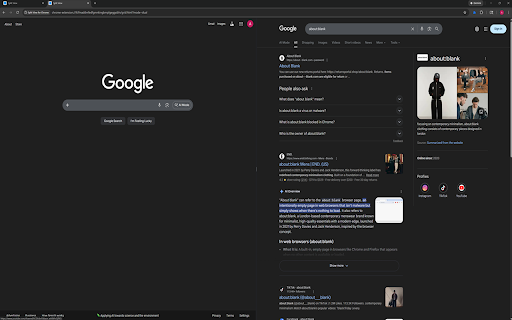


Split websites in one tab with dual, quad, or custom layouts. Resize panes, save layouts, and restore your exact setup. Dual view (2 panes), quad view (4 panes), and custom layouts (1-16 panes). Drag-resize grid splitters. Per-pane navigation controls (back, reload, URL bar). Live URL tracking — address bar updates automatically when you click links inside panes. Two close behaviors: Close and compact horizontally. Close and compact vertically. Save named layouts and reload them later. Restore Last Session — reopen your last split view exactly as it was. Dark mode and optional nav bar visibility. Quad View (4): opens a 4-pane split view. Dual View (2): opens a 2-pane split view. Custom panes (1-16) + Launch Custom Split: opens a split view with the requested pane count. Reset Split Sizes: resets splitter sizes for the active split tab. Restore Last Session: reopens your last closed split view with all URLs and layout intact. Show Nav Bar: toggles pane nav bars on/off. Dark Mode: toggles dark/light appearance. Layout name: optional name used when saving. Save Current Layout: saves current split URLs + layout geometry. Load Selected Layout: launches a saved layout. Delete Selected Layout: removes a saved layout. Back: navigates pane history backward. Reload: reloads pane URL. Address bar: enter URL or search query (press Enter). Updates automatically when you click links. Close pane (horizontal): closes pane and compacts with row-aligned panes. Close pane (vertical): closes pane and compacts with column-aligned panes.

PageVS - Super Split View for Browser
Open multiple websites in one tab, and freely customize, save, and restore your layout. 🚀 Why Choose PageVS Most Chrome split screen extensions only provide simple column layouts with very limited customization. PageVS is a powerful Chrome split screen extension that lets you freely resize, drag, and arrange multiple panes in a single tab, making your tab split screen workflow much simpler and far more flexible. 📌 Features ● 3 split modes: Vertical, Horizontal, Auto. ● Scroll Sync: keep panes scrolling together. ● Cross Pane highlight: highlight selected text across all panes. ● Freeform layout: resize and drag each pane. ● Layout bookmarks: save a layout and restore it in one click. ● Up to 36 panes per tab. ● Light mode and Dark mode. ● Reader mode (experimental): a distraction free reading view for supported pages.

Save Tabs Chrome
Organize browser with Save Tabs chrome extension. Restore chrome session in one click. Save tab groups, manage and export tabs The Save Tabs Chrome app will help you never lose your research again. This powerful tab extension protects your work, organizes research sessions, and lets you switch between different contexts instantly. Your pages are stored locally, organized into named groups, and ready to restore anytime. 🔷 Why You Need This Extension 💡 Ever lost hours of research to a browser session crash? Need to reopen chrome tabs after an unexpected restart? Our tool solves these problems and more. Whether you're managing multiple projects, conducting deep research, or simply need better organization, this tool transforms how you work with browser. 🔷 Core Features 1️⃣ Instant Saving. Click once and your entire browser session is captured – titles, URLs, and exact order preserved in milliseconds. The save tabs chrome extension works faster than bookmarking and keeps everything organized. 2️⃣ Smart Organization. Create unlimited collections for different contexts. Group tabs chrome by project, topic, or purpose. Keep "Monday Research," "Client Work," and "Weekend Reading" separate and accessible. 3️⃣ Quick Restore. Our chrome session saver lets you restore browsing session with a single click. Open entire groups or cherry-pick individual pages. Everything reopens in the original order, so you pick up exactly where you stopped. 4️⃣ Powerful Search. Search tabs across all collections instantly. Find anything by title, URL, or group name, even if you forgot where you stored it. 5️⃣ Selective Control. Don't want to save all tabs chrome? Select specific pages and capture only what matters. You control what stored and what doesn't. 6️⃣ Multi-Window Support. Working across multiple browser windows? No problem. This Save Tabs Chrome tool opens across all windows and keeps your multi-window workflows organized effortlessly. 7️⃣ Export & Backup. Export any collection to CSV format. Save tab groups to cloud storage, email to colleagues, or transfer between computers. Your data stays portable and shareable. 8️⃣ Offline Ready. Full functionality without internet. The extension Save tabs chrome locally uses storage API. Lightweight design won't slow your browser down. 🔷 How It Works ✓ Saving Process: Click the toolbar icon. Done – everything is stored and searchable ✓ Restoring Process: Browse your collections. Click to restore chrome session instantly Continue from exactly where you left off 🔷 Real-World Solutions ▶️ Research Management. Collecting information over days or weeks? Save tabs in chrome as you find them. Add more tomorrow. Your research survives crashes, restarts, and accidental closures. ▶️ Context Switching Made Easy. Stop manually reopening everything when switching between work and personal projects. The save tabs chrome app lets you transition instantly. Each workspace stays preserved and ready. ▶️ Crash Protection Computer froze? Unexpected update? Battery died during presentation? Your collections remain safe. Tab save functionality ensures nothing is ever truly lost. ▶️ Shared Computer Solution. Family needs the computer? Save and close tabs - Chrome makes it easy with our extension, let others use the browser, then restore everything when you return. Your workspace stays private and recoverable. ▶️ Reading List Control. Stop keeping 20+ "read later" pages open forever. Keep articles in collections, read when ready, keep your browser running smoothly. ▶️ Long-Term Projects. Managing multiple topics simultaneously? This Chrome save tabs tool keeps everything organized by purpose. "Client Meeting Prep," "Q4 Report Research," "Technical Documentation" – each context preserved separately. 🔷 Privacy Commitment Your data stays on your device. We use local storage only. No external servers, no tracking, no analytics, no data selling. When you save browser session data, it stays yours completely. 🔷 How to save tabs in chrome Getting started is simple. Install the extension, click the icon, and your first collection is created. Name it something memorable. From there, you can create unlimited collections for different purposes. 🔷 Coming Soon ⭐ Auto-Backup. Scheduled automatic exports protect against data loss. Set it once, forget about it forever. ⭐ Cross-Device Sync. Access collections from any computer. Seamless synchronization across all devices makes the save tabs chrome app even more powerful. ⭐ Share via Link. Generate shareable links for collections. Send resources to teammates without file attachments. Perfect for collaborative research. 🔷 Why Not Regular Bookmarks? Bookmarks pile up endlessly without context. They lose their original purpose. This tool organizes by intent and preserves your complete working environment. You restore entire workspaces, not just individual pages. 🔷 Get Started Today Your browser deserves better management. Download the chrome tab saver extension today and transform how you handle work forever.

SplitPilot - Split Screen for Chrome
Open two websites side by side in one tab. Multitask faster with a clean split-screen for Google Chrome. Boost your productivity with SplitPilot, the Chrome extension that lets you open two websites side by side in a single tab. No more switching back and forth between tabs. ✨ Features • Open any two websites in one tab, side by side • Right-click a link and open it directly in split view • Drag the separator to resize panels • Swap, refresh, pop out, or close either side independently • Choose horizontal or vertical layout • Light and dark themes for a personalized experience • Saves your layout and theme preferences automatically 💡 Perfect for • Comparing AI tools (ChatGPT, Gemini, Claude, etc.) • Watching videos while browsing another site • Researching with notes open side by side • News and work dashboards 📂 Stay organized and boost productivity with a simple, lightweight tab manager that gives you a smarter way to browse. 👉 Work smarter. Split your tabs. Disclaimer: SplitPilot is an independent extension and is not affiliated with or endorsed by Google.

SnapzBack Layout Manager - Windows & Tabs
Boosts your productivity by saving and restoring your Chrome window layouts and switching between them with a click. Boosts your productivity by saving and restoring your Chrome window layouts and switching between them with a click. SnapzBack is the perfect productivity tool to manage your browser workspace. Save the positions, sizes, and open tabs of your Chrome windows, making it easy to handle multiple layouts. Restore your setups quickly and create different window arrangements for your tasks or projects. With solid support for multiple tabs and monitors, SnapzBack takes your browsing to the next level. The Smart Restore feature lets you automatically restore your favorite layouts on Chrome startup or via keyboard shortcuts. Your layout data is stored locally on your device, keeping it secure and private. Use backup import/export to transfer, send, or back up your data easily. Got feature ideas or suggestions? Instead of leaving them in reviews, drop us an email at info@webective.com. We’d love to hear your thoughts and make SnapzBack even better!
