
biohjdkjclhempinkjfnjenpldjnkcfn

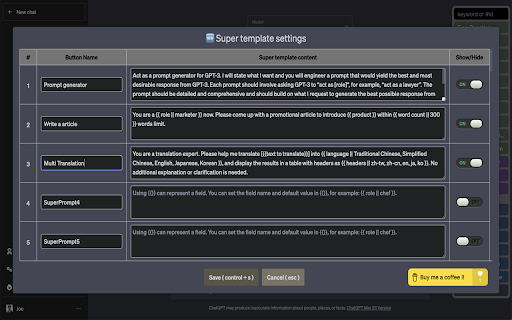

This tool improves efficiency when conversing with ChatGPT by providing templates, quick replies, and shortcut functions. The main features are: - Support Gemini - Support Claude - Support Grok - Provide 10 question templates for users to quickly create questions. - Provide customizable settings window for users to freely design the format of questions. - Provide 1000 sets of super templates, allowing for more flexible creation of question templates. - Super Template Supports Input , Dropdowns, Checkboxes, Radio Button - Provide 100 sets of custom quick reply buttons for users to freely design the content of quick replies. - Use tab and tab + shift for quick switching between fields. - Support Dark Mode to make users comfortable to use in low-light environments. - Export the configuration file and share your designed question templates and quick reply text with friends. If you like this tool, please encourage us through the following link: https://www.buymeacoffee.com/Joe.lin Please note that this tool only provides assistance in conversation and shortcut functions and does not include the use of ChatGPT Plus To use ChatGPT Plus, please visit the official website to subscribe.

Chatgpt Prompt Helper
Chatgpt prompt, help you ask more efficiently This Browser extension is going to prower chatGPT with awesome chatgpt prompt helper with other helpful features. features 1. prompt managements(save/edit/delete) 2. prompt with built in libs 3. screenshot (support batch combine multiple conversions)

Felo Search Toolkit
Enhances your Felo Search experience with shortcuts and quick access buttons for the Felo Search website. Enhance the user experience of the Felo Search website. Currently, it adds some shortcut key functions to the Felo Search website ( https://felo.ai ), and more UX-enhancing features may be added in the future. More useful features will be released in the future, and we welcome everyone to provide ideas and suggestions. 1. Click the extension's icon to directly open the Felo Search website. 2. On any page, right-click to select "Use Felo Search to summarize this page" from the context menu to automatically summarize the entire webpage. - Quickly toggle the sidebar - Press Ctrl+b to quickly toggle the sidebar - Quick page navigation - Press Escape to quickly return to the homepage - Press t to jump to the Topic Collections page - Press c to click the Create topic button within the Topic Collections page - Press / or Alt+/ to jump to the History page - Press j or Alt+j to jump to the next history record - Press k or Alt+k to jump to the previous history record - Thread keyboard operation optimization - Press s or Alt+s to quickly share the current thread - Press Ctrl+Delete to quickly delete the current thread - Input field operation optimization - Press Escape to clear the input field - If on the history page and the input field is empty, press Escape to go back to the previous page - Zen Mode - Press f to enter Zen Mode (similar to a full-screen display)

NotebookLM Toolkit
Enhance your NotebookLM web experience with keyboard shortcuts, enhanced buttons, and quick access to NotebookLM. - Mind Map - Provide a "Clone" button that, when clicked, can copy the text of all expanded nodes in Markdown format. - Notes - Adds a button on the NotebookLM notes page to quickly copy the complete note content. - Custom Audio Summary Prompt Saving - Automatically saves prompt content you enter in custom audio summaries - Right-click the extension icon and select "Custom Audio Summary Prompt History" to view saved prompts - Supports prompt management: view, expand/collapse, and delete functions - Prevents duplicate saves, automatically manages the most recent 50 prompts

Gemini EDU Prompt Assistant (TW)
備註:此擴充會需要使用Google AI Studio API設定,請自行至Google AI Studio取得 --- Gemini Prompt Assistant for Education This Chrome extension serves as an assistant specifically designed to help educators and students leverage Gemini more effectively in an educational setting. It streamlines the process of crafting and managing prompts with the following features: 1️⃣ Prompt Templates: Allows users to instantly populate the prompt field with a single click of a button. 2️⃣ Manual Prompt Storage: Users can navigate to a "Custom" section within the extension to manually add, edit, and save their own frequently used prompts. 3️⃣ AI-Powered Prompt Optimization (PARTS Principles): When adding a new custom prompt, users can utilize a built-in AI function to analyze and refine it. 4️⃣ 'Gems' Instruction Optimization (Markdown Syntax): This feature (also available when adding new prompts) uses AI to specifically optimize instructions intended for "Gems" (custom versions of Gemini). Important Note (備註) Requires Google AI Studio API Key: Please be aware that this extension requires an API key from Google AI Studio to function. You must go to the Google AI Studio website to obtain your own personal API key and configure it within the extension's settings.
