
biindgchnmnggjbfibclcafabgkaebpa
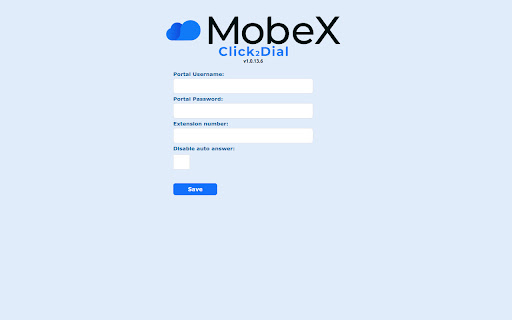
MobeX Click2Dial Chrome extension. Transform phone numbers into clickable links and initiate calls from MobeX! The MobeX Click2Dial Chrome extension automatically detects phone numbers on any webpage or application and converts them into clickable links for easy dialling, saving valuable time with a click to call feature. With this extension, you can initiate calls with a simple one-click action, accompanied by a phone icon next to each number. To get started, download the extension and enter your portal username, password, and extension number. Click "Save," then restart Chrome. After this, phone numbers on supported sites will be displayed as clickable links. Important: A MobeX license is required to use MobeX Click2Dial, so ensure you have an account with a provider that supports MobeX.

BitCally
Dialpad extension to originate calls for xcally webrtc and phonebar Bitcally is the extension working with the XCALLY customer care suite: it allows your contact center agents to Click and Dial any formatted phone number detected inside your Google Chrome browser! It is simple and fast to use: just install the Bitcally extension and you will be able to dial any numbers available inside your browser with a simple Click. The phone numbers can be the Contacts inside your CRM, Ticketing system or any kind of Web page your call center agents manage. The configuration is easy: 1. In case your agents use the XCALLY Phone bar: just install Bitcally for Chrome and they can start working with it immediatelly 2. In case your agents use external SIP phones: install Bitcally for Chrome, click on OPTIONS inside the Chrome bar extension icon and setup: - Select "Other SIP clients" - URL: the XCALLY server http://IP address - The xCALLY agent USERNAME - SAVE and you are done! - The agent username Insert a prefix in case you want to automatically add a prefix for each dialed extension.

Australian Phone (tel:) Linker
Find Australian phone numbers on websites and turn them into links (tel:). Having phone numbers on websites that you have top copy and paste can time consuming, especially if it's something you need to do 10's or 100's of times a day. And existing solutions have a hard time working with Australian phone numbers. This extension scans web pages you visit for Australian phone numbers and automatically turns them into clickable (tel:) links, making it easier to initiate calls directly from your browser. Specifically designed for you're browsing business directories, client websites, or internal portals. ✅ Detects standard Australian phone number formats ✅ Automatically adds tel: links ✅ Lightweight and runs seamlessly in the background ✅ Great for sales teams, support staff, and anyone who makes frequent calls Streamline your workflow and click to call with ease. NOTE: This is still early access, so any feedback is encouraged. Also, this extension doesn't make calls, it only turns phone numbers into clickable links, so it is easier to integrate with your existing phone provider.

ClikDial
Initiate calls from your web browser to your mobile device. This extension allows you to select any number on the browser and call as well as send whatsapp message to that number by right clicking and selecting option to call using ClikDial. Registration and login is required to initiate call from user's mobile device. There is no need to type the number or key in the mobile. Also, user can setup to have hands free call, even when user's mobile is locked as well. You get a beep when the call is initiated from the mobile. If you have dual SIM card, you might have to select the SIM when call gets initiated after the beep sound(unlocking the phone is required).

Click to Call VZ
Operation of the Extension: Number Selection and Web Calls: The main functionality of the extension is to allow users to select phone numbers directly from the web and make calls to those numbers from their desk phone. This is achieved through a contextual menu that is activated when selecting text on a web page or by selecting text and pressing the Alt+C shortcut. Custom Context Menu and Shortcut: Upon installing the extension, a contextual menu option (right-click) called "CallVZ" is added. When the user selects a phone number on a web page and right-clicks, they can choose this option to initiate a call. The same function can also be performed when the user selects a phone number on a web page and uses the Alt+C shortcut; it also initiates the call. Number Cleaning and Formatting: When selecting a number, the extension automatically cleans and formats the phone number, removing non-numeric characters, which is crucial to ensure that the number is valid for making calls. Integration with Call Service: The extension uses a locally stored URL (configurable in the extension's popup window) to integrate with a call service, presumably a system like FreePBX. When a number is selected, the extension creates a popup window (not visible to the user) that initiates a call through this service. Customizable Settings: Users can input and save the IP address of the phone system and their desired extension number through the extension's user interface, allowing for customization to meet their specific needs. Reasons to Install the Extension: Convenience in Phone Calls: For users who frequently need to make calls to numbers found on the web, this extension simplifies the process, eliminating the need for manual copying, pasting, or dialing. Improved Efficiency: By automating part of the dialing process, users can save time and reduce errors, especially in work environments where many phone numbers are handled. Personalization and Flexibility: The ability to configure the IP address and extension number gives users significant control and flexibility to adapt to different phone systems. Ease of Use: The simple user interface and seamless integration with the Chrome browser make it easy to use, even for those who are not technically proficient. Enhanced Productivity in Professional Environments: In business or office environments where phone calls are frequent, this extension can be a valuable tool for improving productivity and efficiency. Conclusion: "Click to Call VZ" is a useful extension for users looking for a quick and efficient way to make phone calls from their browser. Its ease of use, along with the customization and efficiency it offers, make it valuable for professionals and businesses that handle a high volume of phone calls.
