
bibbfboplacbgnobiebieficdenamhmd


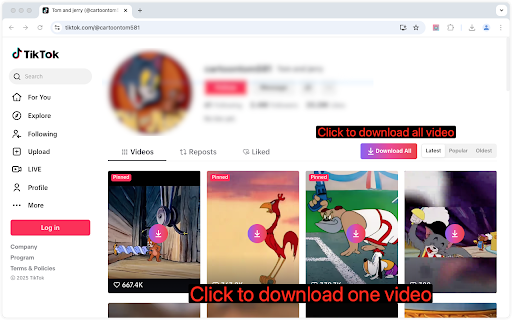
Easily download high-quality Short videos with one click – no watermarks, no hassle! 🚀 Easily save videos from supported websites with this all-in-one Chrome extension! ⚡ One-Click Save: Quickly save media from web pages with a single click. 📂 Smart Detection: Automatically detect downloadable media resources on supported pages. 🌐 Translate Instantly: One click to translate descriptions or comments. 💡 Simple & Fast: Clean interface with smooth user experience. 💧 No Watermark: Save Short videos in crystal-clear quality, watermark-free! 1⃣ Open a webpage containing video or media content. 2⃣ Click the download button to download short videos. 3⃣ Click Download All button to download Short videos from a user’s profile. 4⃣ Click the translate button to translate comment and post. ⚠ Disclaimer: This extension is not affiliated with or endorsed by any third-party platforms. Users are responsible for ensuring their use complies with applicable terms of service and copyright laws.

Video Downloader Plus
Download and save videos from any website instantly. A fast, simple video downloader that just works. Video Downloader Plus detects videos as you browse and lets you save them in a few clicks. It picks up HLS, DASH, and MP4 streams the moment they load — no searching, no pasting links, no extra steps. 1. Visit any page with playable media 2. The icon lights up when something is found 3. Click it, choose your quality and format 4. Save to your device or upload to cloud storage WHAT YOU GET • Stream Detection — A smart video downloader that goes beyond direct file links. It captures adaptive HLS and DASH streams that basic tools miss entirely. • Up to 8K Quality — Whatever resolution the site offers, you can grab it. 720p, 1080p, 4K, and even 8K. • Audio + Video Merge — Some sites deliver audio and video separately. This video downloader combines them into one file automatically, ready to play. • Format Conversion — Convert to popular formats like MP4 or extract just the audio track. Multiple output options available. • Chromecast & AirPlay — Cast what you find to your TV directly from the browser. • Cloud Storage — Connect your preferred cloud provider and send files straight to the cloud. • Video Library — Save videos to your list and come back to them later. Syncs across devices when you are signed in. • Live Recording — Record live streams as they happen, before they disappear. • Filter by minimum file size to skip tiny clips and ad prerolls • Pick which formats to watch for • Block specific sites from detection • Set a preferred folder for all saves • Dark mode, light mode, or match your system • Badge style: video count or a simple dot FREE AND PREMIUM The free plan includes unlimited standard-quality saves and a daily allowance for HLS and DASH. Premium unlocks unlimited resolution, cloud uploads, format conversion, and priority support for users who need more from their video downloader. Choose monthly, yearly, or pay once with the lifetime option. Any site that delivers media over HLS, DASH, or plain HTTP is supported — news, education, social media, embedded players, and thousands more. Available in 59 languages. This video downloader does not support YouTube. Chrome Web Store rules do not allow it, and we follow those rules. Everything else that uses standard streaming is fair game.

Loom video downloader
Easily download any Loom video for free on any website! ⬇️ How to download a Loom video with this extension? Simply visit the page which contains the video, and once it's fully loaded, a download icon will appear in the corner of the video frame (might take a few seconds to show). Click the icon. The video will start downloading immediately. This extension enables you to: - download Skool lesson videos that are hosted on Loom - download Loom videos embedded on any website - download Loom videos shared with you (direct Loom link) If you face any issue, contact me by clicking on the extension icon in Chrome and select "Report an issue". We welcome any suggestion & feature ideas that can improve this extension.

Twitter Downloader - Twitter Video Downloader
Download Twitter videos effortlessly with Twitter Downloader. Save your favorite clips, moments, and content in just a few clicks. Twitter Downloader - Twitter Video Download: Easily Save Your Memorable Moments This powerful tool allows you to easily download any video from Twitter, whether it's a funny clip, a memorable moment, or educational material, all with one click and save it locally for viewing anytime, anywhere. Through our plugin, you can freely save various content for personal or academic use. We recommend that users do not download copyrighted content without permission. ☑️ One-Click Download, Convenient and Fast: No complicated operations, just click the "Download" icon in the bottom right corner of the video to quickly save the video. ☑️ Support for Multiple Formats:Supports downloading videos in various formats such as MP4, WebM, etc., to meet your different needs. ☑️ High-Definition Quality, Original Taste: The downloaded videos retain the original quality, allowing you to enjoy the best viewing experience. ☑️ Safe and Reliable, Privacy Guaranteed: We are committed to protecting your privacy, all download operations are completed locally, and your personal information will not be leaked. ☑️ No Password or API Required: Simplifies the user experience, no additional information needs to be entered to start downloading. ☑️ 24/7 Support: Provides technical support 24/7 to solve your usage issues. 1. Open the Twitter website or app, find the video you want to download. 2. Click the "Download" icon in the bottom right corner of the video. 3. Select the save location, and the download will start. 📝Disclaimer: This plugin is independently developed and is not associated with the official Twitter app or website. Please ensure compliance with relevant laws and regulations before use.

Telegram Video Downloader - TVDownloader
Telegram Content downloader: Restricted videos/images with a single click. (Telegram Movie Downloader) Telegram Video Downloader fully supports one-click downloads of Telegram videos (movies, audio) and more. You can watch saved Telegram videos (movies) offline anytime, anywhere on your PC or mobile device. 🚀 Key Features: 1. One-Click Download: With just one step, TG Video Downloader automatically downloads Telegram videos, images, or audio 2. High-Speed Download: Supports high-speed, unlimited downloads of content from Telegram public channels and private groups 3. Original File Titles: Preserves original file titles, making it easy for you to identify downloaded media content 4. Multi-Format Support: Compatible with various media formats supported by web.telegram.org/a and web.telegram.org/k, including MP4, MKV, FLV, and more 5. Restricted Content: Suitable for downloading restricted videos, series, , audio, photos, etc. on Telegram 6. Privacy Protection: No data collection, no password required, ensuring your privacy and security 7. Cross-Platform Support: Supports all operating systems 8. Instant Download: No need to search or input video links, or download bot, supports instant downloading 9. Free to Use: Free to use after installing the TG Video Downloader plugin 10.Batch Download: Upcoming feature for easy downloading of multiple files (Stay tuned!) 📥User Guide: How to Download Telegram Videos/Images/Audio? 1. Activate: For first-time use, please activate the plugin's download function. You can turn it off when not in use 2. Download: Simply click the download icon at the bottom right of the video/image message to complete the automatic download 3. View: Click on the download history in the upper right corner of the browser to view the downloaded video content 🔒Disclaimer: All features are developed and maintained by independent third-party developers. We strongly recommend that you comply with legal requirements and use the tool responsibly. Use TVD Telegram Video Downloader to make downloading Telegram videos easier and more efficient than ever. Download now and experience it for yourself!
