
bhnchphfhbkgieljecbphalgampfiehh
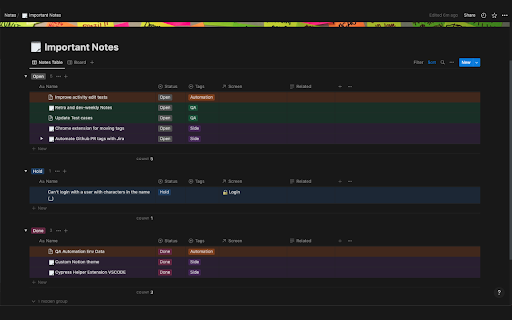


This extension adds colors to Notion tables based on the tags you specify.

Dictionary to Notion
Saving Dicionary vocabularies to Notion, now supporting Oxford Learner's Dictionary and Cambridge Dictionary! New Updates! (patch 0.6.2) ! 1. Added International Phonetic Alphabet on/off feature (for old users, you have to add a "Phonetic Alphabet" column to your database 2. Added US/UK pronunciation feature (default to US pronunciation, can be changed in the settings) 3. Fixed bugs This plugin allows you to send Vocabulary data to your own Notion account. (Currently supporting Oxford Learner's Dictionary and Cambridge Dictionary!) Setup: 1. Create an Notion Integration: [Notion's guide on how to create an integration](https://www.notion.so/help/create-integrations-with-the-notion-api) 2. Copy the Internal Integration Secret 3. Duplicate this database to your own Notion: https://electric-mice-3d7.notion.site/Vocabularies-5808944f5d7846eb8a72a148aef42052?pvs=4 4. Add the Notion Integration into your duplicated database: [Notion's guide on how to connect your integrations](https://www.notion.so/help/add-and-manage-connections-with-the-api#add-connections-to-pages) 5. Find the database ID: [Notion's guide on how to find the database ID](https://developers.notion.com/reference/retrieve-a-database) You could copy the link to view and find the Database ID. 6. Click on the settings Icon and navigate to the settings dashboard, on the left hand side you will find the settings tab, enter your KEY and Database ID 7. You're good to go!

Notion Card
Notion Card is a Chrome extension that converts Notion content into card images, perfect for publishing online. One-click generation: Easily and quickly convert Notion content into card images. Visual optimization: Automatically adjust content layout for better social media presentation. High-quality output: Produce high-definition, vibrant card images for optimal visual impact. User-friendly: Simple and intuitive interface design, no design experience required. Use Cases: Self-media publishing: Enhance the visual appeal of your articles and posts to attract more attention. Content marketing: Create professional visual displays for your brand content to strengthen brand image. Knowledge sharing: Organize knowledge points and information into beautiful card images for easier dissemination and retention.

Notion Charts
A simple chart plugin for Notion, powered by Mermaid. Introduction This extension uses Mermaid syntax, providing convenience for Notion users to easily insert various charts and diagrams in the document. Instructions 1. Switch between different tabs in the extension page to view different types of charts. Click the copy button in the upper right corner of the chart. 2. In Notion, paste at the position where the charts or diagrams need to be inserted. 3. Switch the code block language in the upper left corner to Mermaid, and use Split mode to display both code and chart. We will continue to optimize and update this extension. If you have any questions and enquiries for optimizations, please click the button on the upper right corner of the extension to join our Slack channel.

Notion Tools
Make your Notion experience a little bit better with some QOL including colored headings, folded sidebar buttons and more. This extension provides a group of options that aim to improve your experience with the Notion website. These include: + ⭐ Automatically highlighting every heading across all your Notions. + 🔥 Having more vertical space in the sidebar by folding the "Search", "Inbox", and "Settings" buttons into horizontally lined icons (the notification counter also works). + Additional headings indication by adding # symbol at the end of it. + More horizontal space for your database board view. + Slightly more vertical space on page by reduced margin above it icon/name. + Ability to hide "invite members" button from sidebar. Every option can be disabled, if you want. I will continue adding more features over time. Hope you like it! ♥ UPDATE 1.2.2 - Added support for dark theme.
