
bhhinkiejikaoegbkfghkchkfekbkbic

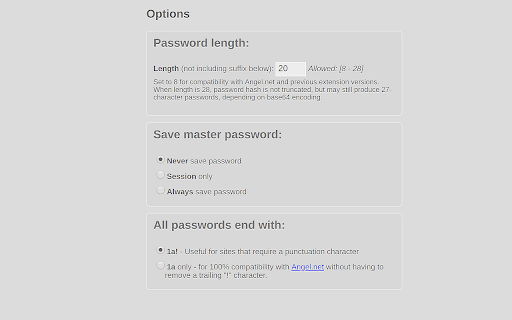
Remember a single password to generate repeatable, secure passwords for multiple sites. Extension adds a 'save' button to store the master password (optionally), and will try to pre-fill the site name with the current site's root domain name. Last three characters of password will always be "1a!" for sites that require a combination of letters, numbers and/or punctuation. (new) Optionally, they can be set to "1a" for compatibility with angel.net. *CHANGELOG* Version 0.3.0 (20-02-2025) + Updated for manifest version 3 + Use chrome local and session storage APIs over localstorage and sessionstorage + Use web APIs for SHA digest and base64 encoding + Add support for longer passwords + Support SHA-1, SHA-256, SHA-384, and SHA-512 Version 0.2.0 (03-20-2018) + Adding option for longer (up to 27/28 character passwords, before adding extra characters). + Recognize .io domains when stripping subdomains + Upgrade manifest version to support chrome 67 Version 0.1.3.6 (04-21-2010) +Fixed options page settings not being saved Version 0.1.3.5 (03-11-2010) +Adding options page and session storage option +Removed 'save' checkbox from popup +Added compatibility option with angel .net (passwords end in '1a!' vs '1a') +Improved domain name parser +Better button style Version 0.1.3.2 (12-12-2009) +Added default_title Version 0.1.3.1 (08-12-2009) +Rounding popup corners Version 0.1.3.0 (29-11-2009) +Automatically copy generated password to clipboard

TweakSync
TweakSync lets you style web elements in real-time from Chrome and sync changes with VS Code for a smooth development experience. TweakSync is a powerful tool designed for front-end developers and web designers who want to streamline their styling workflow. This Chrome extension enables real-time styling of web elements directly within Chrome, allowing you to see changes instantly as you tweak styles. Real-Time Styling: Easily select any element on a webpage and adjust its styles on the fly. With live previews, you can see the impact of your changes immediately, making the styling process more efficient and intuitive. Seamless Integration with VS Code: TweakSync syncs your style changes directly with your VS Code environment. This integration allows you to apply and save your CSS changes effortlessly, ensuring that your development process remains smooth and uninterrupted. Efficient Workflow: By bridging the gap between your browser and your code editor, TweakSync eliminates the need to switch back and forth between tools. This results in a more streamlined workflow, saving you time and effort. Boost Your Efficiency: Save time with instant style updates and seamless integration with VS Code. TweakSync helps you make changes faster and more accurately. Improve Your Design Process: Experience a smoother design workflow with live previews and direct synchronization between Chrome and VS Code. Streamline Your Development: Minimize context-switching and keep your development process focused with TweakSync is real-time styling and VS Code integration.

The Big Gift List
Easily add items to your 'The Big Gift List' lists Help friends and family take the guesswork out of buying you gifts with The Big Gift List. When it comes to a birthday, Christmas, wedding or any other special occasion, with your gift list you can show your friends and family what you really want, so they don't need to guess. Use the official browser extension to add items to your gift lists directly from any website.

Michael's Upgrade for TrakED
Upgraded features for TrakED in the THS. (This extension is not an official product of the THS or Intersystems TrakCare software.) Upgraded features for Trak ED in the LGH. Features: - Re-enable spell check in the triage page - Use the enter key when logging in - Handover sheet for ED Main Floor and EMU - ED Main Floor filters and persistent sort - Triage Summary print out - Filter and count results of an enquiry - Count patients currently breaching length of stay targets -- This extension is not an official product of the LGH or InterSystems Trak software.

Avatier Universal UI
Modernize your digital workforce with Avatier for Chrome. Discover a breakthrough seamless collaborative self-service IT experience and automation for the entire enterprise without compromising privacy and security using Chrome. Get more done with the Chrome and Avatier Now more simple, secure, and faster than ever - with Google’s smarts built-in. Utilizing the Avatier for Chrome extension allows users to customize their browser experience. Introducing Avatier for Chrome which integrates with the leading MFA solutions in the industry to provide a true-passwordless secure Identity Management experience. Leverage Avatier OTP SMS/Email or phoneless MFA, Duo Security, Google Authenticator, Okta Verify, Ping Identity, Radius, RSA SecureID, Symantec VIP, and many other FIDO2 WebAuthn compliant solutions. Discover all you can do with Avatier for Chrome: * Single Sign-on for Chrome. Modern SSO solutions need to support a diverse workforce with a choice of how and where they would like to securely consume cloud access. Avatier for Chrome Extension enables access when your workforce needs it the most while surfing the web. With Just-in-Time (JIT) cloud app user provisioning/deprovisioning it has never been easier to onboard your workforce across your cloud applications. * Self-Service Group Management for Chrome. Microsoft/Azure group membership is paramount as it controls your role in the company, access to files, and even cloud application access via leading SSO solutions like Avatier. Avatier for Chrome allows self-service group membership requests with push notification for workflow approval. Now you can request creation, deletion, renaming and even group ownership conveniently using Chrome. * Certification Campaigns for Chrome. Verifying workforce granular access has never been this easy. Avatier for Chrome ensures access governance is continuously being met by empowering managers to approve, deny, allow an exception, or re-assign certifications to a co-worker. * Universal Workflow Approval for Chrome. Push notification instantly alerts you to urgent matters that require your attention. Using Chrome with Avatier don't ever miss an important workforce request for roles, access, assets, or even generic change control. Approve/Deny ServiceNow and Workdays using Avatier's Universal Workflow Platform(TM). * User Management for Chrome. Never panic when its time to disable or delete user access. Avatier for Chrome you can request disabling user access now and schedule deleting the user later. * Self-Service Password Management for Chrome. Your workforce needs self-service password reset and synchronization without requiring an expensive call the help desk. Your service desk needs a secure friendly assisted password reset form anywhere. Avatier for Chrome gives your workforce the seamless ability to perform these actions wherever they are by securely authenticating with a variety of flexible authentication MFA options. Avatier's Password Policy Manager will also ensure that your password meets the enterprise password policy and maintain strong passwords across all systems. Achieve more together with Avatier for Chrome. If you are ready to see Avatier for Chrome in action we are offering an exclusive FREE trial to qualified organizations. Schedule yours today: https://calendly.com/avatier-cloudtrial/avatier-for-chrome-kickoff-meeting?month=2020-06
