
bgoiennlbkgepofbpmfhijjaiimipckd


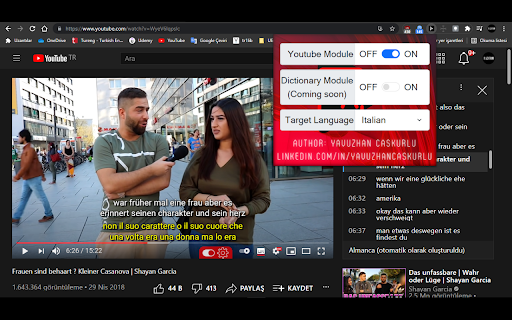
Select your native language from extension configuration and start to learn language with the content you surf on youtube For now, this application only aims to instantly translate the words in the video subtitles being watched on YouTube, and to display a translated subtitle as a secondary subtitle depending on user preference. Some parts of the extension (DICTIONARY module and LOGIN module) do NOT work yet. They will be added soon. However, the FOLLOWING FEATURES are AVAILABLE in the application. -------------------------------------------------------------------------------------------------------------------- TRANSLATION TO ALL LANGUAGES -Regardless of your native language, you can choose the language you want from the extension configurations and translate to that language. INDEPENDENT OF VIDEO LANGUAGE -Whatever the language of the video, the language of the video is automatically detected and translated from that language. NO NEED FOR SPECIALLY CRAFTED SUBTITLES -The extension doesn't need custom subtitles made by other people to work. It can work with both subtitle and closed captions(auto generated by youtube). *Important* The video being watched must have at least one subtitle or closed caption for this extension to work properly. INSTANT TRANSLATION -You can translate instantly by moving your mouse over the word you want in the subtitles displayed by the extension on YouTube. DUAL SUBTITLES -On YouTube with double subtitles, you can see both the translation and the original dialogue at the same time and compare them. If you want to don not see secondary subtitle, you can turn off this feature from extension configurations. CONFIGURABLE FONT SIZE -You can resize font sizes of primary and secondary subtitles from extension configurations. CONFIGURABLE FONT COLOR -You can recolor fonts of primary and secondary subtitles from extension configurations. AUTO-RESIZE FOR SUBTITLES -Dynamically updating font-size according to your interface size and fullscreen changes. AUTO-PAUSE -We prevented you from missing a scene by automatically pausing when a word is translated in the subtitles displayed by the extension on YouTube. SUBTITLES IN THE SIDEBAR -You can view the entire dialogue on YouTube and quickly jump to the sentence you want. ------------------------------------------------------------------------------------------------------------ Coming Soon (The features listed here are currently NOT working) -Dictionary Module -Login system (for dictionary module synchronization via google)

LangMagic
Learn languages with Youtube subtitles & ChatGPT This is as close as it gets to having a language teacher around most of the time. Select a phrase you want to learn and access dictionary, explanations, examples in context, teacher's notes and more. Save words and phrases and then use every spare minute of time when on the move on a mobile device. The app will send you short stories with phrases you saved. The most natural and efficient way to learn a language: from a context.

Simplilearn Subtitles translate
translate and display texts in complete sentences and choose to show the English translation with your original language The program offers a service to users of the simpleearn website. Captures the subtitle file and reviews it. And the user has to press the right button of the mouse and choose the translation by Google and choose the appropriate language for him. And then it is adopted in the video. Program Advantages: 1) Sub-translation. 2) The original sub-translation with the target language. 3) Review the text in sentences. 4) Windows with focus and without focus. 5 ) Specify the font size when browsing the text. 6) Compare and review the original subtitle file with the target language. 7) You can now specify the position of subtitles on the video. New Features 8) Add text sync with popup. 9) Add navigation control when syncing text. 10) Control the number of characters in subtitles per line. 11) Download translated text and original text. 12) Navigate to the subtitle location in the video from the pop-up window by double-clicking on the text. This program is designed for everyone who struggles with learning due to language barrier. The program is paid. But if you don't have money, no problem, consider it a gift for you.

Search by Subtitles/CC for Youtube™
Search for videos on Youtube™ by Subtitles/CC in a specified language. Step 1: Search anything on Youtube Step 2: Select subtitles language (next to the filter button) Step 3: Click "Start filtering" Note: - Once you select the language, the extension remembers it and highlights all video thumbnails that have CC in that language, anywhere on youtube. - Every CC badge on a video (if existing) contains a list of all available languages with an option to download each.

EasySubs – Learn languages by watching films and series
Customizable subtitles and a popup dictionary to master your vocabulary while watching YouTube or Netflix. Open-source and free. Improve your language skills by watching TV shows and movies with subtitles. Enjoy seamless experience – point over a word to get it translated, the video playback will be automatically paused. You can even translate the whole phrase by clicking on it. Do you have a subtitle file in your native language? Upload it and easily sync it with the video if needed. – TRANSLATION: Hover over or click on subtitles for single-word or full-sentence translations. – WORD PRONUNCIATION: Improve your listening and speaking skills with correct pronunciations. – VOCABULARY EXPORT: Export words to language learning services like Anki, LinguaLeo, and Puzzle English. – UPLOAD YOUR OWN SUBTITLES: Supports .SRT and .VTT formats. – SMART AUTO-PAUSE: Hover over a word, and the video will pause automatically. – SUBTITLE PROGRESS BAR: Navigate subtitles easily. Click to rewind the video to the desired point. – MANUAL SUBTITLE SYNC: Adjust subtitles if they’re out of sync with the video. – REWIND AND FAST-FORWARD BY SUBTITLES: Use the right arrow key to replay the last sentence. – SHOW ALL AVAILABLE SUBTITLES: Access all subtitles and audio tracks on Netflix, regardless of region. – YouTube (videos and originals) – Netflix – Coursera – KinoPub …and more coming soon. Please note that some services may not be available in your region or may require a subscription (e.g., Netflix). We are not affiliated with these services. ❤️ QUESTIONS AND FEEDBACK EasySubs is a completely free, open-source Chrome extension with no ads or hidden costs. If you like it, please leave a positive review – it helps a lot. – Send your feedback to support@easysubs.cc – Ask your question in our Telegram group: @easysubs_ext – Contribute to the project – find more details on our GitHub page: https://github.com/Nitrino/easysubs
