
bgnpgpfjdpmgfdegmmjdbppccdhjhdpe
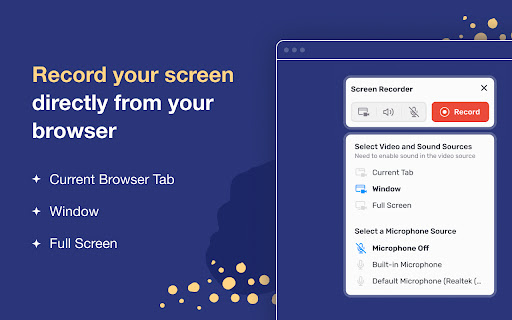
Screen recorder - simple, tiny, user-friendly and full-featured! Free Screen recorder for Windows PC, Mac, Chromebook and Linux 🔥Our screen and audio recorder captures screen, webcamera, microphone and system sound, and autosaves recordings to your computer in MP4 format. ⭐️Key Features Capture screen in three modes: whole desktop, separate window or chrome tab Record screen with system sound, microphone, both of them or no audio at all. Our Screen recorder extension is free, without watermark, limits and sign ups! Looking for the best screen recorder for PC? Reasons to choose our Screen recorder: 🎬 Record unlimited videos — all free, no sign ups! 🚀 Recordings are automatically and instantly saved to your computer in MP4 format. 🎥 Record screen with audio from microphone and system sound. 👍 Easy, compact and draggable interface — it saves your screen space in full screen mode 🛡️ We respect your privacy — you always know exactly what sources (video and audio) are being recorded, the extension does not collect or store any of your data. 💡 How to make a screen recording? 1. Install the extension by clicking the "Add to Chrome" button 2. Open a new browser page or reload the current page 3. Click the extension icon 4. Grant access to your microphone if you want to record your voice 5. Select video and audio sources in the pop-up dialog 6. Record your video 7. Once you click Stop, the recording will be automatically downloaded to your Downloads directory ⭐️Top Use cases ▸ Record simple tutorial videos: how to use any website or application. ▸ Save time when discussing a problem or bug: create steps to reproduce a video that helps the developer understand the context and find the problem. ▸ Capture system sound: recording system sound works for Chrome tab option, so you can share your game play with all the details. ▸ Eliminate work meetings in favor of more effective, asynchronous communication.

Screen capture and recorder - Screenshot Tool
Record screen and camera, screenshot, edit, and share via Google Drive Unveiling a Comprehensive Screen Capture and Screen Recorder Tool Navigating the world of screenshots and screen recordings just became simpler. This versatile tool is your one-stop solution for all your screen capture and screen recording needs, designed with a vast array of features tailored for today's digital age. ⚡SCREEN CAPTURE FEATURES⚡ ⭐ The screenshot function lets you effortlessly capture a full webpage, a designated section, or just the currently visible area. ⭐ After making a screen capture, you can immediately dive into editing, then save in formats like PDF, JPEG, and PNG. ⭐ Quick storage ensures no lag, and the offline mode offers screen capture without any data worries. ❗ Elevate your screenshots with powerful editing tools: 👉 Easy sharing to Google Drive or through a link. 👉 Copy your screen captures to your clipboard instantly. 👉 Resize, crop, and tailor your captures. 👉 Annotations with various shapes, perfect for highlighting. 👉 Insert and modify text to convey more with your screenshot. 👉 Emphasize vital points with the highlight feature. ⚡SCREEN RECORDER FEATURES⚡ ⭐ Dive into the seamless world of screen recording with this tool, allowing you to grab videos and get an immediate sharing link, making collaborations a breeze. ⭐ From product walkthroughs to feedback rounds, the screen recorder ensures you stay synced with your team, thanks to the async video feature. ❗ Screen recorder capabilities include: 👉 Recording your desktop, a particular browser tab, or your camera feed. 👉 Integrate your reactions into the screen recording by embedding your webcam. 👉 Add a personal touch with voiceovers via the microphone option. 👉 Store your recordings either locally or on Google Drive. 👉 Choice of WebM or MP4 download formats. 👉 Instant sharing links after each recording session. In sum, for those seeking a robust screenshot, and screen recorder tool, this Chrome extension is the answer, housing a myriad of options for all your capturing and recording desires.

RecordBlast — Powerful Screen Capture Tool
Record your screen, tab or webcam with audio. Annotate in real-time with drawing tools. Free, fast & powerful screen capture tool. 🎬 RecordBlast — Powerful Screen Capture Tool Record your screen, browser tab, or webcam in stunning quality — completely free. No sign-up required, no time limits, no watermarks. Just click and record. Tired of screen recorders that force you to sign up, limit your recordings to 5 minutes, or slap a watermark on your videos? RecordBlast is different. ✅ No account required — start recording instantly ✅ No time limits — record as long as you need ✅ No watermarks — your videos, your brand ✅ No cloud upload required — everything stays on your device ✅ 100% free — no hidden paywalls 📺 Screen Recording Capture your entire screen, a specific window, or any application. Perfect for tutorials, presentations, and demos. 🌐 Tab Recording Record a single browser tab with crystal-clear quality. Ideal for recording web apps, online meetings, and streaming content. 📷 Webcam Overlay Add a camera bubble to your recordings. Draggable, resizable, and beautifully circular. Make your tutorials personal with a face-cam overlay. 🎙️ Audio Capture Record system audio from your computer and/or microphone. Capture music, sound effects, narration — or all at once. Draw and annotate directly on your screen while recording. No post-editing needed! ✏️ Pen — Freehand drawing in any color 🖍️ Highlighter — Semi-transparent highlighting ➡️ Arrow — Point to important elements 🔲 Rectangle — Frame areas of interest ⭕ Circle/Ellipse — Highlight circular areas 📝 Text — Add text annotations on the fly ↩️ Undo — Made a mistake? Just undo 🗑️ Clear All — Start fresh with one click Choose your color and brush size from the annotation toolbar. All annotations are baked into the recording automatically. • Circular camera overlay with live preview • Drag anywhere on screen • Resize by dragging the corner • Camera position saved between sessions • Works with built-in and external webcams • Picture-in-Picture mode for full-screen recording A sleek, minimal toolbar appears during recording with everything you need: ⏱️ Timer — See exactly how long you've been recording ⏸️ Pause/Resume — Take a break, then continue ⏹️ Stop — Finish your recording 🎙️ Mic toggle — Mute/unmute microphone on the fly ✏️ Draw — Open annotation tools 👁️ Hide — Minimize toolbar to a small dot 🖐️ Drag — Move the toolbar anywhere on screen The toolbar auto-fades after 8 seconds so it doesn't distract. Hover to bring it back. • 1080p — Full HD recording (default) • 4K — Ultra HD for maximum clarity No artificial quality caps. Record in the highest quality your hardware supports. Power users love keyboard shortcuts. Record without even touching the mouse. Enable an optional 3-second countdown before recording starts. Gives you time to prepare your screen and get everything in position. When you stop recording, your video is automatically saved to your computer. No extra clicks, no sign-up forms, no cloud uploads. Your recording goes straight to your Downloads folder. RecordBlast speaks your language: English, Español, Deutsch, Français, Português (BR), Português (PT), Italiano, Polski, 中文 (简体), 中文 (繁體), 한국어, हिन्दी, 日本語, Türkçe, Українська, العربية, Русский • All recordings stay on YOUR device • No data sent to external servers • No tracking, no analytics, no cookies • No account required • Open and transparent — what you see is what you get 💡 PERFECT FOR 🎓 Students & Teachers — Record lectures, create study materials 💼 Professionals — Create presentations, record meetings 🐛 Developers — Record bug reports with annotations 🎮 Gamers — Capture gameplay moments 📱 Content Creators — Create tutorials and how-to videos 🛠️ Support Teams — Show customers how to fix issues 📊 Sales Teams — Create personalized video messages ☁️ Cloud storage — Save recordings online and access from anywhere 🔗 Share links — Share your videos with a single link ✂️ Video editor — Trim, cut, and polish your recordings 🎨 Custom branding — Add your own logo to recordings Stay tuned for updates! If RecordBlast helps you get things done, please leave a review! Your feedback helps us grow and improve. Got questions or suggestions? We'd love to hear from you.

Screendesk - Screen Recorder
The companion screen recorder from Screendesk.io Maximize your productivity and streamline your screen recording experience with the Screendesk - Screen Recorder extension, the ultimate companion for Screendesk.io. Designed with simplicity and efficiency in mind, this powerful Chrome extension allows you to capture high-quality videos of your screen with just a few clicks. Whether you're creating tutorials, recording presentations, or documenting bugs, Screendesk - Screen Recorder is your go-to tool for quick and easy screen recordings. Easy-to-Use Interface: Start, pause, and stop recordings with ease using our intuitive interface. No complicated setups or configurations are necessary—record your screen right away. Seamless Integration with Screendesk.io: Directly access and manage your Screendesk.io library through the extension. View, share, and organize your recorded videos without ever leaving Chrome. High-Quality Recordings: Capture crisp, clear video and audio of your screen. Choose to record your entire screen, a specific application window, or just a browser tab. Instant Sharing: Once your recording is complete, share your videos with colleagues, clients, or friends with just a link. Screendesk.io makes it easy to collaborate and get feedback. Privacy and Security: Your recordings are stored securely on Screendesk.io, ensuring that your data remains safe and private. Control who has access to your videos with customizable sharing settings. No Watermarks: Enjoy clean, unbranded recordings that put your content front and center. Screendesk - Screen Recorder doesn't add watermarks, letting your work shine. Install the Screendesk - Screen Recorder extension from the Chrome Store. Click on the extension icon and sign in to your Screendesk.io account (or sign up for free if you don't have one). Choose what part of your screen you'd like to record and hit the record button. Access and manage your recordings directly through the extension or by visiting Screendesk.io. Perfect for professionals, educators, and content creators, the Screendesk - Screen Recorder extension simplifies your workflow and enhances your screen recording capabilities. Download today and elevate your screen recording experience! Encountering issues or have suggestions? Our dedicated support team is here to help. Contact us through Screendesk.io/support for assistance and feature requests. Bring your screen recording to the next level with Screendesk - Screen Recorder. Happy recording! Screendesk - Screen Recorder is developed under the GNU General Public License v3.0, aligning with our commitment to transparency and community collaboration. You're free to modify, extend, and redistribute our extension under the same GPL terms. Access the full license and contribute to our community on GitHub: https://github.com/adriennhem/screendesk-chrome

Screen recorder
Elevate your productivity with Screen Recorder tool. Effortlessly capture and share your screen recordings for optimal efficiency. 🌟 Introducing our Chrome Screen Recorder extension, your ultimate solution for seamless screen recording directly from your browser. 🎥 Whether you're a content creator, educator, or business professional, this free screen recorder offers unparalleled convenience and functionality. 🚀 With our Chrome Screen Recorder, capturing your display has never been easier. Simply install the extension, and you're ready to record from the display with just a few clicks. No complex setup or technical expertise required! Here's why our Screen Recorder stands out: 1️⃣ Effortless Screen Recording: Record your screen with unparalleled ease. Whether it's a tutorial, demo, or presentation, our extension simplifies the process. 2️⃣ Audio Recording: Capture not only video but also audio with our screen recorder. Perfect for narrating tutorials or adding commentary to your recordings. 3️⃣ Flexible Recording Options: Choose to record your entire display or select specific windows or tabs. Our flexible options cater to your recording needs. 4️⃣ High-Quality Output: Enjoy crisp and clear recordings every time. Our screen recorder ensures that your videos maintain excellent quality, making them suitable for professional use. 5️⃣ Customizable Settings: Tailor your recording settings to suit your preferences. Adjust video resolution, frame rate, and audio input to achieve the perfect recording. 📝 Enhance Your Content Creation ✔ Dive into content creation effortlessly with our Screen recorder. ✔ Perfect for capturing high-quality videos directly from your display. ✔ Benefit from a free screen recorder that enriches your video blogs or tutorials. ▸ Utilize the chrome screen recorder for all your professional needs. ▸ Record from the dispaly to create engaging webinars and training sessions. ▸ Leverage screen recording during presentations to provide valuable resources afterward. 🎮 Streamers and Gamers' Ideal Tool 🔺 Use this online screen capturing for live streaming games. 🔺 Capture every exciting moment with robust screen and audio recorder capabilities. 🔺 Share your high scores and gameplays online with a dedicated video capturing. 🎶 Music and Tutorial ➤ Ideal for musicians wanting to share performances or tutorials. ➤ Record video from the display that syncs flawlessly with your audio. ➤ Screen recorder with audio lets you educate and entertain seamlessly. 💻 For Software Developers and Tech Enthusiasts 📌 Show off new software or coding projects using our recorder screen. 📌 Create clear, instructive clips on bug fixes or feature demos. 📌 Makes sharing technical walkthroughs straightforward and effective. 📚 Education and Online Learning 📘 Record educational materials that students can access anywhere, anytime. 📘 Use the Screen recorder to capture online classes, enhancing the e-learning experience. 📘 Educators can create reusable content that helps students outside of classroom hours. 🌐 Remote Work and Collaboration ✅ Record meetings or remote sessions for future reference or those who couldn't attend. ✅ The Screen recorder is an excellent tool for teams to share project updates. ✅ Ensures that everyone stays in the loop, maintaining team synergy. 1. Capture step-by-step guides using Display capture. 2. Combine screen video recorder and audio to fully narrate the procedures. 3. Increase viewer comprehension and retention with visually appealing guides. 🖥️ UI/UX Design Feedback and Revision — Capture real-time user interactions to better understand user experiences. — Use the Screen recorder to document reactions and provide constructive feedback. — A tool that is vital for UI/UX designers seeking to perfect application design. 🛠️ Customer Support and Troubleshooting • Provide customers with clear, concise visual aids and troubleshooting videos. • Use the online recorder to capture common problems and their solutions. • Enhance support services by creating a library of easy-to-follow help videos. 💎 Experience the convenience and versatility of our Chrome Screen Recorder today. Start recording from the display with ease and take your content creation to new heights!
