
bglicehingnhimmkihplligdihgfapjf
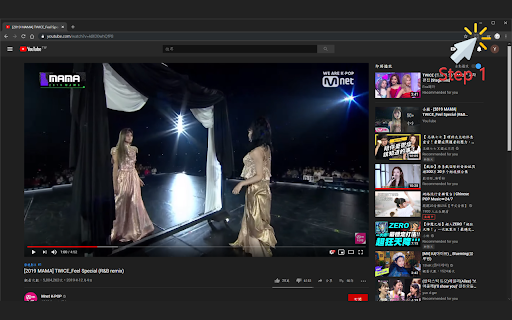
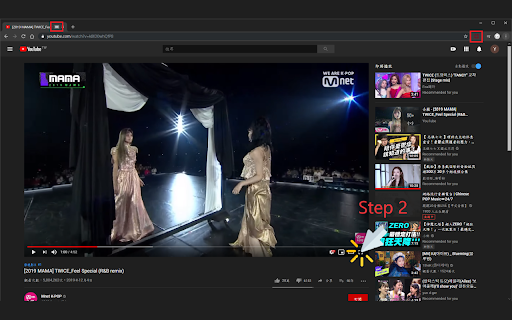
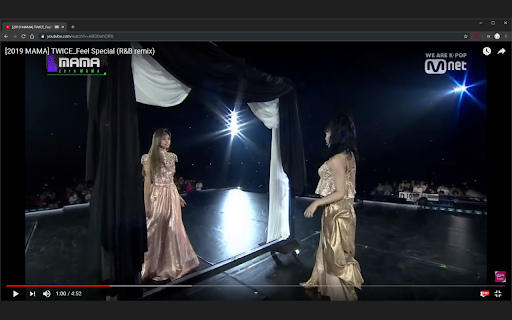
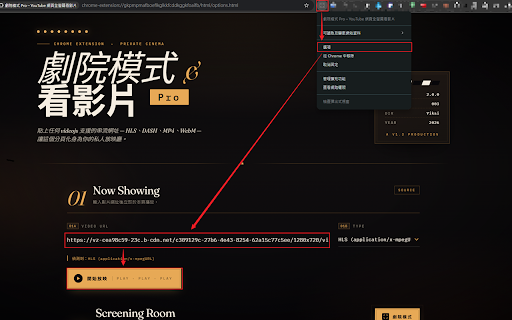

One-click theater mode for YouTube, Twitch, Netflix & any web video. Dim the page, fill the screen, watch immersively. 功能描述(Description): —使影片填充整個瀏覽器畫面 —(Let the video fill the browser view) 使用說明(User guide): —已啟用(Enable): 插件按鈕為紅色(The color of the extension button is red) —已停用(Disable): 插件按鈕為灰色(The color of the extension button is gray) —步驟一(Step 1): 點擊插件按鈕以啟用(Click the extension button to enable the feature) —步驟二(Step 2): 點擊影片全螢幕按鈕(Click the full screen button of the video) —步驟三(Step 3): 享受劇院模式(Enjoy the theater mode) —※若您想使用傳統全螢幕而非劇院模式, 點擊插件按鈕停用即可 —(If you want to watch the video in whole screen, click the extension button to disable the feature) —※當發生以下狀況, 插件將自動停用: (1)切換Chrome頁籤(2)切換不同的Chrome視窗(3)瀏覽器全螢幕 —(The extension will disable automatically when encountering the following situations: (1)Switch to another chrome tab(2)Switch to another chrome window(3)Browser full screen)

Video Fill - TheY2T
Stretch any video to fill your screen — remove letterboxing and pillarboxing on streams and video players. This extension allows you to fit to screen any video across any platform video feeds regardless of aspect ratio. This is especially handy for people with older LCD / Plasma screens that do not support 16:9 or 16:10 ratio and you're always getting letterboxed screens as a result. Use this tool to avoid losing 30 - 40% of your already smaller screen!

UltraWideo – Remove Black Bars & Fit Any Video to Your Screen
Remove black bars and fit any video to your screen. Works on Netflix, YouTube, Prime, Disney+, HBO and all video sites. Remove black bars from any video. Fit any video to your entire screen on any video platform — automatically. UltraWideo is the cross-browser extension that manipulates video aspect ratio to fill your screen. Whether you own an ultrawide monitor (21:9, 32:9), a standard 16:9 display watching 4:3 videos, or anything in between — UltraWideo eliminates black bars and gives you a true full-screen experience. Why UltraWideo over other extensions? Unlike alternatives that break on certain platforms or stop detecting videos, UltraWideo is proven to work on all major video streaming platforms, including embedded videos across the web. No "video not detected" errors. No broken layouts on non-video pages. It only activates when there's a video to work with. ▸ Works everywhere — any streaming service, any site with embedded video, any platform. Not limited to a single site. ▸ Blazingly fast — written in plain JavaScript with a tiny footprint. No memory leaks, no background processes draining your battery, no performance degradation over time. ▸ Minimal interface — a thoughtful popup that doesn't get in your way. No intrusive overlays, no UI that pops up over your video. Just clean controls when you need them. ▸ Multiple modes — Upscale to fill your screen, Stretch to fit, or scale manually. One mode active at a time for a simple experience. ▸ Adjustable scale — fine-tune the zoom level to get exactly the crop you want, simultaneously with the active mode. ▸ Magic touch — toggle between modes using pinch gestures on trackpads and touch screens, or mouse wheel + CTRL key. No other extension offers this. ▸ Keyboard shortcuts — fully customizable through your browser's built-in shortcut manager, so they never conflict with other extensions or websites. ▸ Dark & light mode — automatically matches your system appearance, or set it manually. ▸ Cross-browser — available for Chrome, Firefox, Edge, and all Chromium and Gecko-based browsers. ▸ 40+ languages — AI-translated for global accessibility. Pro Features Support UltraWideo's development and unlock bonus features: ▸ Magnetic Helper — make UltraWideo work outside of fullscreen by attaching it to any video player you select. Perfect for windowed viewing. ▸ Accent Color — personalize the interface with 8 carefully selected color themes. ▸ Disabled Mode — hide modes you don't use for faster switching. ▸ Consents — control which notifications you receive. ▸ Ambient Light — adds an immersive ambient glow around your video, enhancing the viewing experience and helping protect OLED screens from uneven burn-in. Trusted by 75,000+ users across Chrome and Firefox. Works on any screen size and any aspect ratio. If it doesn't work somewhere, open a ticket on GitHub and it will be fixed.

Windowed Fullscreen for Videos
Works with most websites that include videos through the HTML5 tag, including videos that are embedded through iFrames and videos on websites that use shadow roots. Options: Enable / disable the extension for specific websites, and adjust button positioning so it doesn't interfere with other video overlays. You may report websites that are not compatible with this extension, but this usually happens due to websites being coded in exceptionally weird ways, so it might not always be possible for me to fix the problem. Please blame the website and not the extension :-)

Fill Window - Youtube
Plays Youtube videos in the entire window Adds a button to the corner of your browser that will toggle youtube videos to fill the window.
