
bgkcjbiegadgageanompjehbnlehepck

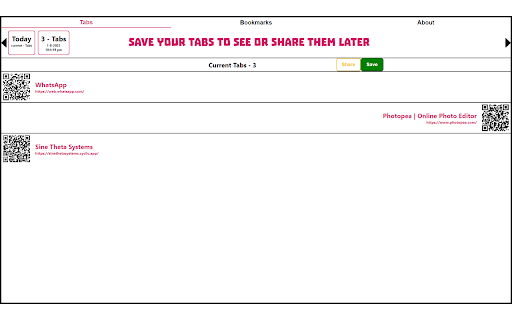
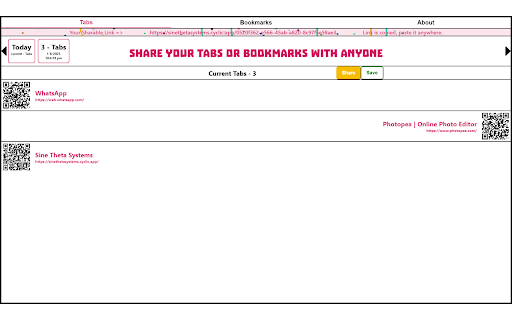
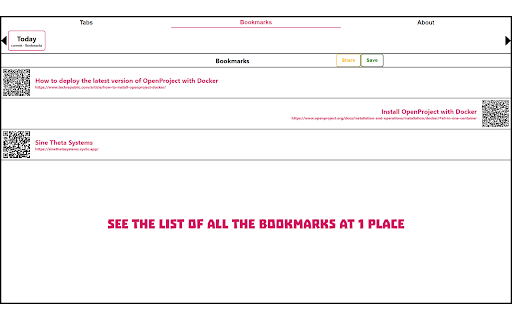
Share Your Tabs Easily.! Tabs Extension is a versatile browser extension that simplifies sharing tabs and bookmarks across devices(from PC to PC or PC to Mobile), with friends and colleagues. Effortlessly send URLs to others with the click of a button, eliminating the need for copy-pasting or complex sign-ins. Experience seamless browsing by seamlessly shifting tabs and bookmarks between computers and mobile devices. With user privacy in mind, Tabs Extension operates securely without requiring any account login, ensuring confidentiality. Enjoy additional save with date feature like tab and bookmark backup and an intuitive interface. Enhance your browsing experience and collaboration with Tabs Extension. Download now to stay connected and productive. Use this addon to share your tabs and bookmarks.

Power Tab - Save, Share & Manage
Save, Share & Manage with Power Tab PowerTab: Organize Your Browser, Amplify Your Productivity Experience the ultimate tab management solution with PowerTab. Here's why it's the must-have extension for every browser user: Effortless Tab Organization: Say goodbye to tab clutter! PowerTab simplifies your browsing experience by allowing you to effortlessly organize your tabs with just a few clicks. Streamlined Workflow: Stay focused and efficient with PowerTab's intuitive interface. Easily save, categorize, and access your favorite websites and resources, ensuring you never lose track of important information again. Save and Access Tab Groups: Whether it's project research, client communications, or personal interests, PowerTab enables you to save and access tab groups instantly. No more digging through endless tabs – find what you need with ease. Edit Saved Tabs: Modify and update your saved tab collections with ease. PowerTab allows you to edit existing tab groups, ensuring your information is always up to date and relevant. Enhanced Collaboration: Collaborate seamlessly with colleagues and friends by sharing curated tab collections. PowerTab allows you to copy folder codes and share them via text message. Your recipients can execute the shared code in their browsers, instantly accessing the same set of organized tabs. This effortless sharing fosters creativity and innovation, making collaboration intuitive and productive. Professional Interface: Designed with professionals in mind, PowerTab offers a sleek and polished interface that complements any workspace. Elevate your browsing experience with a tool that's as stylish as it is functional. Take control of your browsing experience and unlock your full potential with PowerTab. Try it today and discover the power of organized browsing.

HelloScreen Screen Sharing for Chrome
Instant, multi-cursor screen sharing for Chrome. ⚡ Superfast screen sharing for anyone who sells over the phone. Salespeople rely on HelloScreen to show, not just tell. No Zoom setup, no back-and-forth — just a simple way to add real-time visuals to your calls. ✅ Share your screen in seconds Click "Share Tab" and send a single link. Your customer opens it on any device with no installs or friction. 👀 Make your calls more engaging Explaining next steps, pricing, or a product demo? Show your screen in real-time so customers get the clarity they need to move forward. 🔒 Secure and high-quality Only share the tab you choose — no risk of exposing other screens. HelloScreen delivers a crisp, lag-free viewing experience. 📈 Faster decisions, fewer follow-ups Sales teams use HelloScreen to gain trust faster, reduce follow-ups, and convert 2x more customers — without adding complexity. 💡 Built for sales teams, trusted by thousands of businesses. HelloScreen is brought to you by Upscope, a leader in screen sharing and co-browsing technology. Try it today and see the difference on your sales calls.

ChatGPT Recall Prompts
"ChatGPT Recall Prompts" is an extension that allows you to quickly recall your previous inputs in the textbox by pressing the "up" keyboard button without copying and pasting. It saves you time and effort when composing messages. Try it out to experience fast text input recall with just a button press! Tip 1: If nothing shows in the textbox, try to press F5 key or send your first prompt to reload prompts. Tip 2: If you don't see the full text when recalling prompts, try to type any text or press space key to show full text in the textbox. Tip 3: If pressing "Enter" doesn't send your message, try editing the text box first. Simply type or delete something to enable the "Enter" key functionality. "No data is saved or used by any third party, all prompts are removed every time the page is reloaded."

Tabox - Save and Share Tab Groups
Save your open tabs into collections and reopen them whenever you want in a single click! Tabox lets you save all open tabs in the current window to a "Collection". You can click on the collection to open all tabs instantly! The extension's export and import feature is especially useful for working teams that need to share list of work URLs. Want to help support Tabox? Checkout our sponsorship page! https://tabox.co/sponsorship/ Additional Features: - Save all your open tabs and tab groups to a collection - Save all windows at once! - Allow auto updating of collections once you open them (enable in settings) - Assign colors to collections for easier sorting and categorization - Export / import collections - Sync your collections across multiple devices using Google Drive - Drag & Drop to rearrange your collections Terms of Service: Tabox is completely free and does not charge for its service or cloud sync option Loss of saved tabs can happen, backup your collections to file periodically to avoid data loss
