
bgidopbekmafbignafgkiaggengmigek


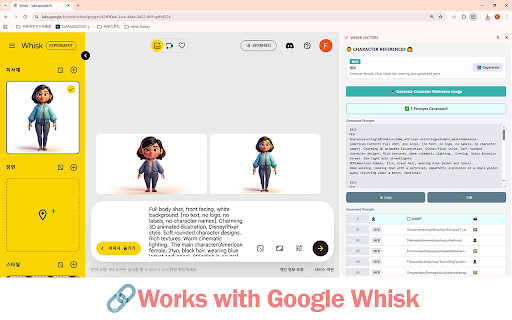

Make AI image creation easier with Google Whisk. Convert scripts to prompts and reduce repetitive image generation tasks so you can… Whisk Factory is a creative assistant for Google Whisk that helps you generate AI images more easily. Key Features: - Script Mode - Convert your scripts into AI image prompts automatically - Prompt Mode - Generate images directly with your own prompts - Character Reference - Create consistent characters across multiple images - Style Gallery - Choose from 8 pre-designed style templates - Sequential Workflow - Work through multiple prompts smoothly - Easy Save - Save images with clean, organized filenames How to Use: 1. Open Google Whisk (labs.google/whisk) 2. Click the Whisk Factory icon to open the side panel 3. Paste your script or enter prompts 4. Click "Generate" and let AI do the work Whisk Factory reduces repetitive tasks so you can focus on creating.

Whisk Image Downloader
Download images from Whisk with custom prompt names - Fast and reliable downloads

WHISK AI PRO
WHISK AI PRO helps creators and freelancers generate batches of AI images on Google’s Whisk page with one click, turning a plain .TXT list of prompts into hands‑free, step‑by‑step runs you can start, pause, resume, or stop at any time. It’s built for transparent, user‑controlled automation with a simple popup UI, trial or license activation, and safeguards that only run on the intended Whisk project pages you already have open in your browser. What it does Load a .TXT file of prompts, then automatically inputs each prompt into Whisk and submits it with realistic timing so you can focus on other tasks while images render in sequence. Provide start, pause, resume, stop, and reset controls from the popup, plus live status and progress counters so you always know which prompt is running and how many remain. Offer a 24‑hour trial via Google sign‑in and a license key option, with clear on‑screen status of activation and remaining time to keep access simple and transparent. Save time by eliminating repetitive copy‑paste and Enter presses across large prompt lists, which speeds up batches and reduces input mistakes during long creative sessions. Work safer and with more control: automation only starts after you click START on a valid Whisk tab, and you can stop instantly if you need to adjust prompts or settings mid‑run. Keep your workflow lightweight: everything runs from the browser popup, with local progress tracking and a reset option to clear data when you’re done. Key features at a glance Targeted automation for Whisk project pages with URL checks to prevent accidental runs elsewhere. Randomized delay window between prompts to mimic human pacing and reduce unnecessary strain on the page while maintaining throughput. Error handling that detects missing inputs, reports status back to the popup, and safely advances or stops based on your command. Who it’s for AI artists and stock contributors processing many prompts daily who need consistent, low‑friction throughput without babysitting the input box. Freelancers and teams who want visible, controllable automation that respects session context and keeps actions confined to the page they’re already using. How you’ll use it Open Whisk, load your .TXT prompts in the popup, activate your trial or license, then click START to begin the sequence and watch progress update live in the UI. Pause to review results, resume to continue, or STOP/RESET at any time; when finished, you can clear local data from the same panel for a clean next session.

Flux - Whisk Auto Animator
Flux automates AI video generation on Google Whisk. The ultimate tool for YouTube automation and content creators. 🎬 FLUX - Bulk AI Video Generator for YouTube Automation Experts Stop clicking manually for every video. Flux processes your prompts automatically, generates images, animates them, and downloads the finished videos - all while you focus on other work. ▸ Transcript ⟶ Visual Prompts ⟶ Videos Upload/Add transcript, and Flux uses AI to build visual prompts for your videos. ▸ Enter 10, 50, or 100+ prompts Flux processes them one by one while you do other work. ▸ Full Automation Pipeline Image generation → Animation → Video rendering → Download. Each step runs automatically without your intervention. ▸ Auto-Download Videos save directly to your Downloads/FluxVideos folder. No manual downloading needed. ▸ Stop & Resume Pause anytime and pick up exactly where you left off. Your progress is saved automatically. ▸ Manual Retry for Failed Prompts If a prompt fails, click the retry button to regenerate just that one - without restarting everything. ▸ Activity Logs Full history of what Flux did, when, and any issues encountered. Open Google Whisk (labs.google/fx/tools/whisk) Click the Flux icon to open the side panel Enter your prompts (one per line) Set delay between prompts (12 seconds recommended) Click Start Videos download automatically to your computer • Whisk video generation credits (the extension uses your Whisk credits to generate) • Access to Google Whisk (labs.google/fx/tools/whisk) 💡 BUILT FOR CREATORS / AUTOMATION • YouTube Shorts creators - Batch generate B-roll, intros, transitions, visual hooks • Faceless channel operators - Automate visual content production at scale • Video essay creators - Generate scene illustrations in bulk • AI art channels - Produce daily content without daily clicking • Social media managers - Create platform-specific video variations • Anyone tired of clicking - If you've ever generated more than 5 videos manually, Flux is for you • Adjustable delay between prompts (5-60 seconds) • Custom download folder naming • Toggle auto-download on/off • Clear prompts and start fresh anytime This extension only runs on Google Whisk pages. It does not collect, store, or transmit your personal data. All processing happens locally in your browser.

WhiskEngine - Bulk AI Image Generation Automator for Whisk AI
WhiskEngine automates bulk AI image generation in Whisk AI with fast batch processing, smart controls, and real-time tracking. Are you tired of manually clicking, waiting, and downloading images one by one? WhiskEngine is the ultimate "all-in-one" automation powerhouse designed to streamline your AI art creation process on Whisk AI (Google Labs). Unlock the full potential of Version 8.0.0 with our breakthrough Multi-Version Gateway architecture. Whether you need background speed or classic stability, WhiskEngine puts you in full control. ⚡ True Batch Automation: Forget manual entry! Import a list of hundreds of prompts directly or upload a .txt file. WhiskEngine processes your entire queue automatically while you focus on other tasks. 💾 Smart Auto-Download: Never lose an image. All generated photos are instantly saved to your device. Includes Smart File Naming based on your prompt for effortless organization. 🖼️ Advanced Reference Image Support: Take control of your composition. Upload reference images for Subject, Scene, or Style to guide the AI with precision. 🌓 Modern UI & Side Panel: Enjoy a sleek, eye-friendly Dark Mode interface integrated into a convenient Side Panel for easy access. Disclaimer: WhiskEngine is an unofficial extension independently developed by facelessclip.ai. It is not affiliated with Google or Whisk AI. Please use responsibly and adhere to the service provider's terms.
