
bghceahjdhjncoohgobeohgnmfnooibd

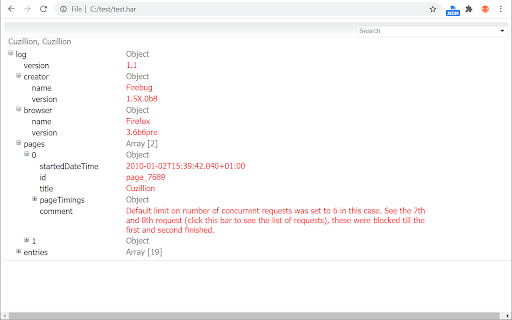

Visualizes HTTP Archive (HAR) files opened locally or online. Also features JSON tree view for HAR and any structured JSON files. Embedded HAR/JSON viewer. Visualizes HTTP Archive (HAR) files opened locally or online. Also features JSON tree view for HAR and any structured JSON files. Allows to switch between HAR (if available), JSON tree and plain (original) views. Note: In order to get this viewer working with local files you have to grant the respective permission: chrome://extensions -> HAR/JSON viewer -> Details -> Allow access to File URLs.

SAML-tracer
A debugger for viewing SAML messages A tool for viewing SAML and WS-Federation messages sent through the browser during single sign-on and single logout.

SAML Chrome Panel
Extends the Developer Tools, adding support for SAML Requests and Responses to be displayed in the Developer Tools window This is an Open Source SAML debugger for Chrome. It operates as another panel in the Chrome Developer Tools section, which monitors the traffic in the current active tab. This panel is trying to replicate what the Firefox version of SAML Tracer does as there wasn't a good enough one (or any) for Chrome at the time of writing this. GitHub Repo: https://github.com/milton-lai/saml-chrome-panel Feel free to branch and help make this even better! It is designed to display all network traffic, along with the request and response data. If there is a SAML request or response, then it will grab the message, format it nicely and show it to you in another tab. Updates: - Set links to open in the same browser -- There is a new feature to "Scrub" the links in the current page. Basically, it will update all anchor tags and set their target attribute to equal '_self'. This should address the issue of having SAML transactions opening up in new tabs and such. This is the best implementation I could think of as I'm unable to listen to all traffic on all tabs. - Import and export the network traffic. -- It imports and exports the traffic on the browser in a JSON format. - Toggle showing SAML traffic. Please note that at the moment, I've only looked at OpenAM Redirect and POST SAML transactions (as that is what I've got access to). If there are others which are working, please let me know. If there are SSO frameworks that are not working, then also please let me know and I'll try to get it working (e.g. SOAP). Thanks to @jasonwzs (https://github.com/jasonwzs) and @AlmogBaku (https://github.com/AlmogBaku) for contributing Update (2020-07-18): -- Updated internal libraries. -- Reduced extension size. -- Minor code cleanup. -- Increased SAML font size. Update (2017-11-19): -- Added toggle limit of 500 network requests, to keep memory footprint smaller. -- Added Search option for the SAML tab.

Postman Interceptor
Capture requests from any website and send them to Postman Client. Postman Interceptor helps you send requests which use browser cookies through the Postman app. It can also send headers which are normally restricted by Chrome but are critical for testing APIs. The Interceptor makes this process painless. Something that would have required a proxy earlier can now be achieved without any installation steps or extra configuration.

Modify Header Value (HTTP Headers)
Add, modify or remove a header for any request on desired domains. Modify Header Value (HTTP Headers) is an extension that can add, modify or remove an HTTP-request-header for all requests on a desired website or URL. This Addon is very useful if you are an App developer, website designer, or if you want to test a particular header for a request on a website. Key features: 1. Easily add, modify or remove a header for any request on desired domains. 2. For a complete list of HTTP headers, please take a look at the list of all HTTP Header Fields on the Wikipedia page (https://en.wikipedia.org/wiki/List_of_HTTP_header_fields). 3. Clicking on the Toolbar icon opens a UI to quickly switch the Addon ON or OFF, or open the options page. 4. Each header item has several options to adjust (see add-on's Options page for details) 5. You can add several header items and active or inactive them separately. 6. An example in the options page shows a tutorial on "How to add a custom header". Note: to report bugs, please visit addon's homepage (https://mybrowseraddon.com/modify-header-value.html) and fill out the bug report form.
