
bgdllkogfkdjdpaholocflnnabbgjjdc
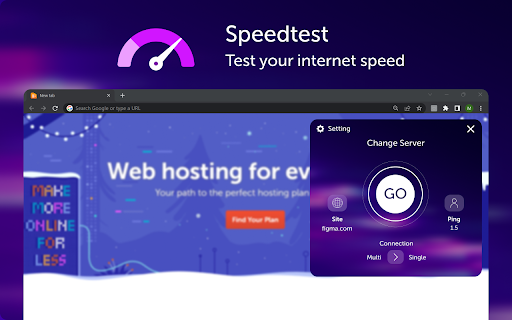

Test the internet connection speed and measure the uploading and downloading capacity "Speed Test" is an application that allows users to test the speed of their internet connection. It can be useful for those who want to make sure they are getting the required level of speed from their ISP, or for those who want to check how fast their network is in different locations. The main features of "Speed Test" include: Upload and Download Speed Test: The app measures how fast you can upload and download files from the internet. This allows you to determine how fast your internet connection is. Latency Test: The app measures the latency or "ping" of your connection to determine how fast data can move between your device and the internet. This is especially important for online games and other applications where low latency is critical. Stability Test: The app can also measure the stability of your connection, i.e. how long it can run without failure or interruption. All in all, "Speed Test" is a useful app for those who want to check the speed of their internet connection. It is easy to use and accessible to everyone, but its results should be considered as estimates and not exact values.

Speedtest by Jalti.in
Test your Internet Bandwidth Speed What is Jalti.in ? Jalti.in calculates your current internet bandwidth. Generally you will get this speed results from internet service providers to which your gadget is connected. How to check ? Open extension, Click Start. That's it. Test 2 to 3 times for average results. Remember to close all downloads like download manager, torrents and streaming or buffering activities before you run Jalti.in. Why does Jalti.in report on ping, latency, jitter and other things? Jalti.in is a simple-to-use way for Indian consumers to test what bandwidth their ISP is providing. Designed for network engineers as a tool for analysis and diagnostic speed test suite. Will the Jalti.in speed test work everywhere in the world? Jalti.in will test internet speed globally on any device (mobile phones, desktops, laptops, or smart TV with browser). Why is Jalti.in offering the speed test service for free? We thought consumers need simple, quick, commercial-free way to estimate the internet speed their ISP is providing.

NetMet: Internet Performance Check Tool
Evaluate internet performance NETwork METrics with this web measurement tool. NetMet is a chrome extension/plugin capable of deciphering your internet performance. Monitor your network connection and evaluate web application level metrics.This plugin can be installed in any of your chromium based browsers (Google Chrome, Opera, Brave, Edge, etc.). It can observe various web browsing metrics based on the CDN server locations you are connecting to for some of the top websites in your region. Measuring internet speeds has never been easier, with M-Lab speed test already integrated into the plugin. With just one click of a button a 1-minute test gives you all these details which helps to troubleshoot any network issues you're facing. A video streaming test provides you details on how your network connection might relate to watching videos online. A feature to view past historical measurement data based on which networks you carried out measurements in, is also available, to get a quick overview. What does the tool measure? NetMet measures your overall network and web application performance by using the following test suites. 1.End-to-end goodput, latency and bufferbloat (powered by Google Speedtest - MLab) 2. Web browsing performance by connecting to landing websites hosted by popular CDN providers. 3. Video Streaming performance over DASH (Video on Demand) Based on all collected measurements from your network, NetMet will calculate a score for suitability of various applications. How the test works? 1.Install the extension 2.Popup window displayed periodically (periodic time can be custom set from settings inside the extension) 3.Test execution starts automatically on popup display 4.On test start, user IP, ISP and City details are retrieved using public REST APIs from "ip-api" 5.A new minimised browser window opens up for fetching top 20 websites in your region 6.For every website, a background script extracts performance metrics using the browser APIs 7.After fetching the 20 websites, the browser window is closed automatically 8.The web browsing measurement metrics are displayed to the user as graph visualizations on the popup window 9.The IP, ISP and City details & web browsing performance metrics are compiled into a JSON file and sent to our object storage server hosted in TUM campus network 10.A M-lab speed test for downlink and uplink are executed 11.Simultaneously, the speed test download speed and upload speed metrics are displayed at real-time to the user on the popup window 12.At the end of the speed test the packet loss and latency details are also displayed to the user 13.Performance metrics are retrieved using M-lab's API for the uplink and downlink speed test during execution 14.The speed test performance metrics are compiled into a JSON file and sent to our object storage server hosted in TUM campus network 15. After the speed test, a video streaming test over DASH is performed, and relevant metrics are captured using DASH.js API. 16. The video streaming metrics are compiled into a JSON file and sent to our object storage server hosted in TUM campus network 17.The extension waits till the next periodic popup event, and continues from step 3 Frequent measurements help us to assess the quality of your connection and various bottlenecks affecting it. NetMet uses Chrome Developer APIs for running the test and gathering measurement data as mentioned above. The web browsing metrics are captured using browser's Performance API, specifically Resource Timing. The speed test integrated into the extension to measure uplink and downlink performance is the M-Lab speed test. The measurement data (like, DNS Lookup, Server Connect Time, Upload speed etc.) is collected for research purposes. Only user data which is captured is your IP address and City details. No other sensitive user information like web browsing history or user location is captured. Additionally, for the integrated M-Lab speed test. Please go through M-Lab's Acceptable Use Policy. We hope that our data collection helps us to understand the Internet better. We are an academic institution and will try to publish all our findings to a wider audience. However, we will never publish parts of our dataset which clearly identifies you or your company. Please go through our data collection policies here. We do not capture any sensitive user data. For any concerns please contact us through email.

Speed Test
Speed Test By OpenSpeedTest™️ SpeedTest By OpenSpeedTest™️ is a browser extension developed for the Google Chrome browser. A tool you can use to check your internet connection speed quickly and easily from your browser toolbar itself. That is, You can run a speed test on top of any website you are currently visiting without opening a new tab or window. All you need to do is click on the OpenSpeedTest™️ icon on your Chrome toolbar. Features of this SpeedTest Extension. 1) You can run a speed test from the chrome toolbar itself. SpeedTest by OpenSpeedTest™️ with No Ads. HTML5 Internet SpeedTest. no Flash or Java! Broadband Speed Test That Works on Any Web Browser. Designed to replicate your real-world connection speed! THE MOST ACCURATE AND POWERFUL ONLINE BANDWIDTH TEST Internet Speed Test for any Device [No App required] The best HTML5 Internet SpeedTest! No Flash or Java! You can test your Broadband speed on Any device. Always visit https://OpenSpeedtest.com OpenSpeedtest.com lets you test your internet connection speed accurately. Whether you have Fiber, Cable, DSL, Mobile Broadband, Satellite or Dial-up connection. You will be able to accurately measure your bandwidth anytime, anywhere on any device! Why Openspeedtest.com? --->Speed test using Popular CDN with distributed servers Across the globe!

Speedtest Google (for chrome)
Speed test directly from your Google Chrome toolbar to quickly test your internet performance without interruption. Measure how fast the pages you visit load with Web Speed. We encourage you to read our updated Privacy Policy: https://youtube-adblocker.blogspot.com/2022/05/privacy-policyoklaa-speedtest-for-google.html Features: Get your ping, download, and upload speeds within seconds Measure how fast websites load on Google. Check the Internet, check the Internet speed in a few seconds using SpeedTest, Wifi tester: Accurate speed test results Control network stability with SpeedTest Effective speed safety test convenient interface of SpeedTest program Easy to use SpeedTest is a low-power, fast-loading program Google chrome extension. Works on Google, chrome ,Bing, MICROSOFT EDGE , etc... all the platforms. Note: This extension is not developed and maintained by Google. It is not related to the Google LLC in any manner.
