
bfokbpkmneijnfgpkfajjgckoeffbcgb

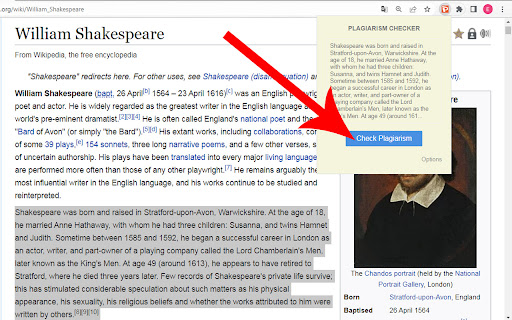

Plagiarisma is the world famous plagiarism checker for scholars, students, teachers, writers. Grab an API key from members area and authorize your extension. Push the extension icon and click the "Check Plagiarism" button. Wait for results.

Chatgpt Plagiarism Checker - GPT-4, GPT-3
Identify your GPT3, GPT4 and ChatGPT text with our Free Chatgpt Ai Plagiarism Checker tool. A simple extension for use Chatgpt Plagiarism Checker - GPT-4, GPT-3 in your PC, Mac, and Windows. The 'Chatgpt Plagiarism Checker - GPT-4, GPT-3' extension is a simple Google Chrome extension that enables users to easily check Chatgpt Text Plagiarism from their Windows or Mac computer. 📭 Step 1: Firstly, click on the extension icon after installing it. You will see a Text box which name is "Enter Text Here" 🧑🎨 Step 2: So, Copy Text from your article or any soruce, then paste to the text box, Then Click "Check Plagiarism" Button. 🧑🎓 Step 3: Then Wait Few moment, You will see the result. Enjoy! 👍 ChatGPT 3.5 and ChatGPT 4 , OpenAi Text plagiarism detector 👍 Simple and lightweight. ⭐️ Compatible with Google Chrome browser on PC, Windows, and Mac. 🔐 Respects user privacy 100%. 🆓 Forever free to use. 👍 Easily accessible with just one click from any tab. First, install this extension. Then, click Icon and Add text on "Text Box" You will see a field to add your text. Simply add it here and click the "Check plagiarism" button. After that, you will be able to see the full plagiarism result. The ChatGPT for Windows extension works seamlessly with all your favorite websites!

Quetext: AI Content Detector & Plagiarism Checker
Check any text for plagiarism and AI-written content. Highlight text on any page, scan text, and get results without switching tabs. Welcome to Quetext for Chrome that brings its plagiarism checker and AI Detector into your browser. Highlight any text on a page, click the extension icon, and get instant results, no tab switching, no copying and pasting into a separate tool. Quetext is trusted by more than 10 million students, teachers, and professionals to write with integrity and confidence. From catching unintentional copying to identifying AI-generated text, Quetext gives you a complete picture of your work before you submit it. Quetext comes packed with tools to support every stage of your writing: an AI Humanizer, AI Summarizer, Grammar Checker, Citation Generator, and source exclusion. Paid accounts also unlock additional users and bulk file upload. Open the Chrome Web Store and search for "Quetext," or follow the link on our website. Click Add to Chrome, then confirm by selecting Add Extension. Once installed, click the puzzle icon in your toolbar, find Quetext, and pin it for easy access. Click the Quetext icon and sign in, or create a free account to get started right away. Highlight any text on a webpage or paste your content into the extension panel and run your scan. From the extension, you can scan content, check your plagiarism and AI score, and access your reports, all without leaving the page you're on. Quetext's DeepSearch™ technology understands context, word placement, and sentence structure to catch all forms of copying and plagiarism. The AI Detection engine goes a step further, identifying text that may have been generated by major LLM tools like ChatGPT or Gemini and giving you a clear probability score. Results are displayed through ColorGrade™ Feedback, which visually distinguishes exact matches, near-matches, and AI-flagged passages so you can review everything side by side. Quetext also checks your grammar as you write, supporting 6 dialects of English and 9 additional languages. Paid plans include bulk file upload. Plans to Fit Your Needs Free: Access all tools without signing up, for up to 1,000 words per feature. A good way to try things out before committing. Essential: Starting at 8.25/mo. per user. Up to 100K words per month, downloadable originality reports, and batch uploads of up to 20 files at once. Professional: $16.50/mo. per user. Up to 200K words per month per feature, unlimited users, and batch uploads of up to 100 files.

Grammar, punctuation and plagiarism checker
Enhance your writing with our Chrome plugin! Grammar, plagiarism, and punctuation checker for error-free content. Introducing TextAdviser Grammar Checker - a powerful and user-friendly plugin designed for Google Chrome. This innovative tool helps users enhance their writing by ensuring accurate spelling and punctuation in their texts. By providing real-time suggestions and corrections, TextAdviser Grammar Checker aims to improve the overall quality and professionalism of written content. Using TextAdviser Grammar Checker is simple and efficient. Users can begin by highlighting the desired text and selecting the preferred action from the intuitive menu. The plugin automatically analyzes the highlighted text, identifying potential spelling and punctuation errors, and provides suggestions for corrections. For users dealing with larger texts, TextAdviser Grammar Checker offers a convenient PRO version. Upgrading to the PRO version provides several benefits, including the removal of ads and faster checking speeds. Users can enable the PRO features by checking the corresponding box in the plugin settings, ensuring a seamless experience when reviewing extensive pieces of text. TextAdviser Grammar Checker is equipped with a smart language detection feature, which automatically determines the language of the text being analyzed. However, users also have the option to specify the language manually by accessing the plugin settings. This flexibility allows users to optimize the grammar checking process based on their specific needs and preferences. With its comprehensive range of features and user-friendly interface, TextAdviser Grammar Checker is an indispensable tool for anyone seeking to enhance their writing skills. Whether it's proofreading an email, editing an essay, or crafting professional documents, this plugin empowers users to produce error-free and polished written content effortlessly. The function of finding the main idea of a text is a fundamental and crucial aspect of comprehension, analysis, and effective communication. It is a skill that enables readers to distill the core message or central theme from a piece of writing, whether it be a short article, a book, an essay, or any other form of text. TextAdviser, as a tool or platform designed to assist in this process, plays a valuable role in aiding individuals, especially students, researchers, and professionals, in honing this skill. Here's an overview of the function and importance of finding the main idea of a text, with a focus on how TextAdviser can facilitate this process: 1. Understanding the Main Idea: The main idea of a text is like the backbone or central thread that connects all the information presented. It encapsulates the author's primary message, argument, or purpose. Being able to identify it is essential for comprehension, as it helps readers grasp the essence of the text. 2. Summarization: Finding the main idea is often the first step in summarizing a text. It allows readers to extract the key points and convey the substance of the text in a more concise form. This is particularly useful when you need to quickly get to the heart of a matter or when preparing study materials. 3. Critical Analysis: Identifying the main idea is crucial for critical analysis. It enables readers to evaluate the author's arguments, evidence, and the coherence of the text. By recognizing the main idea, readers can assess whether it is well-supported and logically presented. 4. Effective Communication: When conveying the main idea to others, whether in discussions, presentations, or written reports, clarity is essential. Understanding and articulating the main idea accurately is key to effectively communicating the content and significance of the text to others. 5. Research and Information Gathering: In academic and professional contexts, researchers often need to review numerous texts to gather information. The ability to quickly identify the main idea helps researchers determine whether a particular text is relevant to their work. TextAdviser's Role in Finding the Main Idea: 1. Text Summarization: TextAdviser can provide summaries of texts, highlighting the main idea and key points. This can save users time and effort when trying to grasp the essence of lengthy or complex documents. 2. Keyword Extraction: By extracting and presenting relevant keywords and phrases, TextAdviser can help users pinpoint the central themes and concepts within a text. 3. Contextual Analysis: TextAdviser's language understanding capabilities can assist in providing context around the main idea. It can identify supporting arguments, counterarguments, and the overall structure of the text, aiding users in gaining a deeper understanding. 4. Content Evaluation: Users can leverage TextAdviser to evaluate the quality and reliability of a text's main idea by assessing the evidence, sources, and arguments presented. In conclusion, finding the main idea of a text is a vital skill for effective reading, comprehension, and communication. TextAdviser, with its text summarization, keyword extraction, and contextual analysis features, can serve as a valuable tool in assisting individuals in this endeavor. Whether you're a student trying to grasp the essence of a complex academic paper or a professional looking to extract key insights from a lengthy report, TextAdviser can streamline the process and enhance your ability to extract and understand the main ideas from diverse texts. Plagiarism Checker TextAdviser is a powerful Chrome plugin designed to ensure the integrity of written content. It seamlessly integrates into your browser, allowing you to scan text for potential plagiarism with just a few clicks. The plugin leverages advanced algorithms to compare your content against a vast database, highlighting any instances of possible duplication. With TextAdviser, writers, students, and professionals can easily verify the originality of their work, fostering a culture of authenticity and academic honesty. It's a handy tool for anyone who values the importance of original and unique content.

Advanced Plagiarism and AI Checker : PlagiarismDetector.net
Check selected text on webpages for plagiarism and AI-generated content using the PlagiarismDetector.net extension PlagiarismDetector.net Chrome Extension helps you quickly check whether selected text is original, AI-generated, or copied from other sources. It’s made for students, teachers, writers, researchers, and professionals who want a simple and reliable way to review content while browsing the web. The extension works only when you choose to use it. You select the text, click the extension, and receive results without interrupting what you’re doing. ▶ How to Use the Extension 1. Click on the extension icon after installing it. 2. Pin the Plagiarismdetector.net extension 3. Log in or sign up 4. Highlight any text and tap the extension icon 5. Get your plagiarism & AI report instantly The goal of PlagiarismDetector.net is to help people feel confident about the content they create, review, or share. Whether you are checking your own writing or evaluating someone else’s work, the extension makes it easier to identify copied or AI-generated text and spot potential citation issues. ✅ Fast, Accurate, and Easy to Use Plagiarism and AI Detector Just highlight text and get instant results: • Similarity checking across thousands of sources • AI-detection for models like ChatGPT, Gemini, Claude, Llama & more • Detailed reports that show exactly what part of the text is AI-generated or plagiarised • The extension runs only after user interaction • It does not scan webpages automatically • No background tracking or monitoring • Login information is used only to verify your session
