
bflhekmjlbpdlibcmojpikplaldgceec


Enhance your experience by providing some useful features designed to streamline your workflow and boost your productivity. This extension offers some key features: 1. Estimate performance and rating during contests. 2. Add test cases to a problem statement (disabled by default, open the setting popup to enable). 3. Show the status of the problems you have submitted. 4. Allow copying and downloading test cases (each or all) with one click. 5. Simplify debugging with the custom test page.

Competitive Companion
Parses competitive programming problems and sends them to various tools like CP Editor and CPH. Competitive Companion parses competitive programming problems and contests and sends the parsed data to various tools like CP Editor and CPH. At the moment it supports 117 online judges, including most major ones like AtCoder and Codeforces. Using it is very simple. Just install the extension, make sure you got one of the supported tools open, navigate to a problem page and click on the green plus icon in the top-left of your browser. On websites where Competitive Companion is able to parse contests, navigating to the page with all the problems and clicking on the green plus icon will download and parse all problems in the contest at once. You can also use the Ctrl+Shift+U shortcut instead of the green plus icon (configurable on chrome://extensions/shortcuts).

BOJ Random Defense
Adds tension to loose random defense 백준에 공개된 랜덤한 문제를 제한 시간 안에 풀고, 레이팅으로 실력 상승을 확인할 수 있습니다.

CF-Predictor
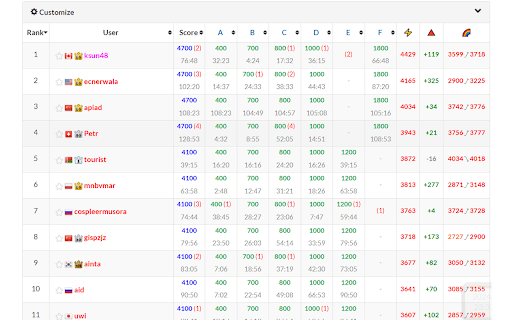
This extension predicts rating changes for Codeforces. It shows approximate deltas during and after the contest. A huge number of your nerve cells die every time when you wait for a rating update on Codeforces. Stop this! From now you could use this extension, it partly modifies the contest standings page and shows approximate rating changes for every contestant.

cses-enhancer
Enhance your experience of CSES problemset solving With this extension, you can ● You can add notes for a task. (The text editor is somewhat styled like notion, implemented with the help of EditorJs), and ● You can mark a specific task that you liked as a favorite. To use the extension, 1) Add the extension to chrome. 2) Visit https://cses.fi/problemset/ 3) Login to your account and refresh the page.
