
bfeediakikkekecpacadnnmlbceadafl


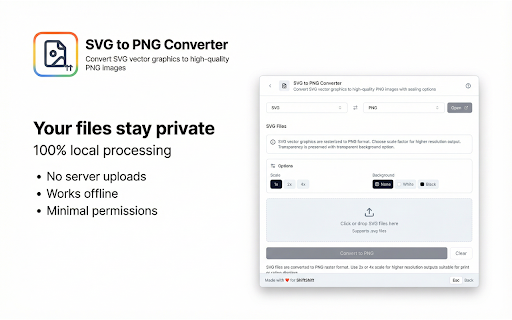
Convert SVG vector graphics to high-quality PNG images with scaling options Convert SVG vector graphics to PNG raster images instantly with this powerful SVG to PNG converter Chrome extension. This tool helps you transform scalable vector graphics into high-quality PNG files with customizable scale factors and background options, perfect for web design, print projects, and sharing images across platforms. Do you need to convert SVG files to PNG format for use in applications that do not support vector graphics? Are you looking for a way to rasterize SVG icons, logos, or illustrations at higher resolutions for retina displays or print? This SVG to PNG converter Chrome extension solves these challenges by providing fast, reliable image conversion directly in your browser. Key benefits of this SVG to PNG converter extension: 1️⃣ Convert multiple SVG files to PNG format simultaneously 2️⃣ Customizable scale options: 1x, 2x, or 4x for higher resolution output 3️⃣ Background options: transparent, white, or black backgrounds 4️⃣ Real-time preview with file dimensions and size information 5️⃣ Works completely offline in your browser with no data uploads required ➤ Drag and drop SVG files or click to browse and select images ➤ Choose your preferred scale factor for output resolution ➤ Select background color: transparent, white, or black ➤ Click convert to transform your SVG files into PNG format ➤ Download converted PNG files immediately with one click This SVG to PNG converter handles various vector graphic scenarios seamlessly. The Canvas API rendering technology accurately rasterizes your SVG content at any resolution, ensuring crisp output even at 4x scale for high-DPI displays. ▸ Web designers needing raster versions of vector assets ▸ Graphic designers preparing files for applications without SVG support ▸ UI developers creating icon sets at multiple resolutions ▸ Marketing professionals converting logos for social media ▸ Anyone who needs PNG versions of SVG graphics Common use cases for this convert SVG to PNG tool: • Convert SVG icons to PNG for older email clients or applications • Create high-resolution PNG versions of logos for print materials • Generate 2x and 4x assets for retina and high-DPI displays • Prepare SVG illustrations as PNG for image editing software • Export vector graphics for platforms that only accept raster formats This image format converter provides detailed information about each conversion. See original file sizes, converted sizes, dimensions, and size changes at a glance. The scale indicator shows output dimensions before conversion so you know exactly what to expect. Access this tool instantly using the ShiftShift command palette. Three ways to open: 1. Double-tap Shift key quickly from any webpage 2. Press Cmd+Shift+P on Mac or Ctrl+Shift+P on Windows and Linux 3. Click the extension icon in your browser toolbar Navigate the command palette effortlessly with keyboard shortcuts: - Arrow keys Up and Down to move through the list - Enter to select and open items - Esc to go back or close the palette - Type to search across all your installed tools Customize your experience through Settings accessible from the command palette: Extension Recommendations Feature: The Command Palette can display recommendations for other useful extensions from the ShiftShift ecosystem. These recommendations appear based on your usage patterns and help you discover complementary tools that enhance your productivity. You can dismiss any recommendation if you prefer not to see it. Does it work offline? Yes, this extension processes images entirely in your browser. No internet connection required after installation. What about image quality? The conversion uses high-quality Canvas rendering. Select 2x or 4x scale for sharper results on high-resolution displays or print projects. Is transparency preserved? Yes, when you select the transparent background option, the PNG output maintains full alpha channel transparency from your SVG source. Why might PNG files be larger? PNG is a raster format that stores pixel data, while SVG is vector-based. Higher scale factors produce larger files but with greater detail. Privacy and security remain priorities in this SVG to PNG converter Chrome extension. All image processing happens locally in your browser with no external servers involved. Your graphics stay private on your device. The extension connects to ShiftShift servers only for the extension recommendation feature. No image data collection, no tracking, no cloud uploads required. The extension works efficiently with SVG files of various complexity. Simple icons convert instantly while complex illustrations with many paths process smoothly without freezing your browser. Lightweight design ensures minimal impact on browser performance. Install this SVG to PNG converter Chrome extension today and transform how you work with vector graphics. Stop struggling with format compatibility issues. Start converting SVG to PNG instantly with customizable resolution and background options for perfect results every time.

SwiftDial YN
Speed Dial | Home Page | New Tab | 📱 Modern | 🎨 Easily customizable | 🛡️ Privacy-friendly | SwiftDial YN creates a pinned tab with a speed dial to which you can add your favorite websites and set up how they look with the help of the simple and intuitive settings. It has all the features of the regular SwiftDial version and works even with the browsers that don't support replacing their homepage (such as Yandex or Opera). YOU CAN ALWAYS: 📱 Install and use SwiftDial in tabs and sidebars of popular (desktop and some mobile) web browsers { 🌐 nscript.ru/swiftdial/browsers } ➕ Add, remove, edit and reorder sites on the homepage ✔️ Open, close, switch to auto-hidden mode and then invoke menu panels ✔️ Choose the side of the browser window the panels should appear from 🖼️ Use custom images as site thumbnails 🎨 Set site background color and opacity 📐 Set the dimensions and roundness of site tiles as well as the gaps between them 📐 Set the width of the site tiles area, spacing from the edges of the homepage and site tiles alignment 📐 Choose whether site tiles should always preserve their dimensions or adapt to browser window size 🔲 Add site border and set its width and color 🔲 Set size, color and opacity of site tile shadows 📝 Add site titles and set their position, size, color, as well as the color and opacity of their background ✨ Liven up the appearance of the home page with the mouse hover effects ✨ Choose the duration of the mouse hover effects ✔️ Choose where the main menu is supposed to be on the homepage - top, bottom, vertically on the left side or vertically on the right side ✔️ Place the main menu buttons at the start, the end or on the sides of that menu ✔️ Hide the main menu to enjoy your speed dial without distractions 🎨 Choose a background color of the homepage 🖼️ Use your own custom images or the images from the built-in gallery as the homepage background 🖼️ Create and edit several types of multi-color gradients of your choice for the homepage background 🖼️ Combine several homepage backgrounds into a slideshow and choose their change interval and order 🖌️ Choose the Light, Dark and High Contrast menu themes 🖌️ Choose the Auto menu theme that adapts to your system preferences 🎨 Choose any of the more than 3 million colors of the Customizable menu theme 🎨 Set opacity of the menu panels background 📂 Create, edit and reorder site groups 📂 Use your own custom images or their silhouettes, or choose between the 160 icons from the built-in gallery as site group icons 📂 Pin site groups to the homepage using their menus (three dots to the right of each group) 📂 Enable and choose the Home Site Group that will be shown on browser startup or when opening the homepage 📂 Disable the Home Site Group feature and let the extension remember the last one you opened 📂 Move sites between site groups 📂 Open, edit and clear all group's sites simultaneously 🎨 Choose one of the variants of the extension icon and customize it to your liking with more than 3 million colors and even more numerous gradient variations ↗️ Open sites in current and new tabs and windows ↗️ Open sites in new private windows 🔒 Use the Fixed Mode to lock the current state of your settings and sites 🔗 Copy site links 👍 Easily share site links on social media 🏳️ Choose between English, Russian, Spanish, French, Portuguese, German, Italian, Chinese, Japanese, Korean and Hindi languages 🖱️ Use the extension with a mouse, a keyboard and touch devices ⤵️ Quickly import sites and site groups from exported bookmarks, files, text and even other homepages 🛡️ Backup/restore your settings and sites 🛡️ Reset the settings and sites to the default state 🛡️ Be sure that your settings and sites are stored on your device and are not being sent anywhere else 🛡️ Manage the extension's permissions YOU CAN PERMIT TO: ➕ Quickly and easily add sites to the homepage using the extension's icon on the browser toolbar 🖼️ Automatically generate site images or icons 📷 Generate site screenshots 🖼️ Add images as site thumbnails or as homepage backgrounds directly from web pages or by supplying their web addresses ✔️ Use all the features of SwiftDial in sidebars of private windows YOU CAN ALSO: 📱 Learn how to use SwiftDial as a traditional homepage on Vivaldi, Opera, Yandex and mobile browsers 🌐 https://nscript.ru/swiftdial/browsers/ Your donations will help SwiftDial to always steer clear from the more questionable methods of monetization and stay the reliable homepage that is available to everyone without strings attached. 🎁 With a donation 🌐 https://nscript.ru/donate/ With ratings, mentions, likes and follows you help new users discover the conveniences of SwiftDial. ⭐ With a rating 🌐 https://nscript.ru/swiftdial/rate/ 🏆 With a nomination 🌐 https://nscript.ru/nominate/ More features are coming... Stay tuned and let us know what you think so far by leaving a review or via email.

Chat Queue for ChatGPT, Claude & Copilot
Queue and bulk add prompts while AI is responding. Auto-sends when done. Works with ChatGPT, Claude & Copilot. Free forever! Queue prompts, batch send, and automate your AI workflow. A prompt queue and management tool for ChatGPT, Claude, and Copilot. Send follow-ups while the AI is still responding, bulk add prompts, and chain sequential messages automatically. Perfect for power users, prompt engineers, and anyone who has tried to send a follow up while it's still responding. Great Quality of Life Extension. Chat Queue adds a smart queue to your favorite AI chat tools: ChatGPT, Claude, and Microsoft Copilot. Add prompts to the queue while your AI is still responding, when it's done, the next queued prompt sends automatically. ⚙️ Super easy to use! While your AI is replying, just type your next prompt and press Enter to add it to the queue. Only the prompts you add are sent, never anything automatically pulled from your typing box. (If you're typing when the extension is ready to send, it will wait until you're finished and preserve your text.) ➕ Bulk Add Prompts Add prompts directly from the queue panel. Type them one at a time or paste a whole list. Multi-line prompts are supported, and you can split them into individual prompts with one click. Great for batch workflows and prompt engineers. ✏️ Pause, Edit & Reorder Made a typo? Change your mind? Pause the queue, edit any queued prompt, delete items, or reorder with arrows or drag and drop. Full control before anything gets sent. 🔒 Privacy-First Runs entirely in your browser, nothing is sent anywhere else. No accounts, no servers, no tracking, no analytics. Your data stays with you. Each tab has its own queue so there will be no cross-talk between conversations. 💚 Free Forever No subscriptions, no "pro" tier, no paid upgrades. Just a dev that will upgrade and improve it, because I actively use it. -Bulk add prompts directly from the panel. -Auto-growing prompt cells with multi-line support. -Split by Line Breaks to turn pasted text into individual prompts. -Insert prompts between existing ones with the inline insert button. -Undo for clear and split actions. -Queue and Clear buttons now only show when relevant. -Other fixes and improvements. Open to ideas and suggestions. Reviews are welcomed, this project grows with your feedback.

JobPixel
JobPixel official extension JobPixel helps organizations to collect, manage, and publish authentic videos. A JobPixel team subscription is required to use this extension. To learn more, go to https://www.jobpixel.com/

TweakSync
TweakSync lets you style web elements in real-time from Chrome and sync changes with VS Code for a smooth development experience. TweakSync is a powerful tool designed for front-end developers and web designers who want to streamline their styling workflow. This Chrome extension enables real-time styling of web elements directly within Chrome, allowing you to see changes instantly as you tweak styles. Real-Time Styling: Easily select any element on a webpage and adjust its styles on the fly. With live previews, you can see the impact of your changes immediately, making the styling process more efficient and intuitive. Seamless Integration with VS Code: TweakSync syncs your style changes directly with your VS Code environment. This integration allows you to apply and save your CSS changes effortlessly, ensuring that your development process remains smooth and uninterrupted. Efficient Workflow: By bridging the gap between your browser and your code editor, TweakSync eliminates the need to switch back and forth between tools. This results in a more streamlined workflow, saving you time and effort. Boost Your Efficiency: Save time with instant style updates and seamless integration with VS Code. TweakSync helps you make changes faster and more accurately. Improve Your Design Process: Experience a smoother design workflow with live previews and direct synchronization between Chrome and VS Code. Streamline Your Development: Minimize context-switching and keep your development process focused with TweakSync is real-time styling and VS Code integration.
