
bfcajgcjbnmpblmomjphdaiodkfjjcdn

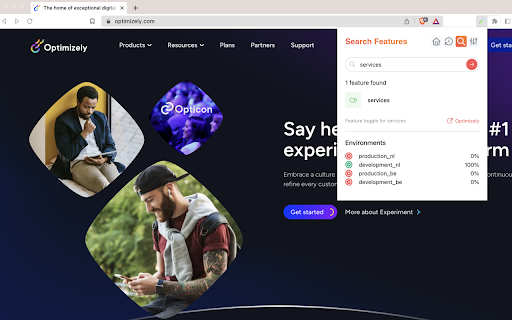


A browser extension to inject the LocalStorage of a website for Optimizely experiments. Toggle Experiment for Optimizely is a Chrome extension that has the ability to search for A/B tests and feature tests within the Optimizely platform thanks to its API integration. The extension allows users to connect to the Optimizely API using an API key, which can be obtained from the Optimizely platform. Once connected, the extension allows the user to search for A/B tests and feature tests by experiment name. This allows users to quickly and easily find the specific A/B tests or feature tests that they need to work on, without having to navigate through the Optimizely platform. Additionally, the extension also allows users to retrieve information about the different variations of an A/B test or feature test, including their names, description, and status. This information can be used to compare the performance of different variations of a website. The extension also allows you to test whitelisted users, where you can run an A/B test or feature test directly in your browser. This means you can test different variations of a website without having to make the changes live on the website. This can be useful for developers and testers who want to test changes before they are released to the public. Overall, the Toggle Experiment extension makes it easy for users to manage and test A/B tests and Feature tests within the Optimizely platform by utilizing its API. This can save time and improve efficiency for web developers and testers who need to work with A/B tests and feature tests on a regular basis. The Chrome extension is not from Optimizely itself and has nothing to do with Optimizely. Additionally, the extension is open source, which means that the code is publicly available and can be modified by anyone on GitHub. This allows developers to easily improve the extension and add new features as needed. GitHub page: https://github.com/aaron5670/toggle-experiments-extension

Locale Switcher
Lets you quickly switch the browser locale to test localization on your website. 🌏 Locale Switcher Browser Extension to quickly change your browser locale. ❓ What does it do? When a locale chosen the following thinks will be adjusted: Chrome & Firefox Support for 700+ languages and variations Per tab basis Favorite your most used locales Fully shortcut enabled, no mouse needed (Windows: Ctrl+Shift+L / Mac: Cmd+Shift+L)

Locale Emulator
Switch Chrome's locale per tab with Locale Emulator — an extension for adjusting regional settings to test website localization. Tired of complex setups for testing multilingual websites? Locale Emulator simplifies web development and QA workflows by enabling regional settings per tab, so you can quickly debug localization issues and deliver better global experiences. 🛠 Essential for Web Development ⟢ Seamlessly test website behavior in different regions and languages. ⟢ Debug localization issues with precision and efficiency. ⟢ Improve user experiences by simulating diverse regional settings. ✨ Core Features of Locale Emulator 1️⃣ Instantly adjust browser locale settings per tab for testing. 2️⃣ Simulate specific regions or dialects directly in Chrome. 3️⃣ Customize your experience with an intuitive language bar. 4️⃣ Debug regional content without affecting system-wide settings. 5️⃣ Test multilingual features to ensure optimal global compatibility. 👨🏻💻 Why Choose Locale Emulator? ✎ Tailored for developers and testers working on multilingual websites. ✎ Fully integrated into Chrome—no external software needed. ✎ Change language preferences in Chrome per tab without complex configurations. 🔄 Simplified Regional Settings Switching ➤ Select any region using the intuitive language selector. ➤ Test how websites appear in different settings directly in Chrome. ➤ Switch seamlessly between regions for real-time debugging. 📋 Benefits for Professionals 📌 Ensure website compatibility with Chrome’s regional settings. 📌 Simulate region-specific user experiences using this powerful testing tool. 📌 Optimize workflows for testing multilingual websites quickly and efficiently. ⚙️ How to Use the Locale Emulator 1. Add the extension to your browser. 2. Open the tool from the extension bar. 3. Select the desired regional setting from the intuitive interface. 4. Test and refine your site’s performance based on localized results. 🔒 Safe & Transparent Privacy Focused: Locale Emulator does not collect or store any personal data, ensuring complete security. Permissions: The extension requires access to tabs to simulate regional settings accurately. ⚡ Who Benefits from the Locale Emulator? ✔️ Developers optimize and test their websites in multiple regional settings directly within the browser. ✔️ QA testers verifying website behavior under different language settings without altering system preferences. ✔️ Product managers and marketers tailoring campaigns and user experiences for international markets. 📝 Locale Emulator is Perfect for Testing Web-Pages ✦ Enable localized ads and pages with just a few clicks. ✦ Accelerate debugging with this language extension chrome. ✦ Preview websites as they appear to users in different regions. ✦ Simulate content delivery scenarios for various regional settings. ✦ Simplify multilingual testing workflows without complicated browser configurations. 🔒 Safe & Efficient 🔗 Fully secure extension for professionals. 🔗 Focused on enhancing productivity while ensuring user privacy. 🔗 Built with developers in mind, integrating seamlessly with web developer tools. 🌟 Popular Use Cases ‣ Debug localization issues by simulating specific regions. ‣ Preview websites as they appear to users in various locations. ‣ Test region-specific features without affecting your default browser settings. ‣ Optimize multilingual workflows for global campaigns. 🧐 FAQs ❓ Is it easy to use? - Absolutely! Locale Emulator makes changing regional settings per tab simple and intuitive. ❓ Can I test multiple regions simultaneously? - Yes! Locale Emulator allows you to switch locales per tab, enabling seamless testing. ❓ How does this help with localization testing? - Locale Emulator helps developers and testers debug and simulate regional preferences effortlessly, directly within Chrome. 🚀 Boost Your Workflow 🎯 Easily switch regions in real-time for debugging. 🎯 Fine-tune your settings with intuitive controls. 🎯 Improve testing accuracy with this Chrome locale emulator extension. 🌐 Streamlined Per-Tab Regional Switching 💠 Assign unique regional settings to individual tabs with Locale Emulator. 💠 Test region-specific features without modifying default browser configurations. 💠 Simulate global user environments for accurate testing results. 📊 Streamline Changing Regional Settings Workflows ◆ Troubleshoot region-specific site behaviors with ease. ◆ Change chrome language websites per tab to simulate global user environments. ◆ Adapt content to diverse regions with instant change browser language options on websites. • This extension is independently developed and is not affiliated with any other tools or extensions. 💡 Ready to Elevate Your Workflow? Start enhancing your multilingual testing workflows today! With Locale Emulator, explore how your website behaves in diverse linguistic and cultural settings. Easily adjust browser locale settings per tab to ensure a flawless global user experience.

Locale Switcher
Use the Locale Switcher extension to change locale in chrome per tab. A web development tool to test website localizations. Elevate your web development and browsing with Locale Switcher extension. This extension allows you to quickly change chrome language, letting you select linguistic preferences and regional settings for each tab. Perfect for testing sites and accessing country-specific content. 🛠 Key Features • Language selector: Easily pick your preferred options. • Chrome localization settings: Modify locale settings per tab in the browser. • Browser testing tools: Essential for web developers. • Language bar: Quick access to dialect options. 📌 Why Use the Extension 1️⃣ Chrome change language per tab effortlessly with the extension. 2️⃣ Acts as a locale emulator for comprehensive web page testing. 3️⃣ Simplifies changing language chrome settings through the extension. 4️⃣ Enables you to switch dialect per tab without needing to restart. 🚀 Benefits of the Extension 🔺 Utilize a powerful language extension for quick testing. 🔺 Manage language preference for each tab, enabling efficient multitasking. 🔺 Improve efficiency with the web development tools that make it easy. 🔺 Seamless Chrome switch regional settings experience in the side menu bar. 📋 How to Use Locale Switcher ➤ Install the locale switcher extension from the Chrome Web Store. ➤ Click the extension icon to access the language selector. ➤ Choose your desired locale in the tab. ➤ Refresh the tab to apply the new settings. 👥 Who Needs This Tool? 🌐 Web Developers needing convenient solutions for testing. 🌐 QA Testers working on multilingual sites. 🌐 Users wanting to change browser language per tab quickly. 🌐 Anyone needing to change locale in chrome easily. 💡 Use Cases for Locale Switcher extension ✨ Test websites with various regional settings. ✨ Change language in chorme and access locale-specific content. ✨ Use it as a local emulator for development. ✨ Adapt your browsing environment with a variety of linguistic preference selections. 🔧 Advanced Features 🔗 Modify regional preferences per tab without hassle. 🔗 Acts as a locale emulator for various regions. 🔗 Enhances web developer tools suite. 🔗 Easy change the language of chrome per tab. 💼 Why Locale Switcher Stands Out 🟤 Functions as a local emulator, allowing you to test regional settings. 🟤 Acts as a language switcher for quick changes. 🟤 Recognized as a reliable language chrome extension. 🟤 Manage linguistic settings per tab swiftly. 📈 Improve Efficiency 📌 Change browser locale chrome per tab in seconds. 📌 Simplify adjust regional settings during development. 📌 Ideal for those needing to change the language Google Chrome uses per tab. 📌 Change locale chrome in the side menu bar for a fast and easy way. ❓Frequently Asked Questions ➤ Can I set dialects per tab? → Yes, you can set language in Chrome for each tab individually. ➤ Is it easy to switch linguistic preferences using the extension? → Absolutely! It makes it simple to switch linguistic preferences on the fly. ➤ How to change language on Google Chrome browser per tabs? → You can do it manually or install our extension to effortlessly change language on Google Chrome browser for individual tabs. 💻 Integration with Web Development Tools 🔹 Easily change language in browser chrome per tab and adjust locale preference on websites without the need to restart your browser, ensuring a smooth and uninterrupted development process. 🔹 Enjoy a convenient options integrated into the side menu bar, granting quick access to all language settings and making switching idioms a breeze. 🔹 The extension enhances your web developer tools suite, providing robust features for comprehensive testing. 📥 Get Started Today ▫ Download Locale Switcher now! ▫ Experience the ease of chrome switch language per tab. ▫ Join thousands of web developers improving their regional configurations workflow. 🛡 Privacy and Security ✦ Locale Switcher respects your privacy. ✦ Only adjusts browser regional configurations per tab. ✦ No data is collected or stored. 🌐 Tell us what do you think about the Locale Switcher - Share your experiences 🔗 Download Locale Switcher Now and Enhance Your Workflow and Browsing Experience The language extension chrome offers intuitive controls, making it effortless to switch between idioms directly from your browser toolbar. This extension is the perfect solution for anyone needing to change language in chrome per tab efficiently. You no longer have to worry about how to change Google Chrome browser language per tab!

Ghost Inspector - Web Test Recorder
Ghost Inspector extension for recording automated website tests in your browser Ghost Inspector is an automated browser testing service that allow you to run automated tests on your websites and web applications to ensure that they are functioning properly. Our web test recorder allows you to record yourself performing actions on your website within your browser, then sync them to the Ghost Inspector service and run them continuously as a regression test. You can record them on your staging server and execute them through our API when your code changes — or record them on your live site and automatically run them at a set interval to continuously check for issues. You will need to sign up for a Ghost Inspector account to use our recording tool.
