
bfaogmhmapcefhmkdablidkcgkgnhghl
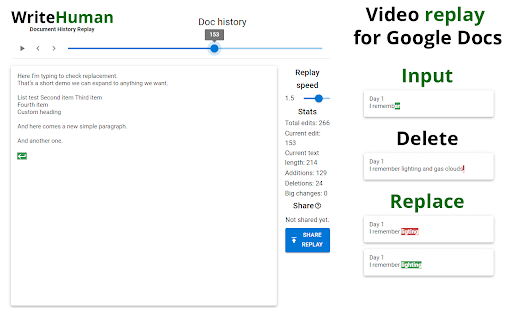
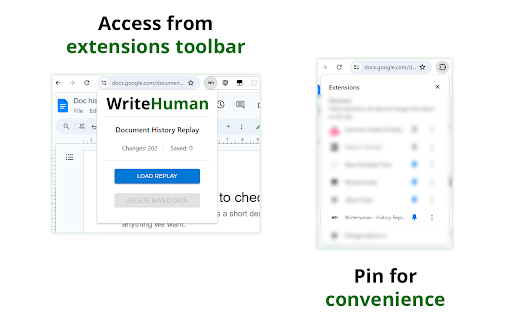
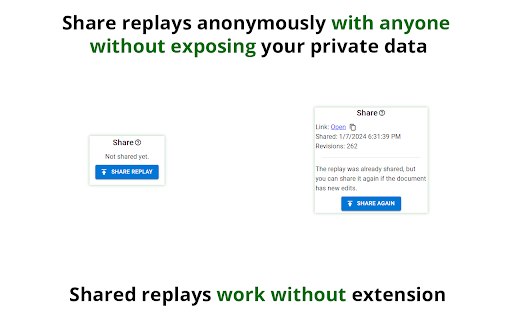
WriteHuman lets you watch the writing of any Google Doc (that you’re given access to, or the editor of) from start to finish. It loads the video substantially faster than Draftback & other playback Google Doc revision history tools. Simply install the plugin and then click “Load replay” and within 2 seconds you can watch a video from start to finish of the writing process. This extension is not anti-AI, it’s just about transparency. Whether you allow zero AI used by your students or employees or partial AI usage, WriteHuman can give you a look into that process and ensure your rules are adhered to. “But what if they generate the text on another device and then slowly type it out in the Google Doc?” That’s a good point, but watch back the history of one of your own pieces of writing and you’ll see that genuine authorship looks very different than slowly typing out a piece of writing from another screen. Genuine authorship shows movement to different sections of the document, lots of backspacing, lots of deletions and rewrites, etc. And the good news is all of that is viewable within WriteHuman. Most importantly, we DO NOT track the time spent on a document (as of now) as I currently do not believe it is necessary to discern human effort vs AI cheating. However, we will revisit this in the future if it is requested. I have concerns about bias if less time is spent, or a project is started close to the deadline, and I have discussed these concerns with educators and they've confirmed they could be true. HOW TO USE 1. Install. 2. Open any Google document you have edit access to. 3. Click the extension icon in the extension area of Chrome to the right of the address bar. You might need to open the list of all extensions if you have many installed. It's the puzzle icon in the extensions area. Pin WriteHuman for convenience. 4. Click load replay then view replay. DATA PRIVACY & COLLECTION The extension DOESN'T collect any of your personal data. It only fetches document changes on the level of text - nothing about who and when did those changes. By default, all fetched data is stored locally on your computer. You can upload the replay using the share feature, but even then it doesn't use any of your personal data: the online sharing uploads only raw changes data and assigns it a random link so you can share it with others. Unless you give this link to someone - it's impossible to find your replay online. All shared replays are also automatically deleted in 30 days.

Doc Edit Replay - AI Detector & Originality Checker for Google Docs
The ultimate revision history tool for Google Docs. Replay edits & use AI to verify originality and detect AI-written content. Unlock the True Story Behind Every Google Doc with Revision History. Ever wondered about the true creation process of a Google Doc? Go beyond the standard version history with Revision History, a powerful Chrome extension that provides a detailed, visual, and AI-powered analysis of any document's evolution. Our tool is designed to bring unparalleled transparency and integrity to your writing and review process. Key Features: 🔹 Visual History Playback Don't just read through changes—watch them happen. Revision History lets you replay the entire writing process like a video. See every keystroke, deletion, and paste in chronological order, giving you a clear and intuitive understanding of how the document was built from the ground up. 🔹 Advanced AI-Powered Analysis Click the "Details" button to access our cutting-edge analysis dashboard. Our AI delves deep into the document's history to provide critical insights: AI Writing Probability: In an age of AI-generated text, our tool assesses the likelihood that the content was written by an AI model, helping to ensure human authorship. Natural Typing Analysis: We analyze the typing cadence and speed patterns to determine the probability that the document was typed at a normal, human pace. Originality Probability: Get a confidence score on the document's originality, helping you identify potential plagiarism or heavy reliance on pasted content. Intelligent Summary: Instantly generate a concise summary of the entire document, perfect for a quick overview. 🔹 Detailed Writing Metrics Our integrated toolbar gives you at-a-glance data to understand the effort behind the words: Writing Time: Track the total active time spent editing the document. Sessions: See a complete breakdown of all individual editing sessions, including their duration and timing. Pastes: Monitor the number and volume of paste events, a key indicator for assessing originality. Seamlessly Integrated: Revision History adds a clean and intuitive menu to your Google Docs interface without getting in the way. It feels like a native part of the Google Docs experience. Who is Revision History For? 🔹Educators & Teachers: Uphold academic integrity by verifying that student work is original and authentically created. Easily detect potential use of AI writers or plagiarism. 🔹Students: Showcase your hard work and the integrity of your writing process. Provide proof of your original effort on important assignments. 🔹Editors & Publishers: Quickly assess the authenticity of submissions and ensure that the content you are reviewing is original. 🔹Collaborative Teams: Maintain transparency and accountability in shared documents. Understand who contributed what and how the document evolved over time. Privacy Policy Your data is never shared with anyone, including plugin owners. We strictly adhere to privacy laws, including GDPR and California Privacy Law, to protect your information. All uploaded data is automatically deleted every day. Install Revision History today and bring a new level of clarity, trust, and integrity to your Google Docs workflow.

Process Feedback for Google Docs
Shows the edit history of a Google Docs document 🏆 Used by 100,000+ teachers and students · 400+ verified reviews · Free for individuals Process Feedback turns the edit history of any Google Docs document into a detailed Writing Process Report. It shows the data users need to explore possible AI use, along with typing time, copy-paste events, revision patterns, and more. It is a free, research backed alternative to tools like Draftback, Revision History, and Grammarly Authorship, with rich process insights, privacy focused sharing, and support for teachers and students. For students: understand your own writing process and share it to show your learning journey. For teachers: see how students wrote, not just what they submitted. 📌 What is the Process Feedback extension? The extension reads the edit history Google already maintains for every document and turns the full writing journey into an interactive writing process report. It does not run in the background and collects no data unless the user chooses to share. ➛ Identify AI use timing and locations in your document's edit history ➛ Copy and paste events, including what was pasted and when ➛ Total typing time and typing fluency ➛ Revision vs. drafting time ➛ Break frequency and timing ➛ Author contributions in collaborative documents ➛ Teacher dashboard for managing and comparing multiple student reports ➛ Google Classroom integration ➛ Shareable report link and PDF download ➛ Multiple tabs support 👤 Who is it for? Students use it to reflect on their writing process and to prove their own work when academic integrity is questioned. Teachers use it to understand how students approach writing, identify who needs support before deadlines, and start honest conversations about AI use without relying on unreliable AI detectors. Unlike AI detectors that guess whether text was AI generated, Process Feedback shows writing history that helps users explore possible AI use, review pasted content, and see how the document evolved from the first keystroke to submission. It is a free alternative to Draftback, Revision History, Grammarly Authorship, and Originality.ai, with rich process insights, better privacy, and no subscription required. The extension reads the edit history Google already maintains for every document. Click "Writing Process Report" in the ribbon and it processes everything locally on your device and generates an interactive report instantly. ➛ Step 1: Add this extension to your browser ➛ Step 2: Open your Google document ➛ Step 3: Click "Writing Process Report" in the newly added ribbon below the toolbar ➛ Step 4: If needed, you can change the settings to see a simpler button instead 🔗 How to share the writing process report? ➛ Share Link: Copy the report URL and share it with your teacher or student ➛ Share PDF: Click "Download Process Report" in the sidebar 📚 For teachers: integration guide Visit www.processfeedback.org/gdocs for step-by-step instructions, including how to use the teacher dashboard for large classes. ➛ You need to be logged in to Chrome to install any extension ➛ Reload the Google Docs page after installing ➛ Your institution's IT department may need to approve new extensions ➛ Privacy by default: your data never leaves your device unless you choose to share. When you do share, it collects only what's needed for that report. ➛ Data is only collected when a user chooses to save online to share a report, and only to enable that sharing ➛ For co-edited documents, obtain permission from all co-authors before viewing or sharing process reports ➛ Full privacy policy: processfeedback.org/privacy 📜 Terms and conditions By installing the extension you agree to the terms at processfeedback.org/terms Adhikari, Badri; "Thinking Beyond Chatbots' Threat to Education: Visualizations to Elucidate the Writing or Coding Process"; Education Sciences; 2023.

TrueWrite - Teacher AI Detection & Document Replay Analytics
Advanced writing analytics with document replay visualization. Professional teacher insights dashboard with AI detection. TrueWrite - AI Detection & Document Replay for Google Docs (Teacher Edition) The only AI detection platform that shows you HOW students write, not just what they wrote. ➤ Advanced Document Replay Solution with Copy/Paste Frame detection ➤ Typing pattern analysis to identify natural vs. ai generated writing ➤ Effort metrics tracking actual writing time vs. copying ➤ Paste timeline graphs revealing when and how text appeared ➤ Late-night cramming detection for rushed submissions ➤ Revision heatmaps showing which sections received real attention ➤ 🎬 Full Document Replay Watch every keystroke, edit, and paste unfold in real-time. See the complete writing journey from blank page to final submission - identifying authentic struggle versus instant generation. Custom alerts for YOUR specific concerns Automatic flags for suspicious patterns you define Student-specific warnings based on their writing history Bulk detection across entire classes in one click 🎯 Why TrueWrite? ➤ Beyond Basic AI Detection: While others give you a percentage, we provide actionable intelligence about the writing process itself. ➤ Evidence-Based: Visual proof and timestamped data for difficult conversations with students and parents. ➤ Teacher-Built: Created specifically for educators managing 100+ students, not adapted from generic business tools. ➤ Complete System: Assignment distribution, grading tools, and class management - all integrated.

AI Detector and Human Writing Report - Originality.ai
Use this AI content detector and human writing report to understand if a document was written by a human or chat GPT. Scan for AI writing and plagiarism anywhere with Originality.ai for Chrome, the most accurate AI detector and plagiarism checker. Accurately check for AI and plagiarism where you actually write. Originality.ai for Chrome is the most capable tool for writing integrity, building proof, transparency, and confidence directly in Google Docs and Chrome. ✅ Excellent for students, writers, editors, teachers, and more! ✅ Proven Accuracy: → 99% AI detection accuracy: originality.ai/blog/ai-accuracy → 3rd-party AI detection studies: originality.ai/blog/ai-detection-studies-round-up → 99.5% plagiarism check accuracy: originality.ai/blog/plagiarism-accuracy-study → Tested on the latest LLMs: GPT-5.2, Gemini 3, and Grok 4.1 Fast ✍️ Peace of Mind for Writers and Students: With ‘Watch a Writer Write,’ Writer Replay, you can show how a Google Doc was written, character-by-character, for full transparency. Accused of using AI? Now you can prove that your article, essay, assignment, or other content is your human writing. Prove your writing is your own + confidently bring transparency to authorship. 🤖 NEW The Most Accurate Auto-Typing Detection: Identify non‑human typing behaviors, such as if an auto-typer was used to try and fake human-writing. Show that your work was original and human-written. Conveniently see a Human Typing Score with the most accurate auto-typer detection and insights into whether a document appears naturally typed or automated. Overview of Originality.ai for Chrome’s Industry-Leading Features: → The most accurate AI score and plagiarism score → Select your preferred AI detection model as a default → Writer Replay: ‘Watch a Writer Write’ sped-up replay → Character-by-character video replay of the writing process → See paste counts (and location) → Character count → Word count → Contributors (and their contribution ratios) → Revisions → Shareable read-only reports What does this mean for students, writers, editors, and teachers? ✓ Prove it’s your human writing and confidently address AI accusations. ✓ Protect your writing and publishing reputation. ✓ Demonstrate academic integrity. ✓ Easily track changes, contributors, and identify authors. ✓ Watch a Writer Write: reduce false positives with replay-based proof of authorship. ✓ Stay on the same page about everyone’s contributions to a group project. ✓ Download a shareable read-only report of scan results. ✓ Built for repeat use with instant scans, simple workflow, and synced results. Are you a student or teacher using Originality.ai for Chrome? Share your feedback: originality.ai/contact-us How Originality.ai for Chrome Works in Google Docs: 1. Install the Chrome Extension 2. Click on the Originality.ai icon and log in 3. Start writing (or review a completed document) 4. Click ‘Scan’ to check for AI and plagiarism How Originality.ai for Chrome Works on a Web Page: 1. Install the Chrome Extension 2. Click on the Originality.ai icon and log in 3. Navigate to a web page in Chrome 4. Click ‘Scan’ to check for AI and plagiarism (full web page or a text selection) 📰Originality.ai AI studies are featured in leading publications: The Guardian, The Toronto Star, and The New York Post. Limitations: No AI detector is 100% accurate. We transparently share our false positive rates (AI detection false positives occur when human writing is identified as AI). Read our accuracy study for data on our latest AI detection models: originality.ai/blog/ai-accuracy Try Originality.ai: https://originality.ai/ Terms of Service: https://originality.ai/terms-and-conditions/ Privacy Policy: https://originality.ai/privacy-policy/
