
bfaijiabgmdblmhbnangkgiboefomdfj
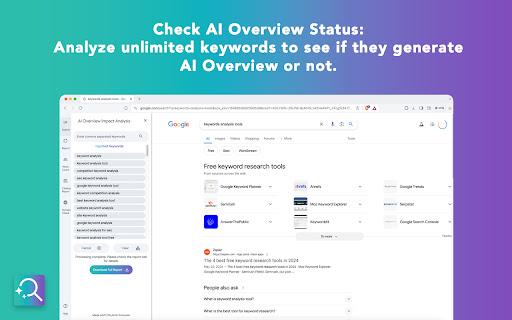


SEO analysis tool for AI Overview status on Google search, Perplexity responses, and ChatGPT conversations for unlimited keywords. 𝐌𝐚𝐲 𝟐𝟎𝟐𝟔 𝐔𝐩𝐝𝐚𝐭𝐞 - 𝐕𝐞𝐫𝐬𝐢𝐨𝐧 𝟑.𝟕: Rebuilt Perplexity and ChatGPT citation extraction to match their May 2026 UI redesigns, separated each platform's results into its own sidebar so they no longer overwrite each other, and improved the one-click redo button to re-run any individual keyword 𝐒𝐞𝐩𝐭𝐞𝐦𝐛𝐞𝐫 𝟐𝟎𝟐𝟓 𝐔𝐩𝐝𝐚𝐭𝐞 - 𝐕𝐞𝐫𝐬𝐢𝐨𝐧 𝟑.𝟓: Added support for ChatGPT citations to analyze AI-generated responses Introduced brand analysis for Google's AI Overviews to detect visibility and comparisons 𝐉𝐮𝐧𝐞 𝟐𝟎𝟐𝟓 𝐔𝐩𝐝𝐚𝐭𝐞 - 𝐕𝐞𝐫𝐬𝐢𝐨𝐧 𝟑.𝟎: Added support for Perplexity search engine with comprehensive citation tracking Implemented brand mention analysis to track competitor comparisons in AI responses 𝐀𝐩𝐫𝐢𝐥 𝟐𝟎𝟐𝟓 𝐔𝐩𝐝𝐚𝐭𝐞 - 𝐕𝐞𝐫𝐬𝐢𝐨𝐧 𝟐.𝟓𝟏: • Fixed issue with incorrect citation links appearing in reports 𝐃𝐞𝐜𝐞𝐦𝐛𝐞𝐫 𝟐𝟎𝟐𝟒 𝐔𝐩𝐝𝐚𝐭𝐞 - 𝐕𝐞𝐫𝐬𝐢𝐨𝐧 𝟐.𝟓: • Added new AI Overview Response tab for better analysis and export capabilities • Implemented customizable search delay settings for more flexible data collection • Introduced expandable sidebar width for improved user experience • Fixed blue links extraction in citations • Enhanced processing speed and overall performance 𝐒𝐞𝐩𝐭𝐞𝐦𝐛𝐞𝐫 𝟐𝟎𝟐𝟒 𝐔𝐩𝐝𝐚𝐭𝐞 - 𝐕𝐞𝐫𝐬𝐢𝐨𝐧 𝟐.𝟒: Updated the extraction logic to adapt to the new HTML structure in Google SERP's AI Overview citations. 𝐀𝐮𝐠𝐮𝐬𝐭 𝟐𝟎𝟐𝟒 𝐔𝐩𝐝𝐚𝐭𝐞 - 𝐕𝐞𝐫𝐬𝐢𝐨𝐧 𝟐.𝟑: • Added a new feature to display the position of cited URLs on the SERP when hovering over them in the report. • Introduced a doughnut chart that shows the distribution of cited URLs across traditional SERP, • PAA, and featured snippets. • Enhanced the Excel report to include SERP position information for each cited URL. --- Analyze Google's AI-generated responses on search results. Input unlimited keywords, run searches, and get detailed reports on AI Overview presence, keyword lengths, cited links, and top domains. You can also search specific domains to see their AI Overview keywords. All data is downloadable in an Excel sheet for comprehensive analysis. Main Features: • Check for AI Overview presence on SERPs with unlimited keywords. • Get reports showing the percentage of keywords with AI Overview. • Analyze keyword lengths and their impact with a pie chart. • View cited links and most referenced domains for AI Overview keywords. • Search specific domains to see which keywords trigger AI Overview. • Download all reports in a comprehensive Excel sheet with multiple tabs. • Background search functionality lets you multitask while the extension works. Why You'll Love It: • Gain insights into Google's AI-generated responses on SERPs. • Save time with automated searches and detailed reports. • Enhance your SEO strategy with data-driven analysis and visuals.

MetaPrompt - AI Prompt Engineer & Optimizer for ChatGPT & Claude
Transform unclear questions into expert prompts. Get better AI responses from ChatGPT and Claude with one click. Metaprompt: Your AI Whisperer Transform how you interact with AI MetaPrompt transforms your ChatGPT and Claude experience by intelligently enhancing your prompts. Powered by advanced GPT 4.1 models, our Chrome extension analyzes your questions and refines them to generate clearer, more precise AI responses - saving you time and frustration. Simple, Powerful Workflow 1. Type your question as you normally would 2. Click the MetaPrompt button to apply expert prompt engineering 3. Watch as your request transform into an optimized prompt that gets real results What Sets MetaPrompt Apart - Instant Optimization: Turn unclear questions into structured prompts that deliver exactly what you need - Seamless Integration: Works naturally within ChatGPT's and Claude's interface with zero learning curve - Universal Compatibility: Use our popup anywhere you interact with AI tools Choose Your Perfect Plan MetaPrompt Pro ($5.99/month) - 5000 monthly prompt enhancements - Access to larger, more powerful models for even better results Who Needs MetaPrompt? - Students seeking deeper explanations and research assistance - Professionals requiring accurate information for critical tasks - Writers looking for better creative input - Developers needing precise code solutions - Researchers formulating complex queries - Anyone tired of wasting time on unhelpful AI responses Stop struggling with AI miscommunications. Download MetaPrompt today and start getting the quality responses you deserve.

Writesonic - SEO Keywords & AI Search Insights
See keyword volumes, difficulty, and trends in Google results. Track AI query fanouts across ChatGPT, Perplexity, Gemini & Claude. Writesonic gives you keyword data and AI search insights without leaving your browser. 🔍 Keyword Data on Every Google Search Search anything and instantly see monthly volume, CPC, competition, SEO difficulty, and 12-month trend charts right in the results page. 📊 Related & Long-Tail Keywords Discover keyword variations, long-tail opportunities, and content gaps based on what's already ranking. Save to collections and export to CSV. 🤖 AI Query Fanout Tracking See the actual queries ChatGPT, Gemini, Perplexity, and Claude run behind the scenes. Understand how AI models find information so you can show up in AI answers. ✍️ Write Anywhere with Cmd+M Access AI writing assistance on any page. Works in Gmail, Google Docs, LinkedIn, Twitter, WordPress, and across the web. Why marketers pick Writesonic over other SEO extensions: Other keyword tools stop at search data. Writesonic connects SEO and AI search visibility in one extension. It's the browser companion to the full Writesonic platform for tracking, optimizing, and proving your visibility across both Google and AI engines.

GEO Checker – AI Visibility Score for ChatGPT & AI Search
Analyze any website for AI visibility and see how tools like ChatGPT understand, interpret your content in AI search results. Check how visible any website is in AI systems like ChatGPT, Perplexity, and AI-powered search engines. With one click, GEO Checker analyzes the current page and gives you a clear AI visibility score, helping you understand how well your content can be interpreted by AI. • Instantly analyze any page you visit • Get an AI visibility score based on real signals • See category-level performance (structure, readability, entities) • Understand how AI systems interpret your content • Identify weak points that affect AI discoverability If your content is not structured for AI, you risk being invisible in AI-generated answers. • Improve your visibility in ChatGPT and AI search • Optimize your content for AI understanding • Identify missing structure and signals • Stay ahead of AI-driven search trends Want deeper insights? Use the full GEO Checker: https://scalevise.com/ai-visibility-geo-checker

ChatGPT AI assistant for Google Reviews and Questions
Use ChatGPT to automate answering Google Reviews, change tones, work with all languages, and more, all for free. Use ChatGPT AI to reply to Google reviews. Works on Google Map and Google Search. You can change tones, reply in all languages, and more, all for free and powered by MailMagic AI. Reply to Google reviews with ChatGPT AI (privacy-friendly). FREE to use forever and No Ads. 🆓 ✔️ Highest quality responses that outcompete all other tools in the market. ✔️ Select interest level for your response. ✔️ All languages are supported. ✔️ Most stable free AI tool on the market for Google Review. (Do not fully rely on ChatGPT) ✔️ Machine learning on your frequent ask questions. Popular ways our users are using MailMagic's AI Assistant For Google Reviews: ✍️ Reply to Google reviews: Effortlessly craft the perfect message. Convince bad reviewers to remove their reviews. 🔍 Grammar Fixes: Eliminate typos and grammatical errors with ease. 🌐 Translation: Translate an existing review to any language. 🔄 Rephrasing: Make your text clearer and more impactful. 📝 Summarization: Turn lengthy text into concise summaries in seconds. 💼 Tone Adjustment: Adapt the tones of your message in a click (Polite, Professional, Mean, etc).
