
bepabeobdmmefhhhkonppcppgodhjdno
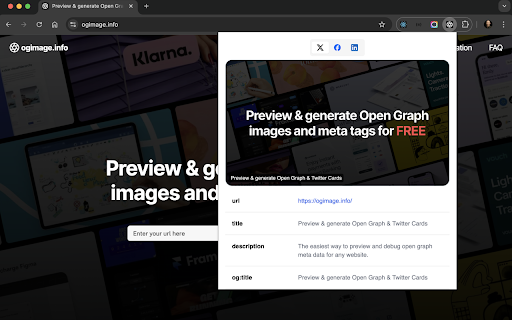


The easiest way to preview and debug opengraph and social sharing images and tags See how Open Graph & Twitter cards look from anywhere in your current tab. Whether you're a developer working locally or just browsing the web, OG Preview helps you understand how webpages present themselves on social media platforms. Key Features: • Instant previews for Twitter, Facebook, and LinkedIn • Check Twitter card types (summary_large_image or summary) • View Open Graph & meta tags in a clear table format • Identify missing tags at a glance Perfect for: • Click the extension icon on any webpage • View platform-specific previews in separate tabs • Check the tag table to see what's present and what's missing Give it a try and see how your pages (or any site you visit) will look when shared across the social web. Your feedback is welcome and helps improve the extension 👇!

Localhost Open Graph Debugger
Localhost Open Graph Debugger is a Chrome extension designed to check the Open Graph meta tags on locally hosted websites. By temporarily hosting the meta tags on our site, it simplifies the process, allowing you to easily verify them without the need for tunneling tools like ngrok.

Open Graph Checker
Check Your Open Graph Open Graph Checker This extension helps you to check the site's open graph for social media previews. Support Twitter, Discord, Linkedin and Facebook

OG Spy
The Open Graph protocol allows any web page URL to be displayed as a rich object on social media platforms by utilizing hints found in the page header. This extension retrieves and displays a few of them: If 'og:title' or 'og:description' are missing, the extension will fall back to the standard 'title' and 'description' meta tags. If 'og:image' is present, it will be displayed as an image. Version 1.3.0 brings: ● A new icon with a flame-colored cat-eye design ● Popup styling that adapts to light/dark mode ● Removed placeholder for missing favicon

OGraph Previewer
A light-weight extension to preview the open graph tags ( og tags) of the page in your current tab Provides a quick preview of open graph data of the page on the current tab. This will give an idea of how the link would look if shared on social media platforms. This tool can be used to improve the SEO of your page while in development. It can also be used to check your open tags of the pages that are already in production. You can also copy the existing og tag data on the page for debugging purposes.
