
bejlkjkhhlbepgecabbjopdjkelfjnim
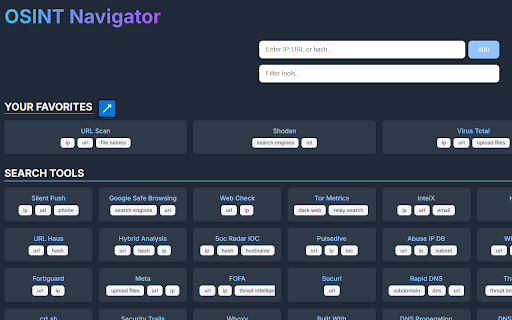

Select any IP, URL, domain or hash, right-click, and send it to OSINT Navigator for instant analysis. Select any IP, URL, domain or hash, right-click, and send it to OSINT Dashboard for instant analysis.

OSINT Multi-Engine Search
OSINT Multi-Engine Search lets you search selected text (or enter a query) across 100+ search engines in 55 countries via a right-click menu. - Country-specific engines: Search engines organized by continent and country for international research - Search across major search engines and more AI-powered services - Quick access: Right-click any selected text to search instantly Prompted input: No text selected? Enter your query when prompted Perfect for OSINT researchers, journalists, investigators, and anyone needing to cross-reference information across multiple sources.

FoxyRecon
A Firefox add-on for OSINT investigations FoxyRecon is a Firefox add-on that helps you carry out searching and investigation activities by using over 90 Open Source Intelligence (OSINT) web resources and an internal tool to create graphs supporting the STIX format. Main Features - You can research and analyse your indicators on more than 90 online OSINT resources, by using the popup or the context menu after selecting your indicator. FoxyRecon will detect the type of the indicator you submitted and suggest you the most suitable web resources. - You can harvest and collect all the indicators that are present on the web page you are visiting. FoxyRecon allows you also to download them in CSV file for future analysis. - You can add custom resources to FoxyRecon, for example local tools (e.g.: MISP, OpenCTI and so on) - You can create a graph from the data collected during your investigation analysis. Graphs are based on STIX format to ensure compatibility with other tools. Moreover, FoxyRecon is able to automatically create graphs on the basis of searches you perform via FoxyRecon Some web tools requires some user interactions, such as entering a query and clicking a button to submit it. To perform these actions faster, FoxyRecon will automatically fill input fields on these web pages, with the indicator you are looking for. Currently, FoxyRecon supports the following indicator types: FoxyRecon includes several OSINT web resources. The full list is available on the GitHub repository webpage. Disclaimer Data submitted using this add-on will be sent to external web resources that are not under control of FoxyRecon. For this reason the data submitted will be treated in accordance with the terms of service of the several web resources chosen for analysis. Please, be aware of the tools and resources you are using and do not submit any personal information.

OSINT Extension
A Chrome extension that allows users to quickly check IP addresses, SHA hashes, and domain names against multiple OSINT (Open Source Intelligence) platforms. Simply highlight the text on any webpage, right-click, and instantly check its reputation across popular security platforms. *NEW FEATURE* You can now right click any link and run it through Any Run's Safebrowsing tool

IOC-SwiftDraw Pro
Fast, privacy-first OSINT Chrome extension: right-click any IOC to pivot instantly with customizable context menus. ## What’s New in v1.2.0 - **Auto-Defang/Refang:** toggle to safely defang or restore any IOC for copy/paste workflows - **Expanded Categories:** now supports ASN, File, Vulnerabilities, Blockchain, Utilities, ThreatIntel & Misc - **New Tools:** dozens of hand-picked OSINT sources added under each category - **Profiles:** create, name & switch between custom tool loadouts to match any investigation **IOC-SwiftDraw Pro** Transform your right-click menu into a full OSINT console. **Key Features:** - 🧛♂️ **Auto-Defang/Refang:** toggle to safely defang or restore any IOC for copy/paste workflows - 🚀 **Instant Launch:** right-click any IP, domain, URL, hash, email or file—pick your tool and go - 🏹 **SwiftDraw Mode:** bulk-open all selected tools in one shot - ⚙️ **Fully Customizable:** enable, reorder or disable any source per category in Extension Options - 🧠 **Profiles:** save multiple configurations (e.g. “Fast Triage” vs “Deep Dive”) and switch on the fly - ⚡ **Lightweight & Fast:** built as a Manifest V3 service worker for sub-50 ms context-menu response - 🔒 **Privacy-First:** no data ever leaves your browser unless you click a tool link **Extension Options:** Use the ⚙️ Options page to tailor your workflow—reorder categories, toggle individual tools, configure SwiftDraw behavior, manage defang settings, and save custom profiles. **How It Works:** 1. Highlight or right-click an IOC (IP, domain, URL, hash, etc.) 2. Select your tool from the context menu 3. For batch investigations, check the 🏹 SwiftDraw box in Options, then click **SwiftDraw** **Key Benefits:** - Centralize your OSINT workflow and eliminate bookmark clutter - Accelerate incident response with one-click batch investigations - Maintain strict data privacy with entirely local settings
