
bedddldfkpeoibpglejikpppdaajolib
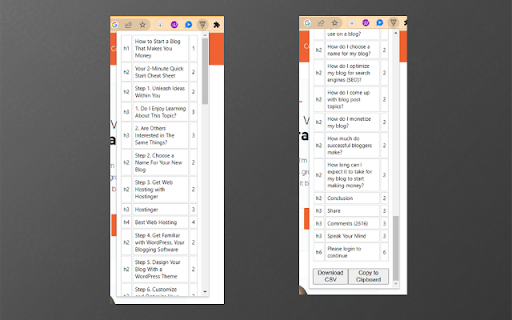
🔍 Are you looking to streamline your SEO workflow, optimize your blog outlines, or… 🔍 Are you looking to streamline your SEO workflow, optimize your blog outlines, or enhance your online research? Look no further! The Easy Headers extension is here to revolutionize your process! 🎉 Easy Headers is a 💪 powerful tool that allows you to scrape and download heading tags (H1-H6) from any webpage in an instant. From SEO specialists to writers and researchers, anyone who needs a quick and effective way to review page structure will find this tool invaluable. 🌟 📑 By creating a clear CSV file of all header tags on a page, Easy Headers helps you visualize the structure of your content. This way, you can easily adjust and optimize your headings for SEO, create detailed blog outlines, or use them to guide your research. Plus, you can quickly copy all the data to your clipboard, making it incredibly easy to paste into Google Sheets, Excel, or your favorite notepad. 🚀 SEO Specialists - Review the structure of your headings to optimize your on-page SEO. Get a quick snapshot of your page's content hierarchy and identify areas of improvement. 🎯 Writers & Bloggers - Creating a detailed outline for your next blog post is as simple as clicking a button. With Easy Headers, you can visualize the flow of any article and shape your outline accordingly. 📝 Researchers - Dive deep into the outline of lengthy articles, academic papers, or comprehensive guides. Easy Headers will help you to extract main points, focus areas, and the overall structure in no time. 📚 Give Easy Headers a try today and elevate your SEO game, streamline your writing process, and turbocharge your research! 🚀

SEO SERP Extraction Tool
The SEO SERP Extraction Tool is a powerful and easy-to-use extension to quickly extract URL in search results. The SEO SERP Extraction Tool is a powerful and easy-to-use Chrome extension designed for SEO professionals and digital marketers. This tool enables you to effortlessly extract Search Engine Results Page (SERP) data directly from Google, allowing you to analyze and optimize your SEO strategies effectively. **Features** - Simple SERP Data Extraction: Quickly extract the title, URL, and position of search results from Google's SERP. - User-Friendly Interface: Clean and intuitive interface for viewing and managing extracted data. - Instant Search: Filter extracted data on the fly using the built-in search functionality. - Export to CSV: Easily export your SERP data to a CSV file for further analysis and reporting. Seamless Integration: Automatically opens the extracted results in a new tab for convenient viewing. - People Also Ask (PAA) Data Extraction: Extract questions and answers from Google's "People Also Ask" section. - Export PAA to CSV: Export the extracted PAA questions and answers to a CSV file for easy reference and reporting. **How It Works** -Activate: Click the extension icon while on a Google search results page. - Extract: The tool will automatically extract the SERP data. - View: The results are displayed in a new tab with a clean and organized table. - Filter: Use the search input to quickly find specific URLs, titles, questions, or answers. - Export: Click the export button to download your data as a CSV file. **Use Cases** - SEO Audits: Easily gather SERP data to analyze competitors and identify opportunities for improvement. - People Also Ask Insights: Leverage PAA data to optimize content for common search queries. **Why Choose SEO SERP Extraction Tool?** - Efficiency: Save time by automating the data extraction process. - Accuracy: Ensure precise data collection directly from Google's SERP and People Also Ask section. - Convenience: Quickly access and manage your data within the extension's user interface. - Flexibility: Export data for use in various SEO tools and reporting systems. - Free to Use: The tool is completely free! If you find it helpful, consider supporting me to keep improving and adding new features.

Heading Extractor
Extractor all headings h1-h6 from a web page Heading Collector: Streamline Your Content Analysis Effortlessly extract and organize webpage headings with Heading Collector, the ultimate tool for content creators, SEO specialists, and web researchers. Key Features: - Instant Extraction: Automatically collects all headings (H1 to H6) from any webpage with a single click. - Hierarchical Display: Clearly shows the structure of content with easy-to-read formatting. - One-Click Copy: Quickly copy all collected headings to your clipboard for easy pasting into your documents or tools. - User-Friendly Interface: Clean, intuitive design makes navigation a breeze. - Time-Saving: Eliminates the need for manual searching and copying of headings. Perfect for: ✓ Content Writers: Quickly analyze article structures and outlines. ✓ SEO Professionals: Easily audit heading structures for optimization. ✓ Researchers: Rapidly capture key points from academic papers or reports. ✓ Web Developers: Swiftly review and assess heading hierarchy in web projects. ✓ Students: Efficiently create study notes and content summaries. How It Works: 1. Navigate to any webpage 2. Click the Heading Collector icon 3. View all headings instantly in our sleek popup 4. Copy all headings with one click Boost your productivity and streamline your content analysis workflow with Heading Collector. Download now and experience the power of efficient heading extraction.

People Also Ask Extractor
The "People Also Ask Extractor" is a user-friendly Chrome extension designed to streamline the process of gathering valuable… The "People Also Ask Extractor" is a user-friendly Chrome extension designed to streamline the process of gathering valuable insights from Google's "People Also Ask" (PAA) section. This tool is particularly beneficial for SEO professionals, content creators, researchers, and anyone who needs to quickly access and compile a list of commonly asked questions and their answers from Google search results. Easy Extraction: With a simple click, the extension extracts questions and answers from the PAA section on Google search results, presenting them in a neatly organized format. Copy Functionality: Users can effortlessly copy all extracted Q&A pairs or just the questions to their clipboard. This feature saves significant time and improves efficiency in data collection. Clickable Q&A Blocks: Each question and answer pair is displayed in an individual block. Clicking on a block automatically copies that specific Q&A to the clipboard, making it extremely convenient to select and use specific information.

BlogStorm: People Also Ask Tool
Extract and organize People Also Ask questions from Google search results for better content research What's New in Version 1.0.4 We are excited to announce the release of Version 1.0.3, bringing powerful new functionality to BlogStorm! Here's what's new: 🆕 Integration with BlogStorm * Seamless Workflow: You can now push PAA questions directly to BlogStorm to create PAA content in minutes. * Enhanced Content Creation: This integration streamlines your ability to generate insightful, SEO-friendly content from Google's People Also Ask (PAA) questions. BlogStorm’s People Also Ask Tool Transform your content research with smart PAA analysis! Extract and analyze Google's PAA questions for better content research and SEO insights. Key Features ✨ Real-time PAA Extraction * Instantly extract People Also Ask questions from Google search results. * Capture complete question trees with expandable branches. * Analyze questions at multiple depth levels. 💾 Export Capabilities * Download all extracted data in CSV format. * Includes questions, answers, and source URLs. * Perfect for content planning and SEO research. Perfect For: * Content Writers * SEO Specialists * Digital Marketers * Researchers * Anyone interested in topic exploration How It Works: 1. Perform a Google search. 2. Click the BlogStorm icon. 3. Select your desired extraction depth. 4. Click "Grow Tree" to start. 5. Export your data with one click. Privacy & Security * Works only on Google search pages. * No personal data collection. * Completely secure and transparent. Thank You for Using BlogStorm! Your feedback is invaluable to us. Stay tuned for more updates and improvements. Unlock deeper insights into your content research today!
