
bebhhjmapjadpdkkhbkpnpbjhkhndofl
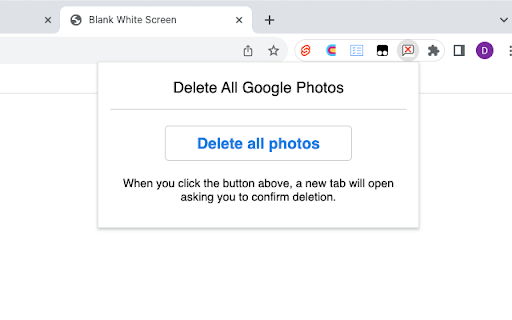

This extension automates bulk deletion of your Google Photos since Google doesn't allow you to. Delete thousands of photos and free up your storage space! For some reason Google won't just let you delete all photos in Google Photos, so this extension automates selecting all photos and deleting them so you don't have to manually click hundreds or thousands of photos. This will help a lot to get rid of the “Gmail is almost out of storage” message. 🌟 “The only way to easily remove your Google Photos library. Saved me literally hundreds of hours of boring clicking. Thank you.” – Reviewer. After you install the extension, a screen with deletion options will appear. A confirmation screen is shown before the deleting process starts. Then just leave the browser tab open and let it work. By default, there is a limit of 500 deletions per day. For a small one-time payment that buys lifetime access to the extension on any browser, you can delete without any limits. This is to make the extension worthwhile to update and maintain. Some people don’t realize the amount of work that goes into extensions and think everything should be free. Making good extensions is hard work and requires compensation! We hope you'll understand. 🥺 Note: this extension does not read, store, or transmit your Google Photos or other browsing data in any form. The extension needs permission to access extensionpay.com to manage your paid features, but no information is shared with this site. Please consider leaving a review! Many reviewers try the extension once, there's a bug, they leave a bad review, the extension is fixed, and then they never update their review, leaving other potential users with a mistaken impression. Your review would help correct this which would help many people, including me. Thanks! Changelog: v2.5 — Added the ability to delete photos in the Google Photos archive. v2.4 — Fix bug where languages other than English would cause deletion to stall. v2.3 — Fix another change that Google made. v2.2 — Google changed a button slightly, breaking the extension. This update fixes that. v2.1 — Fixed bug caused by Chrome v130 that made extension not work at all. v2.0 — Upgraded limit on free deletions per day, added more payment methods. v1.8 — Added ability to choose which Google account to delete from. v1.7 — Extension will now keep working when each batch of photos takes a long time to delete. v1.6 — Slight name change v1.5 — Fix French and Chinese language errors. v1.4 — Even more robust deleting for large photosets or slow browsers. v1.3 — Much faster deletion and more robust deleting for very large photo sets.

Chrome Web Store
Add new features to your browser and personalize your browsing experience.

Delete all Google Photos (One-click)—Chrome Extension
Sick of that “Gmail is running out of space” nag? Or already backed up all your photos to iCloud and now google photos has *duplicated* them—eating up your storage? ✅ Use this extension to one-click select and delete all your Google photos. Zero dollars and zero patience required. 1. Ensure you’re on the main [photos.google.com](http://photos.google.com) website with the grid view of your photos (not inside any albums) 2. Open the “*Delete all Google Photos in Bulk*” extension in Chrome. 3. You should see a small pop-up. Enter the number of photos you want to delete. 10,000 is default (and max). You can run it multiple times if needed. 4. Click “*Start Deletion Process*” 5. Confirm by clicking “*Move to Trash*” pop-up Your photos should now be moved to trash. Don’t forget to “*empty trash*” later. ✨ If this saved you a few hours, consider buying me a coffee here: https://buymeacoffee.com/shipitdigital Appreciate it :) ✨ This extension needs permission to access the website photos.google.com to automate bulk selection of photos. It does NOT collect or store any of your pictures. You can read our privacy policy here: https://deleteallphotos.click/privacy-policy

Google Photos Cleaner
Google Photos Cleaner is a powerful Chrome extension that helps you manage your Google Photos library efficiently. It automatically selects and deletes multiple photos, saving time and keeping your photo collection organized. Customizable Deletion Limit – Set the maximum number of photos to delete per session (default 10,000). Automatic Scrolling – Ensures all photos in your library are considered for deletion. Progress Tracking – Shows real-time updates on photos selected and deleted. User-Controlled – Deletion only starts when you click the extension icon. Install the extension from the Chrome Web Store. Click the extension icon in your Chrome toolbar. The tool will automatically select and delete photos based on your settings. Use with caution – This tool performs bulk deletions. Ensure you want to delete selected photos. Permanent Deletion – Deleted photos go to Google Photos Trash and will be permanently removed after 60 days unless restored. Entire Library – The tool operates across your full Google Photos account. Requires Stable Internet – Bulk operations may slow your browser temporarily. Works entirely in your browser; no personal data or photos are collected or transmitted.

Google Photos Bulk Downloader & Deleter
Automatically downloads and/or deletes all photos and videos from Google Photos. Google Photo Bulk Downloader is designed to automate the download of your precious photos and videos from Google Photos. No more tedious manual downloading—this extension does the work for you! 🎉 🌟 Key Features ✅ Auto Download and/or Delete Photos & Videos – The extension automatically opens each image or video, simulates the shortcut Shift + D, and saves them to your computer. 💾 ✅ Smart Navigation – After downloading, it presses the right arrow key to move to the next media file. ✅ Hands-Free Operation – Once started, it continues downloading without manual intervention until the set limit is reached. 🏆 ✅ Set Your Download /Deletion Limit – Choose how many photos and videos you want to download in one session. 🎯 ✅ Fast & Efficient – Optimized for smooth and quick batch downloads and deleting. ⚡ ✅ User-Friendly – Simple, clean interface with just one click to start the process. 👌 🎯 How It Works? 1️⃣ Open Google Photos in your Chrome browser. Show the items to process (Home, Album, etc). Or select the first photo from which to start downloading or removing 2️⃣ Adjust the delay if needed and set a Base folder name. Choose the desired mode (download only, download + delete, or delete only). Click on Start in the extension to start the process. 3️⃣ The extension will: 🔹 Click the first photo/video to open it. 🔹 Simulate Shift + D to download and/or simulate the click on the trash icon to delete the item. 🔹 Press the right arrow key to move to the next media. 🚀 Why Use Google Photo Bulk Downloader? 🔹 Save Time – No need to download photos one by one. 🔹 Effortless Process – Just start it and let it run! 🔹 Perfect for Backups & Clean – Keep your memories safe on your local storage and free up valuable space on Google Photos Start saving your memories with one click! Download Google Photo Bulk Downloader now and enjoy hassle-free bulk downloads! At the same time you will free up valuable space on Google Photos! 🔥🎞️
