
bdhknkbhmjkkincjjmhibjeeljdmelje

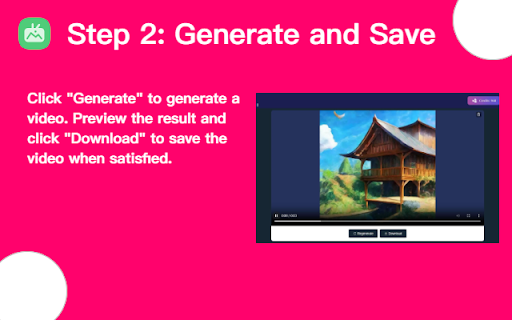
Use Arting AI to convert image to video, generate videos with unlimited creativity Sora Image To Video - Arting AI, a cutting-edge browser extension that revolutionizes video creation. With Sora Image To Video, you can upload a image and harness the power of AI to generate a video based on the uploaded content. Simply follow these steps: 1. Upload your original image; 2. Input a prompt, then click the generate button; 3. View the results and download your newly generated video. Sora Image To Video - Arting AI streamlines the video editing process and unleashes your creativity like never before!

Whisk Automation for bulk image generation & Auto prompt for Whisk AI
Bulk AI image generation for Google Whisk AI. Auto prompt processing & local asset capture to scale your synthetic imagery workflow. Whisk Automation: Bulk Image Generation & AI Prompts Whisk Automation: Get 30 Days Free! Bulk generate images in Google Whisk, automate AI prompts, and export assets instantly. The ultimate tool for AI batch processing. Tired of manual, one-by-one image creation? Whisk Automation is the power user’s bridge to industrial-scale production. We fix the "slow generation" problem with an intelligent Google Whisk auto downloader and AI prompt generator, allowing you to create and export thousands of assets for Etsy, eCommerce, or Microstock sites with zero manual effort. 🎁 Exclusive Offer: 30 Days Risk-Free! Experience the full power of professional AI automation. Install today and get 30 days of unlimited access to our batch processing, auto-downloading, and file conversion features for free. 🛠️ Key Features for High-Volume Creators Whisk AI Batch Processing: Don't waste time on single clicks. Upload a CSV or a prompt list to generate multiple images at once in Google Whisk. Google Whisk Auto Downloader: Say goodbye to "Right-Click Save As." Our engine automatically detects every generation and initiates a bulk export directly to your drive. Automate Google Whisk Prompts: Our "Human-Mimic" timing patterns automate your workflow using natural delays to stay within rate limits and keep your account safe. Real-Time Queue Dashboard: Monitor your production line live. Track progress, remaining prompts, and success rates from a unified dashboard. Background Auto-Recovery: If your browser crashes or the page refreshes, Whisk Automation automatically resumes your batch right where you left off. Multi-Format Image Export: Instant conversion. Save your bulk exports as PNG, JPG, or WebP (optimized for web speed and SEO). Whisk AI for Power Users: Includes professional-grade smart compression and metadata tagging, perfect for studios and agencies. 🎨 Who is Whisk Automation Built For? Etsy Shop & eCommerce Owners: Create hundreds of high-quality vector designs, clip art, or product mockups in minutes. Microstock Site Contributors: Dominate Adobe Stock and Freepik by bulk generating and exporting assets in half the time. Marketers & Designers: Rapidly iterate on A/B test ad creatives and social media visuals. Developers & Founders: Speed up your MVP development by automating all UI assets and placeholders. ❓ Frequently Asked Questions (FAQ) Is the 30-day free trial really unlimited? Yes! For your first 30 days, you get full access to all premium features, including bulk image generation and the auto prompt generator, so you can experience the workflow before you commit. How do I generate 100 images at once? Simply open our extension, paste your list into the Whisk AI batch processor, and click start. The tool will handle the prompts and the bulk export automatically. Will this keep my account safe? Absolutely. We use a natural timing engine to automate Google Whisk prompts safely, ensuring your usage patterns remain human-like to avoid rate limits. Can I export to WebP format? Yes. You can choose your output format (PNG, JPG, or WebP) during the setup, making it easy to create lightweight images for your website. 📥 Get Started in Seconds Install Whisk Automation from the Chrome Web Store. Claim your 30-day free trial upon launch. Start your first batch and watch your library grow automatically.

Text to Video - AI Video Creator | Pictory
Convert any text or URL into a professional AI-generated video with captions, visuals, and voiceovers — powered by Pictory 🎬 Turn Any URL or Text into a Video Instantly The Text to Video Chrome Extension by Pictory lets you transform any online article, webpage, or script into a complete video, all without leaving your browser. 📋 Paste a URL or text, and our AI automatically extracts the main ideas, writes a script, selects visuals, and adds captions and voiceovers. Whether you’re a marketer, educator, or content creator, you can turn blogs, research papers, or news articles into ready-to-publish videos in minutes. ⚙️ How It Works Step 1 – Capture a URL or Enter Text While browsing any webpage, click the Pictory Chrome Extension. The extension automatically captures the URL. Step 2 – Choose Video Type Select your preferred video style: 💡 Explainer 📣 Marketing 💼 Internal Communication 🎓 Tutorial This helps the AI tailor the tone and flow of your script. Step 3 – Generate Your Script Click “Generate Script.” Pictory AI will summarize the webpage or process your text input to create a concise, editable script optimized for video storytelling. Step 4 – Edit and Customize You’ll be redirected to your Pictory workspace, where you can: • Review and edit the generated script • Adjust visuals, captions, and audio • Apply your brand kit (logo, fonts, colors) • Choose voiceovers and music Step 5 – Generate and Download Video Preview your project and download a high-quality video, ready to share across social platforms, websites, or presentations. ✨ Key Features 🔗 URL to Video: Convert any online article or web page into a summarized AI video. 📝 Text to Video: Paste any text, and Pictory turns it into visuals, captions, and voiceover. 🧩 AI Script Summarizer: Automatically extract key ideas from long-form content. 🎨 Fully Customizable: Edit scenes, captions, visuals, and add your brand kit. 🎙️ Voiceover and Subtitles: Choose professional AI voices and auto-generate subtitles. ⚡ One-Click Workflow: Seamlessly integrated with your browser and Pictory account. 👥 Who It’s For 📈 Content marketers repurposing blogs and news articles into videos. 🎓 Educators turning lessons or research into visual explainers. 🏢 Corporate teams creating internal communication videos. 🎥 Creators and entrepreneurs sharing insights on YouTube, LinkedIn, and TikTok. 💎 Why Choose Pictory Pictory’s award-winning AI video platform powers this extension, enabling effortless text-to-video and URL-to-video conversion. 🌍 Trusted by over one million professionals worldwide, it combines script generation, video editing, and brand management in one seamless workflow. 🔒 Privacy & Permissions This extension requires minimal access: • Reads the active webpage only when you click the extension • No background tracking or data storage • Processes text securely via your authenticated Pictory account

AI Image Generator - Text Generate Image
Use AI image Generate to quickly get the desired image. Suitable for art design, brand images and other fields AI Image Generator: Create stunning images with ease, Instantly Visualize Your Ideas Unlock your creativity with the AI Image Generator that transforms your descriptions into stunning visuals directly in your browser. 🚀 Elevate Your Creative Process with AI Image Generator Experience unparalleled visual creativity with this innovative AI Image Generator. Seamlessly integrated into your browsing experience, it opens up a world of artistic possibilities. 🎨 How to Use the AI Image Generator Install the AI Image Generator Extension: Download it from the Chrome Web Store. Launch the AI Image Generator Tool: Click the extension icon in your browser toolbar. Input Your Prompts: Enter detailed descriptions of the images you wish to create. Generate Visuals Instantly with AI Image Generator: Watch as the AI brings your ideas to life with breathtaking, high-quality visuals. 🌐 Instant Access to Visual Inspiration with AI Image Generator One-Click Activation: Access AI-powered visuals effortlessly with a single click using the AI Image Generator. Limitless Creative Potential: From concept art to product designs, let the AI Image Generator fuel your imagination. 🖼️ Generate Stunning Visuals with AI Image Generator Prompt-Based Creation: Describe your desired image; the AI Image Generator generates visuals tailored to your input. Highly Detailed Results: Expect realistic, high-resolution images that meet your creative needs. 🎨 Fuel Your Creative Projects with AI Image Generator Concept Exploration: Visualize characters, scenes, or ideas for your artistic endeavors using the AI Image Generator. Design Inspiration: Effortlessly create product sketches, logo concepts, or mood boards with the help of the AI Image Generator. 🔍 Explore and Discover with AI Image Generator Visual Search: Upload an image to find similar or complementary visuals that inspire you through the AI Image Generator. Expand Your Creative Vision: Discover new perspectives through AI-generated imagery. One-Click Access: The AI Image Generator is always just a click away for quick visual creation. Dynamic Image Generation: Describe your visuals, and let the AI Image Generator craft them based on your prompts. Visual Search Capability: Easily find similar visuals by uploading your images through the AI Image Generator. Adaptive Learning: The AI Image Generator evolves with each prompt, enhancing its understanding of your preferences. 🌟 Why Choose the AI Image Generator? Unlock Visual Creativity: Bring your imaginative ideas to life with the AI Image Generator. Instant Inspiration: Enjoy a continuous stream of visual inspiration right within your browser thanks to the AI Image Generator. Streamline Your Creative Workflow: Generate visuals alongside your browsing experience for maximum efficiency with the AI Image Generator. Stay Ahead in Technology: Leverage the latest advancements in AI image generation technology. 💡 Get Started with AI Image Generator Now Unleash your visual creativity with the AI Image Generator extension for Chrome. Whether for personal projects, professional design work, or artistic exploration, this tool empowers you to transform ideas into stunning visuals effortlessly. Download now and embark on a journey of limitless creativity with the AI Image Generator. 🚀 Join the Visual AI Revolution with AI Image Generator Step into the future of image creation with the AI Image Generator. Enhance your creative process with stunning visuals and discover the full potential of AI with every click. 💻 Download the AI Image Generator extension today and unlock a world of visual possibilities. The future of image creation is here—powered by artificial intelligence. Welcome to a new era of creativity and visual expression at your fingertips.

Potion Screen Recorder - Easily Create Personalized AI Videos
Convert screen recordings into personalized AI videos. Create realistic personalized AI videos. Clone your face, voice & gestures. Potion allows you to easily create customized & personalized AI Videos. Potion is a leading AI video software that empowers you to break through the clutter and connect with your audience in deeper way. Who benefits from Potion videos? - Sales & Marketing Professionals: Close more deals and build lasting relationships with personalized video email marketing. - Recruiters: Stand out and attract top talent with engaging video introductions. - Agency Owners: Showcase your expertise and win over clients with impactful video proposals. - Customer Support Executives: Humanize your interactions and resolve issues faster with personalized customer experiences, delivered with video. - Product Managers: Generate excitement for new features with engaging product demos delivered through AI video personalization. - E-commerce Store Owners: Boost conversions and personalize shopping experiences with targeted video messages. - Real Estate Agents: Showcase properties in a whole new light with personalized video tours. Why choose Potion AI? - Craft Powerful, Personalized AI Videos at Scale: Say goodbye to generic text emails and hello to personalized AI videos! Record a single message and let Potion AI's magic take over. It's like mail-merge for videos, but with the power of AI personalization. - Generate Videos From Text: Use our Personal AI avatars to bring the human element to automated communications. It mimics your gestures, facial expressions, and speech patterns. Thus, making the content feel more engaging and relatable. - Effortless Integration with Your Workflow: Streamline your personalized video outreach with Potion AI. Seamlessly integrate with LinkedIn Messenger and Gmail. Create and share personalized videos at scale directly within your existing tools in just a few clicks. - Boost Sales & Marketing Results: Studies show that personalized videos can increase response rates by up to 500%. With Potion AI, you can easily create personalized video sales letters (VSLs), do AI video prospecting, and run personalized video email marketing campaigns that resonate with your audience and drive results. - AI Prospecting Powerhouse: Level up your AI cold outreach with personalized video emails. Potion is one of the most accessible AI video prospecting software. Thus, you can craft personalized videos at scale to build trust and convert leads faster. Get Started with Potion AI in Minutes: 1. Install the Free Chrome Extension: Get up and running quickly with Potion AI's easy-to-use Chrome extension. 2. Create Personalized Video Templates: Log in to your Potion account and record an engaging video base template tailored to your specific audience and goals. 3. Record Once, Personalize for All: Our AI video personalization software transforms your single recording into personalized videos for each recipient. It's like having your own AI video production team working for you. 4. Don’t Wanna Record? Just Type: Once you've trained our video AI, creating videos with your own face and voice is as simple as typing out a script. It’s that easy! Ready to see the magic in action? Try it today and experience the future of AI video creation. 5. Share Your Videos with Ease: Choose from various sharing options, including links, GIFs, and direct email embedding into LinkedIn messages. Benefits of Using Potion AI: - Build Stronger Relationships: Showcase your genuine interest and connect with clients on a deeper level through personalized video communication. - Stand Out from the Crowd: Break through the text-based email fatigue and grab attention with visually engaging and personalized AI videos. - Boost Trust with Your Audience: Demonstrate your commitment and authenticity with personalized video messages, leading to increased trust and conversions. - Drive Sales & Upsells: Deliver compelling video pitches and personalized product demos to close deals faster and nurture existing customer relationships with impactful video messages. Potion is the easiest way to create mass personalized videos. Potion auto-generates personalized videos without having to record individual videos for each recipient. Potion videos work like mail-merge, but for videos. Record for one, personalize for all. You can record and send videos directly from LinkedIn messenger and Gmail. Potion videos can be shared as links, GIFs, or embedded within your LinkedIn direct messages to add some character and some personalization to your written correspondence. You can use personalized videos in your emails to: - Build stronger relationships with your clients - Stand out from other sales people - Increase trust with your prospects - Upsell to existing customers - Deliver powerful sales pitches and demos Visit www.sendpotion.com to learn more and start your free trial.
