
bdanhcciaojllkmcebhoadjkndbhhimd
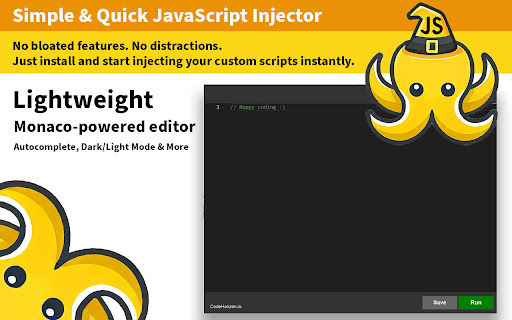

Inject, tweak, and customize JavaScript on any website with a powerful Monaco-powered editor. TamperJS is a lightweight and efficient browser extension designed for developers who need a quick and seamless way to inject custom JavaScript into any website. Built with the Monaco Editor—the same technology behind VS Code—it provides a clean and intuitive environment for writing, testing, and executing scripts effortlessly. Whether you're a developer optimizing workflows, a researcher testing scripts, or a power user customizing web pages, TamperJS provides an easy-to-use interface with domain-based script management, instant execution, and a seamless dark mode for a comfortable coding experience. Our goal is to keep things simple yet effective, helping you customize the web in a way that suits your needs.

Translate Website
Easy Translate Website – translate any website in one click. Fast website translator with accurate web page translation. Translate Website is a powerful website translator designed to help you work with foreign content effortlessly while browsing. This advanced web page translator lets you translate web pages and understand global content without leaving your browser. 🌍 Every day users open pages in unfamiliar languages. News, blogs, and online stores often contain valuable insights, but language becomes a barrier. With this tool, you can translate web content instantly or smoothly convert into your preferred language, making language translation feel natural and seamless. Imagine reading a French tech article. Instead of copying text into another tool for text translation, you can instantly render into English directly. The extension performs fast Full-page translation, showing clean and readable translated text without interrupting your flow. Another case: you open a Japanese marketplace with unique products. Descriptions and reviews are difficult to understand. With one click, you can turn into English the entire page and clearly see all translations, helping you make confident decisions. Students and researchers benefit as well. When working with academic materials, they often need to interpret or paraphrase complex information. This extension helps Translate web pages or put into plain English difficult passages, making study faster and more efficient. Travelers frequently visit local booking platforms that are not available in their language. Instead of struggling, they can translate website to english or simply convert into their native language to understand directions, pricing, and details. ✈️ Key features include: ✧ One-Click Web Translation ✧ Instant Full-page translation for entire pages ✧ Accurate text translation and paraphrase options ✧ Smart Web page translation powered by modern tech ✧ Smooth Translate while browsing experience The extension supports multiple language environments and provides translations in over 100 languages. You can easily put website into english, or render into French, Chinese, German, and more for users worldwide. Professionals often need to process foreign documentation. For example, a developer reading Chinese guides can quickly decipher the content or rephrase technical parts into clear instructions using this website translator. Supported capabilities include: -Translate web pages instantly -translate any website while browsing -perform fast Web page translation -put in plain English complex content Powered by advanced systems, the extension lets you Translate with AI, delivering accurate and natural language translation. It understands context and can even gloss difficult phrases, making content easier to follow. Another real-life case: following international news. Updates often appear first in local languages. You can quickly get web pages on your language, interpret key details, and stay informed without waiting for official translations. Why users choose Translate Website: ➤ Fast translate web content instantly technology ➤ Reliable website translator for daily use ➤ Smooth Full-page translation experience ➤ Intuitive web page translator interface ➤ Advanced Translate with AI capabilities If you are wondering how to translate a website, the solution is simple. Open any page and let the extension read any website, convert into your language, or render into English with one click. 🚀 Main advantages: ▸ Quick translate any website feature ▸ Accurate Web page translation results ▸ Clear and readable translated text ▸ Powerful language translation engine ▸ Support for multiple language use cases Designed for simplicity, Translate Website works as an easy browser tool that helps you understand foreign content. It allows you to Translate websites, reword complex phrases, and instantly access global information. This AI-powered solution helps you translate web content instantly, Translate web content, and translate website to english when needed. With intelligent Translate with AI technology and reliable Full-site translation, you can explore the internet freely and understand content from anywhere in the world. 🌐

InjectJS – JavaScript Injector & Custom Script Manager
Inject custom JavaScript (JS) into any webpage, automate tasks, and manage scripts. Ideal for developers and power users. Inject JS lets you effortlessly inject custom JavaScript (JS) scripts into any webpage. Automate tasks, enhance websites, and instantly modify page behaviors. Key Features: * Inject JavaScript instantly into any website. * Custom Script Management: Create, edit, enable, disable, or delete scripts. * URL & Pattern Matching: Precisely control where scripts run using URL or regex. * Right-Click Context Menu: Quickly execute scripts manually on any webpage. * Mini Dashboard: Access scripts directly by clicking the extension's icon. * Code Auto-Formatting: Built-in editor ensures clean and error-free JS code. * Fully Local & Secure: Scripts remain securely stored on your device. * Manifest V3 Compliant: Meets Chrome’s latest performance and security standards. How to Use Inject JS: 1. Open Inject JS to create a new script. 2. Paste or write your JavaScript code and set URL patterns. 3. Enable scripts to auto-run, or trigger manually via right-click context menu or the mini dashboard (extension icon). Inject JS is perfect for developers, QA testers, automation enthusiasts, and power users who want easy control of JavaScript injection. Install Inject JS today to transform and personalize your browsing experience!

Inject JS - Run JavaScript code
A powerful browser extension that allows you to instantly inject and execute JavaScript code on any website. Perfect for web developers, testers, and power users who need to customize web page behavior on the fly. Key features: Execute custom JavaScript code on any website with a single click Save and manage multiple scripts for different websites Automatic script injection based on domain rules Multiple injection methods to bypass various CSP restrictions Dark mode support for comfortable coding at night Import/export functionality for backing up your scripts Works across all websites with proper permissions Whether you need to test new features, automate repetitive tasks, modify website behavior, or enhance your browsing experience, this extension gives you the power to run custom JavaScript directly in any web page

Quick Javascript Switcher
Quick JavaScript Switcher is a simple Chrome extension that lets you toggle JavaScript on a per-site basis (domain or subdomain) with a single click. Example: You can disable JavaScript on 'https://google.com' but keep it enabled on 'https://mail.google.com' QJS is an open source Chrome extension coded by Maxime Le Breton. As a solo developer, your support means a lot and helps maintain the project Quick JavaScript Switcher is a useful tool for web developers to test site behavior without JavaScript and ensure graceful degradation. SEO specialists can simulate how non-JavaScript search engines view a page, helping identify indexing issues. It’s also valuable for privacy-focused users and accessibility testers to assess a site’s functionality without JavaScript, and for quickly comparing page load speeds with and without dynamic elements. Works with any URL scheme, including domains, subdomains, IP addresses, localhost, and local .html files! Note: The Pause/Resume feature has been temporary disabled since 2.1 because too many users complained about the required 'debugger' permission. Works with Chrome 88+ (for Chrome extensions > keyboard shortcuts (in the bottom right)) 1.1.0 ==== Auto-refresh added & options page improved (auto-refresh can be disabled trough the options page) 1.0.6 ==== Icon modification for accessibility of red/green color deficients
