
bckahlmjijlnomhpdjhkgdnkpoacnfmf
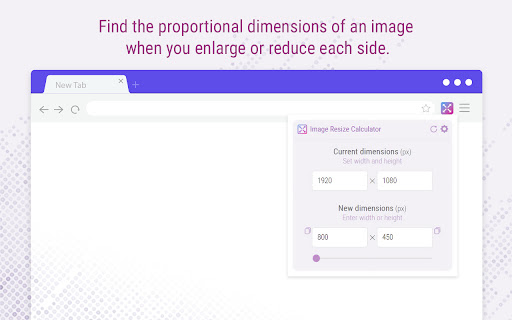

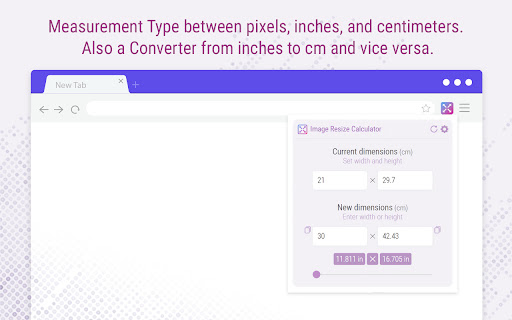
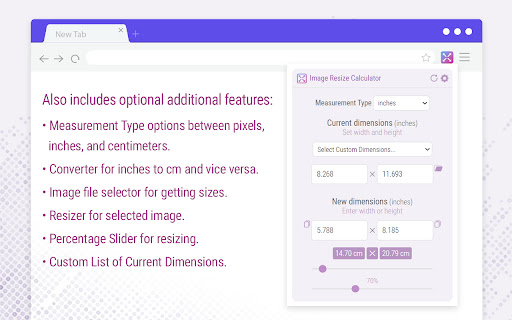
Find the proportional dimensions of your image when you enlarge or reduce its size. Calculator for Resizing an Image While Preserving its Aspect Ratio. Default Current Dimensions: Enter your Default Current Dimensions in the provided field, and the extension will save them automatically for your next use. Save Last Input on Current Dimensions: Say goodbye to repetitive inputs! Our calculator will remember your last used dimensions, making resizing quicker and more efficient. Copy Buttons: Copy buttons are perfect for users who prefer alternative methods to copy their resized dimensions. Preview Sizes: Preview the sizes based on the dimensions of the images you enter, displayed in pixels. Slider: Adjust with Ease: Utilize the slider to set your desired new dimensions. Slider Steps: Fine-tune your resizing precision by customizing the slider steps to match your project's specific requirements. Measurement Type: Select the Measurement Type you want to calculate between pixels, inches, and centimeters. Convert New Values from Inches to cm and Vice Versa: The conversion to inches or centimeters will also be displayed in the results. Select an Image File to Get Its Dimensions in Pixels: Choose an image from your computer, and its dimensions will automatically appear in the current dimensions. Resize and save the image file you will select Effortlessly resize and save selected images with just one click. Percentage Slider: Use the percentage slider to adjust the size of the new image relative to the original. Custom List of Current Dimensions: Save your own list of current dimensions for quick selection in the extension popup. Dark Theme: Enjoy a modern, sleek interface with our Dark Theme option, enhancing visual comfort during extended resizing sessions.

UltraWide Video Optimizer
Enhance your Disney+ viewing experience on ultrawide monitors. Elevate your Disney+ viewing experience on ultrawide monitors with UltraWide Video Optimizer! This extension is meticulously crafted to enhance your screen's real estate, ensuring your favorite Disney+ content fits perfectly without black bars or awkward cropping. Features: - Customizable Zoom: Effortlessly adjust the zoom level of Disney+ videos to seamlessly fill your ultrawide screen, accommodating various aspect ratios like 21:9, 32:9, and more. - Precise Positioning: Fine-tune the horizontal and vertical positioning of your videos to achieve the ideal viewing experience. Adjust for perfect centering or shift the video to your preferred position. - Aspect Ratio Adjustment: Transform older movies and shows into a widescreen experience. Adjust the aspect ratio, zoom in, and reposition the video to fill your ultrawide display beautifully. - Noir Mode: Add a classic black-and-white film effect to your Disney+ videos with Noir Mode, perfect for a nostalgic or artistic viewing experience. - User-Friendly Interface: Enjoy a simple, intuitive control panel that allows you to make real-time adjustments without interrupting your viewing experience. - Multi-Language Support: Access the extension's features in your preferred language with support for 50 languages, ensuring a seamless experience for users worldwide. - Smooth Performance: Experience smooth, responsive adjustments without any lag, ensuring uninterrupted enjoyment of your favorite shows and movies. How to Use: - Install UltraWide Video Optimizer from the Chrome Web Store. - Open Disney+ and start watching your favorite content. - Click the UltraWide Video Optimizer icon in your browser toolbar to access the popup. - Use the aspect ratio and zoom sliders to adjust older movies and shows, creating a widescreen experience. - Utilize the horizontal and vertical sliders or input fields to perfectly position the video. Note: UltraWide Video Optimizer is exclusively designed for Disney+ content, providing the best viewing experience on ultrawide monitors. Enhance your Disney+ viewing experience today with UltraWide Video Optimizer and enjoy every detail on your ultrawide display! Changelog: Version 2.6: - New Feature: Added support for 50 languages to enhance the accessibility and user experience for a global audience. - Improvements: Updated the extension to ensure all interface elements are translated based on the user's browser language settings. - Bug Fixes: Resolved minor issues and improved the stability of the extension. Version 2.5: - Unique CSS Classes: All elements have been assigned unique CSS classes to ensure compatibility and prevent unintended modifications to default elements. - Button Styling Enhancements: Improved the styling of the "Noir Mode" and "Auto Center" buttons for better user experience. Version 2.4: - Gradient Title: Added a gradient effect to the title in the popup for a more visually appealing interface. - Bug Fixes: Resolved issues where the video controls were not covering the full height in fullscreen mode. Version 2.3: - Modified span CSS to eliminate the green color effect on the title font when viewing a video.

Image Dimensions Detector
Detects all images on a website and displays their dimensions. Image Dimensions Detector - Quick Size Check: Instantly find the dimensions of any image on a webpage with Image Dimensions Detector. Perfect for web designers, developers, and anyone needing precise image measurements. Just hover over an image to see its size in pixels—fast, easy, and accurate.

Zoom Video - UltraWide Fill
Zoom Video Chrome extension is designed to eliminate black bars from videos across popular streaming platforms like Netflix, Amazon Prime, Disney+, HBO Max, YouTube, and more. Additionally, it provides the option to adjust the aspect ratio of any video, enabling you to enjoy content in full screen on your ultrawide monitor. Why do you need Ultrawide Video extension? It's for everyone who wants power over the video aspect ratio. This extension is primarily for Ultrawide Video monitors, but that does not mean it's only good for it. You can manipulate the video's size that contains horizontal or vertical black bars and let the video fill your entire screen for a better experience. Here's how to utilize it: 1. Install the extension from the Chrome Web Store. 2. Navigate to a website containing videos. 3. Click the extension icon located in the upper right corner of your browser. 4. Choose your desired aspect ratio. The video will be resized to fit the chosen aspect ratio. Although primarily intended for ultrawide screens (21:9, 32:9), this extension is compatible with any resolution and video. It proves particularly beneficial for 16:9 screens, enhancing the experience with 4:3 videos. Select a predefined aspect ratio (16:9, 18:9, 21:9, 32:9). Selecting it again will reset the video aspect ratio to the original size. This extension enables the support for 21:9 monitors on YouTube, Netflix and others video sites full screen mode. It is great for wide aspect ratio videos, that have black bars at the top and bottom and don't scale correctly. Automatic aspect ratio detection This feature ensures that video will be cropped without you having to lift a finger. It runs continuously and will even detect aspect ratio changes that happen in the middle of the video. You can also use shortcut keys to do everything, they can be customized on Settings page. Define single keys for multiples aspect ratios or define multiple keyboard combos separately also. Notable features include: Elimination of black bars from videos on various websites. Ability to modify the aspect ratio of any video. Compatibility with ultrawide monitors. Your support is appreciated; if you find the extension valuable, kindly consider rating it with 5 stars on the Zoom to Fill extension.

Aspect Ratio Calculator
A Chrome extension for viewing and calculating aspect ratios Quickly view all images and videos Calculate aspect ratio Aspect Ratio Calculator
