
bcikmpimffbmlemadpmoadohmfcliphj
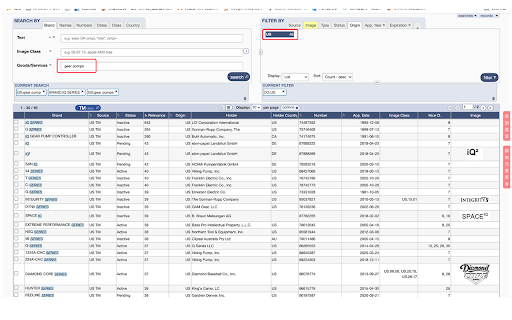


开发助手 开发助手是协助外贸人员通过全球品牌数库进行客户开发的一个工具。 1、全球品牌资源简介 WIPO全球品牌数据库是对全球商标统计的一个数据库,其中含有180多个国家的数据,包括品牌名称,logo图、品牌持有公司、国家、申请人姓名、地址、注册商品分类等信息。 2、我可以如何操作? 可通过产品词(含小语种)、行业词、检索潜在客户;也可通过品牌名查询注册商标、品牌持有公司 3、我们为你做了什么? 我们帮你获取了品牌持有公司的基本信息,其中包括员工姓名、职位、邮箱、社交账号、地理位置信息、交易记录、卫星地图实景等工作来方便我们外贸人员拓展客户。 此为寻求代工合作(OEM)的必要工具。

Email Finder - GetProspect
LinkedIn Email Finder – Look up emails for free. Find email address in seconds – free email finder. Search emails on website. Extract emails with GetProspect. Our plugin is the fast and easy-to-use LinkedIn email finder tool that helps to get accurate business email addresses in seconds. ✔ Email Finder It is the best solution to find email addresses of your connections for free or any people from LinkedIn search. With GetProspect Chrome extension you can easily find anyone’s email address and generate LinkedIn leads by clicking just one button in users’ profiles. - Easily search for email addresses of your 1st, 2nd and 3rd+ Linkedin connections; - Find business email addresses of any person from the basic LinkedIn or Sales Navigator search based on your specific search filters; - Save leads with emails in bulk from Sales Navigator lead lists or LinkedIn group members; - Get all the obtained email addresses verified for FREE. ✔ Bulk email finder Save hundreds or thousands of contacts at once with our batch email finder by clicking «Select all» → «Save prospects» in LinkedIn search, LinkedIn group members, or LinkedIn events attendees. Add the number of pages you want to save leads from. Our bulk email tool will automatically find and add their verified emails to your list. ✔ Email finder by name and by domain You can generate LinkedIn leads from basic search or with Sales Navigator. You just fill in your search criteria on LinkedIn, then extract hundreds of potential clients into a spreadsheet. You not only get an email address – but also other data from LinkedIn: - first and last name - position - location - summary - company name - industry - company website and address - LinkedIn profile URL ✔ Find email address by name with GetProspect email extractor extension This is how to search email by name in 2 minutes. To look up email addresses by name you enter the first and last names of the person of interest in a LinkedIn search. Go to their profile and click «Get email». The email and other information about the prospect will be saved to your GetProspect account. ✔ CRM contact management software All your saved leads from LinkedIn you will find in GetProspect contact management software. The web-based CRM allows you to: - group your leads in relevant folders; - segment your prospects with dynamic lists; - create custom filters; - cooperate with team members; - export your lists in the necessary format; - integrate GetProspect with Gmail or other sales tools. ✔ Our email finder is ideal for: - Sales teams - Founders and owners - Freelancers - Consultants - Project managers - Digital marketers - Email marketers - Growth marketers - Recruiters - Outbound marketers ✔ Main advantages GetProspect email extractor: - FREE monthly credits - Online human support - Email verification at no additional cost - Compatible with free LinkedIn, Sales Navigator and Recruiter - Pricing beginning with 49$/month - Exporting LinkedIn leads with the data in .csv or .xlsx - Saving numerous LinkedIn pages at once - Integrations with other services ✔ How to use the email address finder plugin? Step 1. Install the GetProspect email extractor Chrome extension. Step 2. Go to any LinkedIn profile and click on the «Get email» button. You will see the GetProspect banner indicating that the email is found and saved. Step 3. Or make a search on basic LinkedIn or Sales Navigator, click «Select all» → «Save prospects» and get multiple pages of leads with emails. ✔ FAQ 1. Can I use GetProspect email finder extension for free? Yes, email extractor plugin is free, but you can use it only in the Google Chrome browser for now. 2. How to find email addresses on LinkedIn? To find email with the GetProspect extension, open any LinkedIn profile and tap on the «Get email» button. The email will be automatically saved. If you want to save many emails, open the list of LinkedIn profiles in LinkedIn search, LinkedIn group, or LinkedIn events and click «Select all» → «Save prospects.» 3. Can I find email address owner with GetProspect? You can find email addresses owners in your GetProspect account with the enrichment feature. Go to the «Enrich» page, choose «Email lookup section», and enter the email of interest. 4. How can I use email extractor software for business? You can use the GetProspect extension to find emails of potential clients to reach them without reputation risks to your email account. 5. Can I extract emails from websites by GetProspect? Yes. Go to the tab with the website and click on the GetProspect icon among your extensions. You will see the panel and field to enter the name you want to find the email for. 6. Which payment methods can I use for GetProspect subscription? You can pay for the GetProspect subscription through the Fondy payment gate or BlueSnap payment gate. By default, our system offers to pay through Fondy. In case you are unable to pay by this method, try to use BlueSnap. 7. How to cancel my email finder subscription? Go to the Settings icon in your GetPropsect account. Choose the Price and billing section. In the Subscription tab, find your plan and click Cancel subscription. For any further questions about email finder, feel free to contact us support@getprospect.com

GetEmail.io gets the email of anyone on Earth
GetEmail.io is the easiest way to find email addresses from anywhere on the web, with just one click. GetEmail.io is the easiest way to find email addresses for anyone across the web. With GetEmail.io, you’ll find the professional email address of anyone, whatever their company or position, in just one click. We have one of the highest success rates in finding emails with the lowest possible bounce rate. How? We're two top-tier French engineers who have applied advanced big data and machine learning algorithms to find the right email, every time. As a Dun & Bradstreet company, we're now teamed up with the global leader in commercial data and analytics. Our pricing is free for reasonable use, with additional paid options for more intensive use. Test and use GetEmail.io for free to see it for yourself. When it gives you an email, we’re confident it will be the right one!

FinalScout - Find Anyone's Email
FinalScout - Find valid email addresses for anyone & craft tailored emails based on LinkedIn profile with ChatGPT. Find the Emails You Need with FinalScout FinalScout helps you effortlessly discover email addresses for any person, company, or domain. Additionally, FinalScout empowers you to create personalized outreach messages for any use case, leveraging profile information and advanced AI technology powered by ChatGPT.

Email finder by soujiyi.com
Find email addresses, phone numbers and social accounts from anywhere on the web, with just one click. Email Finder by soujiyi.com gets global customer information accurately, which helps you increase sales revenue through automated marketing and customer management. With over 300,000,000+ customers and leads processed daily, it's perfect for expanding your global customer base. Plus, with free EDM and CRM features, Email Finder offers a one-stop solution for cross-border marketing, lead conversion, and customer management. You can export customer data and have greater control over your private data. Get access to more high-quality customers and achieve greater business success by using it. ✅🔍Information Acquisition Capture contacts, email addresses, phone numbers and social media information from Google Pages, Google Images, Google Store, Google Maps, Linkedin and customer websites in one click, saving you a lot of time. ✅🤝key person mining Open the customer's official website, you can quickly get the key person information of overseas buyers, and efficiently complete customer background investigation and foreign trade customer analysis. ✅👀 Data Duplication Checking It can help you avoid importing existing customer information, and avoid bothering customers you have cooperated with when you use mass email marketing. ✅📧Mailbox Verification It will verify the address of the collected mailbox immediately to avoid bounce when sending bulk mail. ✅💖Leads Collection Clicking "Collect" at the bottom to save this potential information for lead management - not followed up leads, to which you can send e-mail. ✅❌Blacklist Construction Adding a website blacklist to mark the websites that you think are unintentional, and those websites information will no longer appear. ✅🤝Automatic Marketing Binding an email account, selecting the development letter template you edited in advance, you can send emails to potential customers in your lead list in batches. -👉Who is it suitable for? 👨Sales, marketers, job seekers, recruiters, soho, business owners, etc. ✅📊Multi-dimensional data Version 2.0 not only supports single web page capture, but also multiple web page collection.You don't need to click on the web page one by one, directly on the first page of Google search results, you can collect customer information on all pages with one click. The powerful multi-page stitching function enables the acquisition of large amounts of data,simply by opening the plug-in on the Google search page, and sliding the mouse wheel down to achieve automatic page turning, scrolling to the bottom, and the plug-in will find the customer's email and URL of all pages. ✅⚙️Dig deeper The anti-"anti-crawler" technology can tap deeper customer data that is not available to ordinary tools. ✅😍The whole process is free The entire process, from information collection, customer management, and customer marketing, is free to use. “Email, phone and social accounts are all in one go, awesome👍 There are basically no free plug-ins for clue mining, and conscience products are free, which is commendable!”👩💼Frida Cao “It works so well that I use it every day. It's so easy to find emails and phone numbers.”👨💼changhong pi - 👉Thank you very much😚 Before using our web mail collection tool, please be sure to read and agree to search hundreds of millions of privacy policies https://manager.soujiyi.com/policy.html If you have any questions, you can leave us a message info@soujiyi.com ! https://www.soujiyi.com/en Overseas Business, Soujiyi Leads Look forward to cooperating with you!
