
bcgcckcljjhmgfdaoaokoaamjidpjgfh

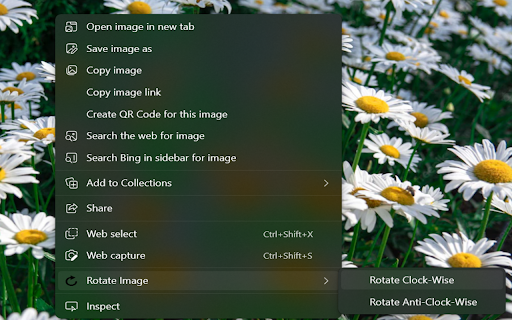
An unofficial extension that uses the context menu to rotate images from WhatsApp™ Web. Introducing our useful, unofficial Chrome extension designed specifically for WhatsApp™ Web. Say goodbye to the discomfort of viewing improperly oriented images that often crop up during your online conversations. Once you've installed our extension, adjusting any image from WhatsApp™ Web becomes a breeze. Simply right-click the desired image and select 'Open image in new tab'. Then, another right click reveals the 'Rotate Image' option. With each click on this option, your image will rotate either clockwise or counterclockwise in 90-degree increments. Enhancing the user experience even further, we've integrated keyboard shortcuts in our latest update. For a clockwise rotation, use 'ctrl+shift+right key'. Alternatively, for a counterclockwise adjustment, 'ctrl+shift+left key' is your go-to command. Avoid straining your neck with stubborn, improperly angled pictures in WhatsApp™ Web. Let our extension handle the rotation, providing you with a comfortable viewing experience. Download our extension today - the unofficial, yet extremely efficient solution for image rotation in WhatsApp™ Web. Say goodbye to neck strain and hello to convenience!

Translator for WhatsApp™ Web
Support multiple translation engines, intelligent recognition of scene languages, and translation using the enter key (unofficial) Usage scenario: We often encounter language barriers when communicating with foreign friends using WhatsApp. By using our plugin, we only need to set my language and the language of the contact person, and the chat content can be automatically translated. The content entered in the input box can also be translated into the target language using shortcut keys. Disclaimer: WhatsApp is a trademark registered by WhatsApp Inc. in the United States and other countries. WhatsApp ™ Real time translation is an independent project and has no relationship with WhatsApp official or WhatsApp Inc. The translation engine used in the plugin also has no association, authorization, recognition or official contact with Google.

Scroll Down for WhatsApp™ Web (Unofficial)
This is a WhatsApp web auxiliary plug-in that can quickly switch the scroll bar position of the friend list using shortcut keys. Usage scenario: When using WhatsApp web chat, we want to send a message to all customers. After each message is sent, the friend list will scroll to the top, and then slide the scroll bar to find the customers who have not sent messages to continue sending. After installing the plug-in, we can use the shortcut key Ctrl+Z to quickly slide to the bottom of the page, and use the shortcut key Ctrl+Shift+Z to quickly slide to the top of the page, saving the user's time sliding the scroll bar. Statement: WhatsApp is a registered trademark of WhatsApp Inc. in the United States and other countries. Scroll Down for WhatsApp is an independent project and has no relationship with WhatsApp official or WhatsApp Inc.

WhatsApp Editor
An extension to edit WhatsApp messages WhatsApp Editor: Take Full Control Over Your WhatsApp Conversations What is WhatsApp Editor? WhatsApp Editor is a revolutionary Chrome extension designed to empower your experience on WhatsApp Web. Have you ever wished you could edit a sent WhatsApp message? Or customize the way your chats look? Now you can! Key Features Edit Sent Messages: Ever made a typo in a message that you wish you could fix? Now you can. Message Customization: Change fonts, add emoticons, and insert images like never before. Quick Access Popup: Easily access all features through a popup window that sits conveniently on your browser toolbar.

WhatsApp Translator
Use WhatsApp Translator to translate messages with one click. Enjoy seamless translation on WhatsApp with auto-translate feature. 🌍 WhatsApp Translator – Your Essential Chat Translation Tool Say goodbye to language barriers in WhatsApp Web! With this handy Chrome extension, you can effortlessly understand messages in other languages, chat smoothly across borders, and enhance communication in real time. Whether you're traveling, collaborating globally, or just talking to someone who speaks a different tongue, this tool is the perfect solution. This powerful translator extension integrates directly into WhatsApp Web, offering intuitive controls and smart functionality that make multilingual conversations easy and efficient. ✅ Key Features of WhatsApp Translator 1️⃣ One-Click Manual Translation – Hover over any message and click the dedicated button to instantly see it in your language. 2️⃣ Automatic Chat Mode – Enable real-time translation for all incoming messages without lifting a finger. 3️⃣ Outgoing Message Support – Write your message, preview how it will appear in another language, and send it confidently. 4️⃣ Flexible Language Selection – Choose your preferred input and output languages with ease. 5️⃣ Seamless WhatsApp Web Integration – No need for external tools or switching tabs. 🧩 How to Use the WhatsApp Translator Extension ➤ Open WhatsApp Web in your Chrome browser ➤ Go to any chat ➤ In the chat header, click the new control added by the extension ➤ Enable chat translation and select your preferred languages ➤ Hover over any message to reveal the translate button ➤ Click to translate manually or turn on auto-translate mode Wondering how to understand messages in English or another language directly within the chat? This extension makes it simple and intuitive with just a few clicks. 🎯 This App is Perfect For ... ▸ Travelers chatting with locals ▸ Remote teams with multilingual members ▸ Friends and families around the world ▸ Online sellers and buyers across countries ▸ Language learners improving their skills ❓ Frequently Asked Questions 🔹 Does WhatsApp support auto translation? Not natively, but with this extension, you can activate that functionality easily. 🔹 Can I enable translations directly in my browser? Yes! The extension adds everything you need to the web version. 🔹 How do I translate on without copying text? Just hover over the message and click the translate button – it’s that easy! 🔹 Does WhatsApp have translation? Native application does not, but this extension gives you the full translate feature you've been missing. 🔹 How to turn on translate in WhatsApp? Use the extension control in the chat header to enable and configure translations. 🔹 How do I interpret messages without copying text? Just hover and click — the rest is automatic. 🔹 Is outgoing message support available? Absolutely. You can preview and adjust your message before sending it. 🔹 Is my privacy protected? Yes. We prioritize your security — no messages are stored, tracked, or shared. All processing is handled securely to keep your conversations private. 📈 Popular Use Cases for WhatsApp Translator • Professionals communicating with international clients • Students using chats to reinforce language learning • Educators reaching parents in their native languages in WhatsApp • Support teams assisting global users • Anyone needing real-time multilingual chat help 🚀 A Must-Have Chrome Add-on for Global Conversations ✔ Quick setup ✔ User-friendly interface ✔ Fully customizable ✔ Ideal for anyone working across languages Take full control of your messages with instant language support. Bridge communication gaps and connect confidently — no matter where your conversation takes you. ❤️ Why Users Love Our WhatsApp Translator App This extension is designed with simplicity and efficiency in mind. Whether you're messaging casually or working across cultures, it helps you stay focused on the conversation, not the tools. With a clean interface, customizable settings, and smooth integration, it feels like a natural part of your daily workflow — not an add-on. 👉 Install now and start chatting without limits 🌍💬 Disclaimer: WhatsApp is a trademark of its respective owner(s), registered in various countries. This extension is an independent project and is not affiliated with, endorsed by, or sponsored by WhatsApp Inc. or its parent company. The use of the name is solely for descriptive purposes related to compatibility and intended functionality.
