
bcdpampngmloakedpagolicejhdflkhb

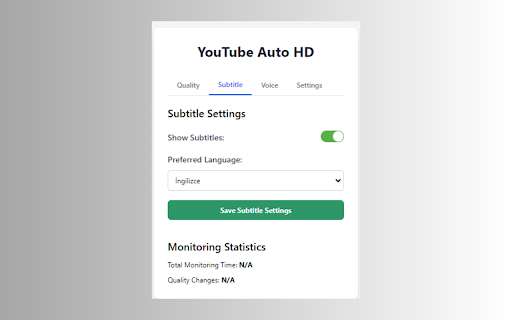


YouTube Auto HD: YouTube automatically adjusts video quality, manages subtitles and audio settings. YouTube Auto HD is a powerful Chrome extension that automatically optimizes your YouTube experience. 🎥 Auto Quality Adjustment: Selects the optimal video quality based on your internet speed. 🔧 Manual Quality Control: Set your preferred quality manually if desired. 📊 Adaptive Performance: Automatically adjusts video quality as your internet speed changes. 🌐 Subtitle Management: Automatically enables subtitles in your preferred language. 🔊 Audio Control: Offers automatic volume adjustment and mute mode features. 📈 Viewing Statistics: Tracks your total watch time and quality changes. YouTube Auto HD is designed to maximize every video watching experience. Whether you have a fast or slow internet connection, this extension picks the best quality for you, so you can focus solely on the content. With its user-friendly interface, you can customize your settings, enable manual quality selection, or switch to fully automatic mode. Set your subtitle and audio preferences once, and let the extension handle the rest! Try Auto YouTube HD now for a smoother, higher quality, and personalized viewing experience on YouTube! 🔌 1. Install the YouTube Auto HD extension from the Chrome Web Store. 🎥 2. Navigate to any YouTube video page. 🚀 3. The extension automatically detects your internet speed and sets the optimal video quality. 🎛️ 4. Use the extension popup to manually select quality or adjust settings if you prefer. 🍿 5. Sit back and enjoy your videos in the best possible quality! 🔄 Automatic quality adjustment every 30 seconds 🌍 Subtitle language preferences applied automatically 🔊 Seamless audio settings management 📊 View your watching statistics in the extension popup 🏆 YouTube Auto HD works silently in the background, ensuring you always get the best viewing experience without any hassle. Whether you're a casual viewer or a Auto YouTube HD enthusiast, this extension is designed to enhance your viewing experience effortlessly. ⬇️ Download YouTube Auto HD now and transform your YouTube watching experience!

Auto HD for YouTube™
Automatically plays YouTube videos in the highest quality available. Set your preferred video quality and enjoy seamless HD playback 🎯 Auto HD for YouTube™ - Watch Videos in Highest Quality Automatically! ⚡ Auto HD for YouTube™ ensures your videos always play in the best quality. Simply install and enjoy YouTube in HD! ✨ Why Choose Auto HD for YouTube™: • 🎞️ High FPS Preference Feature (60fps) • 🚀 Automatic HD/4K/8K quality selection • 🎮 Easy quality preferences (144p to 8K) • ⚡ Instant quality switching • 🔄 Remembers your Auto HD settings • 📱 Works on all YouTube™ pages 🎬 Auto HD for YouTube™ Quality Options: 🛡️ Auto HD for YouTube™ Features: • No ads • Zero configuration • Privacy focused • Regular updates • Lightweight extension 💡 Perfect for Auto HD YouTube™ viewing: ⭐ Make Auto HD for YouTube™ your default quality manager! Automatically set your default YouTube video quality with this great extension, supporting high definition resolution HD. Auto HD for YouTube™ - Version 1.1.0 🚀 High FPS Preference Feature (60fps) - Choose smoother playback when available 🎞️ Standardized Localization Files - Better support for 50 languages 🌐 Performance Optimizations - Faster quality selection and reduced resource usage 💨 Improved YouTube Compatibility - Works with latest YouTube interface changes 🔄 UI Enhancements - Cleaner popup design and better visual feedback ✨ Fixed issue with quality selection on embedded videos Resolved initialization delay on some YouTube pages Corrected premium video quality detection Fixed consistency issues in language translations Enjoy watching YouTube videos in your preferred quality automatically! 🎥 Automatically set your default YouTube™ video quality with this great new Auto HD, supporting high definition resolution HD/4k/8k. Auto HD for YouTube™ Auto HD Features: ✓ Automatically set your default quality for all YouTube videos ✓ All available HD formats and more - 4320p, 2160p, 1440p, 1080p, 720p, 480p, 360p, 240p, 144p ✓ Switch back to Automatic mode (YouTube's default) ✓ Beautiful and simple Auto HD User Interface ✓ Sync your selected Auto HD YouTube quality to other connected PCs ✓ Auto HD for YouTube™ Auto HD lets you watch YouTube videos in your preferred playback quality! Choose any available resolution you wish and set it as your default option for any YouTube video you watch. Select any quality with this Auto HD extension - 8k, 4k, 1440p, 1080p, 720p and more. How to use? Click the Auto HD for YouTube™ icon, choose your new default YouTube™ resolution and be done! We hope you enjoy this ★new★ YouTube™ Auto HD!

Auto Quality for YouTube
Automatically adjust YouTube video quality to: HD/FPS/4K/8K or the highest resolution available Everyone, today I'm introducing a revolutionary product. This isn't just a plugin; it's a game-changer for your YouTube viewing experience. Imagine instantly getting the sharpest, smoothest video quality every time you open YouTube, without having to lift a finger. That's what our plugin does. It automatically selects the highest quality, eliminating those annoying resolution switches. It knows how to choose the best frame rate for your device, ensuring your viewing experience is incredibly smooth. But that's not all. This plugin also intelligently adapts to your network environment, ensuring you get the best experience whether you're on fast Wi-Fi or a slow 3G connection. For those who love to have multiple videos open at once, this plugin is a godsend. It optimizes the video quality for each window, making multitasking even more efficient. And we're not stopping there. This plugin also allows you to personalize settings, allowing everyone to tailor their viewing experience to their preferences. In addition to these amazing features, we're constantly innovating. In the future, we plan to add: Intelligent audio enhancement, so you can hear every word clearly even in noisy environments. Real-time subtitle translation breaks down language barriers. Video content previews let you know if a video is worth watching before you click. Smart ad skipping saves you valuable time. Automatically switches to night mode to protect your eyes. This isn't just a plugin; it's a revolution in video viewing. It will completely change the way you use YouTube, making every viewing experience a joy. Who wants to go back to the days of manual adjustments? We've got the future ready for you. Join us as we usher in a new era of YouTube viewing.

Auto High Quality for YouTube™
Automatically change YouTube video quality to HD resolution or the highest available one This extension automatically changes the YouTube video quality to a user-selected high-quality resolution. Features: 1. Select the highest quality by default 2. Do not change the quality if high resolution is already selected (optional feature) 3. Allows the user to select almost all available qualities. 4. It is possible to disable more than 30 FPS frame rates (optional feature). Use it if you don't have a bandwidth problem, but your browser cannot handle high-frame-rate playing. 5. Use different qualities for visible and hidden YouTube players (optional feature) Some Use Cases: 1. YouTube starts at low quality, but I want to watch at high resolution. 2. YouTube automatically increases quality which causes the loader to appear once per while. I don't want the player to alter the resolution. 3. YouTube switches to 60 frame rate mode, but my browser drops frames.

Naver Video Auto HD
A browser extension that sets the quality of Naver videos according to the user's preference.
