
bbmimfdmijoaefhmobocdllhhdpjnkoc
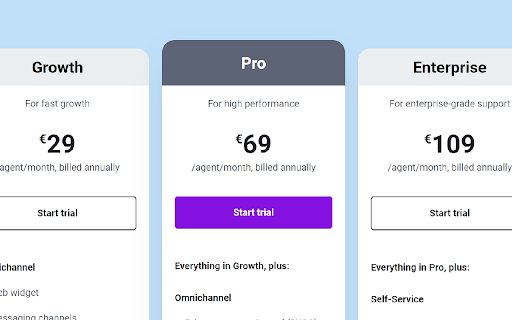


Switch between prices in different currencies on the Freshworks pricing pages. This app allows you to switch between available currencies on the pricing pages of Freshworks websites. The steps are simple: 1. Install the App 2. Pin the app 3. Visit any Freshworks pricing sheet 4. Click the extension to switch between prices. Important When viewing the price of addons which are dependent on an option you choose, please ensure that you choose the value you want to pick and then click the extension to switch through the prices. Changelog: v1.75beta2 - March 10, 2026 - Updated references and class names v1.75beta1 - November 14, 2025 - Updated the code to fix the main pricing - The addon pricing is being reworked and is in progress - Freshcaller and FS for MSP still in progress v1.74 - August 05, 2025 - Updated the code to support the latest Freshworks website layout. - Fixed Bug with FS Enterprise Pricing - Fixed the new addon name for Copilot and Insights - Freshservice for MSPs still in progress v1.73.beta5 - January 14, 2024 - Updated the code to support the latest changes to the website with the Freshservice Enterprise Price. - Added a fix to handle branding changes of Freddy AI v1.73.beta4 - Sept 19, 2024 - Updated the code to support the latest changes to the website code class including the newer Freshdesk and Freshchat pricing. - Added a fix to handle GBP pricing for Connector Task on FD pricing page - Updated currency symbol for AUD to A$ - Added Sandbox add-on modal details - Fixed Asset Pack price display v1.73.beta1 - Jul 26, 2024 - New beta to work with the Customer Service Suite pricing table changes in the website design. This will be in beta, until Freshworks consolidates the design of the entire pricing section. - Work In Progress. CSS Table Headers updated. - Calculate Discount Context menu code added. v1.71 - 25 March 2024 - Updated the extension from beta to release. - Renamed DEFAULT to FRSH as the default app title. - Updated the branding as per Freshworks Guidelines. v1.70beta4 - 23 March 2024 - All drop downs and pricing corrected to work with the new format. No known issues yet. - Fixed the bug on Freshchat pricing page due to a change in the "Free" text v1.70beta2 - 23 March 2024 - Fixed the Freshchat pricing bug. v1.70beta1 - 31 January 2024 - Refreshed Implementation to work with the new website design. This is a beta and has bugs still being fixed. - Addons do not work if there is a variable drop down which defines the price. It will be fixed soon. v1.62(v1.61b) - 30 January 2024 - App is broken. Fix is on the way. v1.6 - 05 March 2023 - Added support for detailed comparison pages for all products - Added an auto update check to the extension v1.5 - 03 March 2023 - Added Currency reset on page change - Added support for drop downs in the addons - Added installation page - Added LICENSE

Breached
Find out which sites you're visiting have been pwned, using the haveibeenpwned.com database Breached is a browser extension that lets you know when you're visiting a site that has been pwned in the past. You can click the button to find out more about those breaches. Breached uses [Have I Been Pwned](https://haveibeenpwned.com/) to learn about breaches. No information about the sites you visit is sent anywhere -- all checks are local.

Outreach Everywhere
Maximize your sales potential, anywhere you go! The Outreach Everywhere Chrome extension lets the user communicate more effectively inside Gmail, and on top of Salesforce with calling and emailing. You must have an account on Outreach, and be signed in for the extension to work.

Tanuki Utilities
Provide useful utilities for GitLab users. * Change the GitLab favicon to a project icon; you can easily distinguish many GitLab tabs. * Move "Copy reference" button on top bar; the button is always shown for your easy access. This extension tries to change favicons in the **all** sites by default. You can specify which GitLab site (e.g. gitlab.com or your self-hosted site) you would like to change favicons. #### Change the GitLab favicon to a project icon

OpenText Core SCA Select Extension
Open Source Select will help developers find and use the right open source and reduce friction between organisations and developers Open Source Select helps you find and use policy compliant and great open-source for any development project. The OpenText Core SCA Select Extension is a free plugin created with developers in mind, enabling you to check the health metrics and license information of an open source project at a glance. If you need more granular data, the extension can lead you to Open Source Select for more detailed information. The three types of metrics you can examine are: Community - How healthy the community around a project is. Popularity - Is it used by many? Is the usage declining? Security - How well does the maintainers apply security best practices. The extension now supports Start Left Policies. This lets you immediately see if the open source you are browsing is compliant with your company’s open source policy, without the need to import and scan code with Software Composition Analysis tools and common source code repositories and package registries such as GitHub, pypi, npmjs, nuget and many others are supported.
