
bbjkhniblichnpnmimjhdndofapbpmji

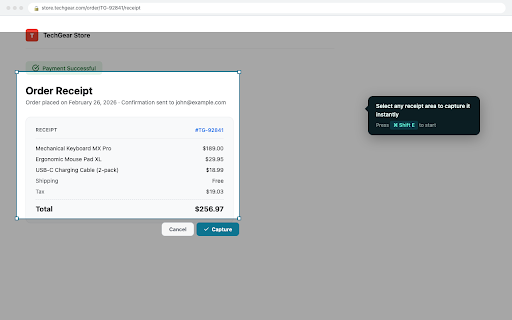


Track your expenses directly from your browser Receiptix — Receipt Scanner & Expense Tracker for Your Browser You just paid for something online. The confirmation page is right there. Hit ⌘+Shift+E (Mac) or Alt+Shift+E (Windows), drag over the receipt, and it's captured — amount, date, merchant, category, all extracted automatically. 1. Install the extension and sign in with Google 2. When you see a receipt on any website, press the shortcut or click the extension icon 3. Select the area to capture — Receiptix reads and categorizes the receipt automatically 4. Your receipts sync to the Receiptix mobile app for reports, analytics, and on-the-go access You can also drag and drop receipt images or PDFs directly into the sidebar, or right-click selected text and choose "Save as Receipt." Group expenses into projects — useful for separating work trips, client billing, or shared household budgets. Select a project from the sidebar dropdown before capturing, and receipts go straight to the right place. Projects sync across the extension and mobile app, so everyone on a shared project sees the same data. WHAT THE EXTENSION DOES - Captures receipts from any webpage with a keyboard shortcut or screenshot tool - Extracts receipt details (amount, date, merchant, category) using AI - Categorizes expenses automatically for spending reports - Supports JPEG, PNG, WEBP, and PDF uploads (up to 10MB) - Works with Google sign-in — no separate account needed THE FULL RECEIPTIX APP The Chrome extension is one piece of a larger expense tracking system. The Receiptix mobile app (iOS and Android) gives you the complete picture: - AI receipt scanning from your phone's camera — snap a photo of any paper or digital receipt and get merchant name, date, totals, and individual line items extracted automatically - Voice mode for logging expenses hands-free — just say what you spent and Receiptix records and categorizes it - Smart categorization that learns your spending patterns over time - Charts and reports that break down your spending by category, time period, and project - Shared projects with per-member breakdowns for group expenses — trips, renovations, team budgets - Multi-currency support with automatic conversions for travelers - Apple Watch app and Telegram bot for quick expense entry - Cloud sync across all your devices Whether the receipt is on a screen or in your hand, it ends up in the same place. The free tier includes manual expense entry, basic categorization, visual reports, multi-currency support, and cloud sync. Premium adds AI scanning, voice tracking, advanced analytics, and unlimited storage. Subscribe through the mobile app.

Browser Status Dashboard
The Browser Status Extension provides users with real-time insights into their browser's performance and network conditions,… The Browser Status Extension provides users with real-time insights into their browser's performance and network conditions, enhancing your browsing experience. With an intuitive interface and essential metrics at your fingertips, you can monitor everything from your connection type to battery status, all in one place. Ping Measurement: Instantly view the latency of your internet connection with live ping updates. Understand how your network quality affects your browsing experience. Memory Usage Monitoring: Keep track of your browser’s memory consumption in real-time. Stay informed about how much memory is being used and optimize your browsing for better performance. Open Tabs Count: Easily see how many tabs you have open at any moment, helping you manage your workflow and prevent overload. Network Quality Display: Get live updates on your network Quality. Battery Status Indicator: Know your battery level and charging status in real time. Perfect for users on the go, this feature helps you monitor your device's power. User-Friendly Interface: Designed for simplicity and ease of use, the extension offers a clean layout that fits seamlessly into your browsing experience.

Rocket Money For Your PC
Rocket Money For PC helps you track your daily expenses. Easily list, edit, and delete your entries to manage your expenses. Looking for a simple, fast, and efficient way to track your daily expenses right from your browser? Look no further than Rocket Money For Your PC! This powerful yet easy-to-use Chrome Extension allows you to effortlessly manage your finances by recording your daily spending in a matter of seconds. Whether you’re tracking groceries, utilities, or entertainment expenses, Rocket Money helps you stay on top of your budget without the need for complex apps or software. Key Features of Rocket Money For Your PC: - Easy Expense Tracking: Add daily expenses with just the name and amount. - Simple Interface: The intuitive, user-friendly design makes it easy to list, edit, and delete entries as you go. - Manage Your Budget: Quickly check your spending habits and keep track of your finances in real-time. - No Sign-In Required: Start using the extension immediately, no account or sign-in required. - Edit or Delete Entries: Make changes to your entries anytime, or remove them entirely when necessary. - Completely Free: Enjoy all features without any hidden costs or subscriptions. - Lightweight and Fast: Rocket Money For PC runs smoothly and doesn’t slow down your browsing experience. Why Use This Extension? Managing your finances is easier than ever with Rocket Money Expense Tracker. Whether you're a student trying to stick to a tight budget, a professional monitoring your daily spending, or someone simply trying to save for something special, Rocket Money provides a straightforward solution for all your expense tracking needs. - Track your spending effortlessly: Rocket Money For PC takes the hassle out of budgeting by providing a quick, no-fuss solution to log your daily expenses. - Stay within your budget: By regularly logging your expenses, you can monitor how much you’re spending and avoid overspending. - Perfect for everyone: Whether you’re a beginner just starting to track your expenses, or a seasoned budgeter, this extension suits all levels of financial planning. - Stay organized: With the ability to edit or delete entries, you can keep your records clean and up-to-date at all times. How to Use This Extension? Getting started with Rocket Money For PC is a breeze! Here’s a quick guide to help you make the most of your new extension: - Install the Extension: Add Rocket Money For PC to your Chrome browser by clicking the "Add to Chrome" button above. - Open the Extension: Click on the Rocket Money For PC icon in your Chrome toolbar to launch the extension. - Add an Expense: To record a new expense, simply input the name of the expense (e.g., "Lunch," "Groceries") and the amount spent. Click "Save" to add it to your list. - Edit or Delete Entries: If you need to modify an expense, click on the "Edit" button next to the entry. To remove an entry, click "Delete" and confirm. - Track Your Budget: Over time, you’ll have a complete record of your daily expenses, helping you stay organized and within budget. It’s that simple! Whether you’re tracking one expense or multiple, Rocket Money For Your PC is the easiest way to keep your financial habits in check. Disclaimer – No Data Collection: At Rocket Money For Your PC, we respect your privacy. We want to assure you that no personal or financial data is collected or stored when you use this extension. All your entries are stored locally on your computer, and we do not access, share, or store any of your information on external servers. You have complete control over your data at all times.

Conduit Copilot - AI analyst for business
Conduit is a Copilot AI for business owners. You can think of it like a data analyst in a box, powered by AI. Conduit brings together SaaS data such as in Shopify, Square and Facebook Ads, into a single dashboard, all with point and click. Business owners can then ask questions like “what’s my most profitable product category” or “which ad campaigns should I turn off.” By integrating GPT-powered AI tools, you can seamlessly connect, analyze, and visualize your data, unlocking a new level of efficiency and productivity. With plain English instructions, you can seamlessly integrate live business data from your systems of record, such as Salesforce, Shopify, Tableau, and Snowflake, directly into your Sheets. Combine the power of AI with live business data to effortlessly build the reports and dashboards you desire, all in record time and with unmatched flexibility. Utilize robust formulas for data cleaning, formatting, querying, enriching, and analysis, making data manipulation a breeze. Auto-Generate Formulas, Pivots, & Charts with Simple Text Commands Experience the convenience of automatically generating powerful formulas, pivot tables, and visualizations with any dataset using plain English instructions. GPT Copilot will jump in to assist you; just type what you need, and it's done! Rely on Conduit's GPT Copilot to handle the heavy lifting, freeing up your time to delve into data analysis. You'll be amazed as GPT Copilot intelligently analyzes any table and generates stunning, insightful charts highlighting the trends you value most. Embrace a more productive and efficient approach to data analysis with Conduit AI.

Expense Tracker
This extension allows users to track their expense/income records with feature of quick reloading total balance of money left, total income, total expense.
